

 johnkerl
[feature request] Complex join conditions
Thank you for developing such a well designed and highly useful CSV processing tool!
While the Miller join command is already very useful, I think it would be even better if it were to support join conditions more complex than simple equality. I propose an additional join command option --condition or -c, that accepts a logical expression that may refer to an arbitrary number of columns in the left and right tables (CSV input files). Miller would use the result of this logical expression to decide whether two rows in each table match and whether to include the merger of these two rows in the final table result.
The specific use case I have in mind is the association of a sparse history of currency exchange rates to a history of trades of some other asset like stocks in a particular currency where the currency exchange rate times may not cover all of those of the stock trades. For example, consider Bitcoin trades which happen continuously in USD on many exchanges worldwide and the currency exchange of USD to CAD which typically happens only during business hours and skips weekends. In order to assign a USD to CAD exchange rate to each Bitcoin trade, given a Bitcoin trade time, we must select the most recent exchange rate time that equals or precedes the Bitcoin trade time.
Consider the following highly simplified example involving a sequence of eleven imaginary currency exchange rates and ten trades of some imaginary asset where the trade times are continuous, but there exist gaps between some exchange rate times. While I include the value of each exchange rate, I omit all details of each trade except its time. For both the exchange rates and trades, I represent time as a monotonically increasing integer.
# Exchange rates
cat << EOF | mlr --csv --opprint cat > exchange_rates.csv
time,rate
1,1.0
4,1.1
5,1.5
7,2.0
9,1.8
10,1.7
11,1.9
EOF
time rate
1    1.0
4    1.1
5    1.5
7    2.0
9    1.8
10   1.7
11   1.9

# Trade times
cat << EOF | mlr --csv --opprint cat > trades.csv
time
1
2
3
4
5
6
7
8
9
10
EOF
The following table shows the expected result of joining the earlier two tables together:
# Trade times joined with exchange rates
$ cat << EOF | mlr --csv --opprint cat
time,rate
1,1
2,1
3,1
4,1.1
5,1.5
6,1.5
7,2
8,2
9,1.8
10,1.7
EOF
time rate
1    1
2    1
3    1
4    1.1
5    1.5
6    1.5
7    2
8    2
9    1.8
10   1.7
While the Miller join command cannot produce this result, you can calculate this result using an SQL Common Table Expression (CTE) and SQL window functions available in PostgreSQL 9.6:
PostgreSQL 9.6 Schema Setup:
CREATE TABLE exchange_rate(time INT, rate FLOAT);

INSERT INTO exchange_rate VALUES
(1, 1.0)
,(4, 1.1)
,(5, 1.5)
,(7, 2.0)
,(9, 1.8)
,(10, 1.7)
,(11, 1.9)
;

CREATE TABLE trade(time int);

INSERT INTO trade VALUES
(1)
,(2)
,(3)
,(4)
,(5)
,(6)
,(7)
,(8)
,(9)
,(10)
;
Query 1:
WITH exchange_rate AS (
SELECT
  time AS start_time,
  LEAD(time) OVER (ORDER BY time) as end_time,
  rate
FROM exchange_rate)
SELECT
  t.time,
  e.rate
FROM trade t
JOIN exchange_rate e
ON e.start_time <= t.time AND e.end_time > t.time
| time | rate |
|---|---|
| 1 | 1 |
| 2 | 1 |
| 3 | 1 |
| 4 | 1.1 |
| 5 | 1.5 |
| 6 | 1.5 |
| 7 | 2 |
| 8 | 2 |
| 9 | 1.8 |
| 10 | 1.7 |
Using Miller, the first step towards this result is to use the step and shift command combination to transform the original currency exchange rate table into one where each row contains the starting and ending times within which an exchange rate is "current":
cat << EOF > exchange_rates.csv
time,rate
1,1.0
4,1.1
5,1.5
7,2.0
9,1.8
10,1.7
11,1.9
EOF

{ cat exchange_rates.csv |
  mlr --csv step -a shift -f time,rate \
    then filter -e 'NR != 1' \
    then cut -f time_shift,time,rate_shift \
    then rename time_shift,start_time,time,end_time,rate_shift,rate \
    then reorder -f start_time,end_time,rate
  # Append last row
  cat exchange_rates.csv |
    mlr --csv tail -n 1 |
    mlr --csv put '$start_time = $time; $end_time="";' \
      then reorder -f start_time,end_time,rate \
      then cut -f start_time,end_time,rate |
    mlr --csv --headerless-csv-output cat;
} |
mlr --csv --opprint cat
start_time end_time rate
1          4        1.0
4          5        1.1
5          7        1.5
7          9        2.0
9          10       1.8
10         11       1.7
11         -        1.9
The result is the same as that of the SQL query exchange_rate in the earlier CTE query:
PostgreSQL 9.6 Schema Setup:
CREATE TABLE exchange_rate(time INT, rate FLOAT);

INSERT INTO exchange_rate VALUES
(1, 1.0)
,(4, 1.1)
,(5, 1.5)
,(7, 2.0)
,(9, 1.8)
,(10, 1.7)
,(11, 1.9)
;

CREATE TABLE trade(time int);

INSERT INTO trade VALUES
(1)
,(2)
,(3)
,(4)
,(5)
,(6)
,(7)
,(8)
,(9)
,(10)
;
Query 1:
SELECT
  time as start_time,
  LEAD(time) OVER (ORDER BY time) as end_time,
  rate
FROM exchange_rate
| start_time | end_time | rate |
|---|---|---|
| 1 | 4 | 1 |
| 4 | 5 | 1.1 |
| 5 | 7 | 1.5 |
| 7 | 9 | 2 |
| 9 | 10 | 1.8 |
| 10 | 11 | 1.7 |
| 11 | (null) | 1.9 |
In order for Miller to produce the final result which joins the trades with the exchange rates, we'd have to apply an additional hypothetical join command -c '$start_time <= $time && $end_time > $time' that resembles the SQL join operation FROM trade t JOIN exchange_rate e ON e.start_time <= t.time AND e.end_time > t.time:
cat << EOF > exchange_rates.csv
time,rate
1,1.0
4,1.1
5,1.5
7,2.0
9,1.8
10,1.7
11,1.9
EOF

{ cat exchange_rates.csv |
  mlr --csv step -a shift -f time,rate \
    then filter -e 'NR != 1' \
    then cut -f time_shift,time,rate_shift \
    then rename time_shift,start_time,time,end_time,rate_shift,rate \
    then reorder -f start_time,end_time,rate
  # Append last row
  cat exchange_rates.csv |
    mlr --csv tail -n 1 |
    mlr --csv put '$start_time = $time; $end_time="";' \
      then reorder -f start_time,end_time,rate \
      then cut -f start_time,end_time,rate |
    mlr --csv --headerless-csv-output cat;
} |
mlr --csv --opprint join -f trades.csv -j time,rate -r start_time,end_time,rate \
  -c '$start_time <= $time && $end_time > $time'
time rate
1    1
2    1
3    1
4    1.1
5    1.5
6    1.5
7    2
8    2
9    1.8
10   1.7
Aside from this use case, another reason for Miller to support complex join conditions would simply be to match the join conditions possible in SQL.

Wow, amazing writeup!! Yes, Miller only uses equality as a join-criterion and we should generalize that. I had not thought of employing the DSL for that.

Thank you! I spent several hours preparing my request so that it would be very clear, concrete, correct, and convincing. This feature would greatly simplify some of my scripts!
Thank you! I spent several hours preparing my request so that it would be very clear, concrete, correct, and convincing.
I really appreciate that! This makes the work all the easier.
mlr join is easier to reason about in the Go port and I plan to do this feature request there.
@NikosAlexandris @aborruso @derekmahar see also https://github.com/johnkerl/miller/discussions/608
R library data.table calls this join a rolling join:
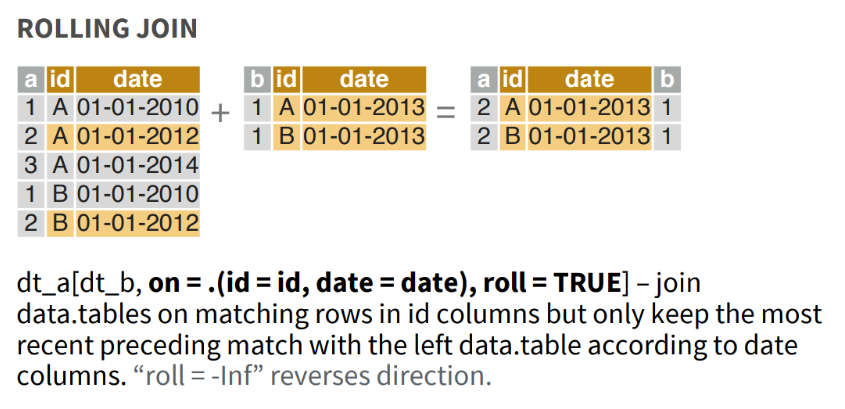
Aside from SQL (by combining window function LEAD or LAG and a non-equijoin) or using Excel function VLOOKUP() to find an approximate match, data.table is the first and only data analytics tool that I've found that supports the concept of a rolling join.
Solution in R using data.table:
library(data.table)
exchange_rate = data.table(
  time = c(1, 4, 5, 7, 9, 10, 11),
  rate = c(1.0, 1.1, 1.5, 2.0, 1.8, 1.7, 1.9))
trade = data.table(time = 1:10)
exchange_rate[trade, on = .(time), roll = TRUE]
#>     time rate
#>  1:    1  1.0
#>  2:    2  1.0
#>  3:    3  1.0
#>  4:    4  1.1
#>  5:    5  1.5
#>  6:    6  1.5
#>  7:    7  2.0
#>  8:    8  2.0
#>  9:    9  1.8
#> 10:   10  1.7
Created on 2022-01-31 by the reprex package (v2.0.1)
Note that this assumes that you've already installed package data.table:
install.packages("data.table")
#> Installing package into 'C:/Users/derek/Documents/R/win-library/4.1'
#> (as 'lib' is unspecified)
#> package 'data.table' successfully unpacked and MD5 sums checked
#> Warning: cannot remove prior installation of package 'data.table'
#> Warning in file.copy(savedcopy, lib, recursive =
#> TRUE): problem copying C:\Users\derek\Documents\R\win-
#> library\4.1\00LOCK\data.table\libs\x64\datatable.dll to C:
#> \Users\derek\Documents\R\win-library\4.1\data.table\libs\x64\datatable.dll:
#> Permission denied
#> Warning: restored 'data.table'
#>
#> The downloaded binary packages are in
#>  C:\Users\derek\AppData\Local\Temp\RtmpY9f4gZ\downloaded_packages
Created on 2022-01-31 by the reprex package (v2.0.1)
I discovered that Python Pandas function pandas.merge_asof can also perform this kind of join:
>>> import pandas as pd
>>> trades = pd.DataFrame({'time': range(1, 11)})
>>> exchange_rates = pd.DataFrame({'time': [1, 4, 5, 7, 9, 10, 11], 'rate': [1.0, 1.1, 1.5, 2.0, 1.8, 1.7, 1.9]})
>>> pd.merge_asof(trades, exchange_rates)
   time  rate
0     1   1.0
1     2   1.0
2     3   1.0
3     4   1.1
4     5   1.5
5     6   1.5
6     7   2.0
7     8   2.0
8     9   1.8
9    10   1.7
I wish I had known about this function almost five years ago!
DuckDB 0.8.0 introduced an SQL ASOF JOIN operation:
cat << EOF > example_trade_exchange_rate_asof_join.sql
CREATE TABLE exchange_rate(time INT, rate FLOAT);

INSERT INTO exchange_rate VALUES
(1, 1.0)
,(4, 1.1)
,(5, 1.5)
,(7, 2.0)
,(9, 1.8)
,(10, 1.7)
,(11, 1.9)
;

CREATE TABLE trade(time int);

INSERT INTO trade VALUES
(1)
,(2)
,(3)
,(4)
,(5)
,(6)
,(7)
,(8)
,(9)
,(10)
;

SELECT t.time, e.rate
FROM trade t
  ASOF JOIN exchange_rate e
  ON t.time >= e.time;
EOF

cat example_trade_exchange_rate_asof_join.sql | duckdb
┌───────┬───────┐
│ time  │ rate  │
│ int32 │ float │
├───────┼───────┤
│     1 │   1.0 │
│     2 │   1.0 │
│     3 │   1.0 │
│     4 │   1.1 │
│     5 │   1.5 │
│     6 │   1.5 │
│     7 │   2.0 │
│     8 │   2.0 │
│     9 │   1.8 │
│    10 │   1.7 │
├───────┴───────┤
│    10 rows    │
└───────────────┘