

 john30
How to set desired temperature for BAI00
Hello, thanks for all the amazing work on ebusd and sorry for this (very likely) rookie question but I wasn't able to solve it even when I read all the documentation and most of the issues here.
I wanted to set the desired temperature for my Vaillant heater but could not find a way how to do that.
Info command returns
MF=Vaillant;ID=BAI00;SW=0609;HW=5502", loaded "vaillant/bai.308523.inc", "vaillant/08.bai.csv
I see that on the ebus there are SetMode messages being published, however when changing desired temperature on thermostat none of the messages chage its value.
1008b5100900003b8cffff00ff00 / 0101 = 9: bai SetMode 10feb516080056122201120618 = 1: broadcast vdatetime 10feb51603019007 = 2: broadcast outsidetemp 1008b5040100 / 0a00ffffffffffffff9007 = 3: bai DateTime 1008b5110101 / 098c7d9007ff630400ff = 9: bai Status01 1008b5110102 / 06033c96468c78 = 3: bai Status02 1008b512020064 / 00 = 1
when I read the message using ebusctl read SetMode I get a correct answer auto;31.0;70.0;-;0;0;0;0;0;0
but when I try to write the same message back ebusd tells me usage: write [-s QQ] [-d ZZ] -c CIRCUIT NAME [VALUE[;VALUE]*] or: write [-s QQ] [-d ZZ] -def DEFINITION [VALUE[;VALUE]*] or: write [-s QQ] [-c CIRCUIT] -h ZZPBSBNN[DD]* Write value(s) or hex message. -s QQ override source address QQ -d ZZ override destination address ZZ -c CIRCUIT CIRCUIT of the message to send NAME NAME of the message to send VALUE a single field VALUE -def write with explicit message definition: DEFINITION message definition to use instead of known definition -h send hex write message: ZZ destination address PB SB primary/secondary command byte NN number of following data bytes DD data byte(s) to send
In the vaillant/bai.308523.inc file most of the commands are marked as read only, some are marked as 'wi' or 'ws' but not the ones I would need.
Following another issue seems interesting to me that I was not able to find PROD number in suggested 08.bai.csv as well as any HW in the fallback section.
Could you please help me how to set desired temperature on my Vaillant heater? Is that possible?
Thanks, Jan

I see that on the ebus there are SetMode messages being published, however when changing desired temperature on thermostat none of the messages chage its value.
Which thermostat- on the BAI or on VRC700? I've noticed that BAI-internal changes, e.g. for PartloadHcKW are not reflected on the bus.
when I read the message using ebusctl read SetMode I get a correct answer auto;31.0;70.0;-;0;0;0;0;0;0
Thats funny- imho that message is write-only?
but when I try to write the same message back ebusd tells me
What is your write command? Please don't let us guess the error cause ;)
some are marked as 'wi' or 'ws' but not the ones I would need.
Not sure what you mean?
Could you please help me how to set desired temperature on my Vaillant heater? Is that possible?
Use SetMode.

Which thermostat- on the BAI or on VRC700? I've noticed that BAI-internal changes, e.g. for
PartloadHcKWare not reflected on the bus.
Works for me, the correct power is reported on ebus, even after changing it directly on BAI. Cannot change PartloadHcKW through ebus though.
some are marked as 'wi' or 'ws' but not the ones I would need.
You can always edit the config by adding wi to the ones you need (and think that they should be writable), try to write to them and if you succeed, please dont forget to submit a pull request :)

Thanks a lot for your help @andig and @Dinth! Seems I've been using the latest ebusd version with 2.1.x configuration files... I don't think this is going to be the root cause but before I dive deeper could you please advise me where to find v3 configuration files? The link http://ebusd.eu/config/ is not working and I could not find it anywhere else... Or can I use v3 ebusd and v2 ebusd-config? Or shall I switch everything to v2?
Thanks
please advise me where to find v3 configuration files?
AFAIR 2.1.x folder contains the latest config.
The link http://ebusd.eu/config/ is not working
It works fine, just run ebusd without config-path parameter and it's gonna fetch the latest config automatically.
It works fine, just run ebusd without config-path parameter and it's gonna fetch the latest config automatically.
I can confirm this. Not sure how john did it but you just can't open http://ebusd.eu/config/ in a browser.
ebusd.eu is hosting exactly what is in the repo under ebusd-2.1.x/de v3 config are not available and ebusd v3 runs fine with v2 CSVs

@janhicl did you see the discussion about SetMode in https://github.com/john30/ebusd-configuration/issues/114? Apart from potential usage problems with ebusd that should answer your question.
@janhicl I have had similar issue, not being able to set desired temperature, however since the new 23.1 version, setting the following mqtt path ebusd/bai/FlowsetHcMax/set to values like 62.0 or so works nicely for me!
This sets the maximum flowset value for the heating circuit. I wasnt sure by the name at first, but it quickly became obvious as i looked the machine itself. This is basically the top end of the heating dial. Set the dial to max, control this value and you have the exact desired temperature input as target for the heating curve of the machine. As I seen on my heating unit if I dial down, then the desired temp will be lower by the ratio of the dial.
Can you too check with the new version?
Previous version didnt allow me to set this value but now it is good.

@mousetwentytwo I tried your FlowsetHcMax setting idea. Got some odd results. Earlier in the day I had been trying to range rate the boiler using PartloadHCKW but as mentioned in #294 and elsewhere, it doesn't appear to influence anything (despite being read back as if it had held and despite also being a writable installer parameter in the Level 1 menu).
But what did happen was that with FlowsetHcMax set to 50 over ebusd and the boiler flow set to 66 on the front panel, when the flow reached 50 - the modulation shot up from the manually adjusted minimum I had left it on (33% = 10kW using the range rating d.0 in the installer menu) and went way beyond (as if the PartloadHCKW I had earlier set to 30kW over ebusd finally got taken notice of).
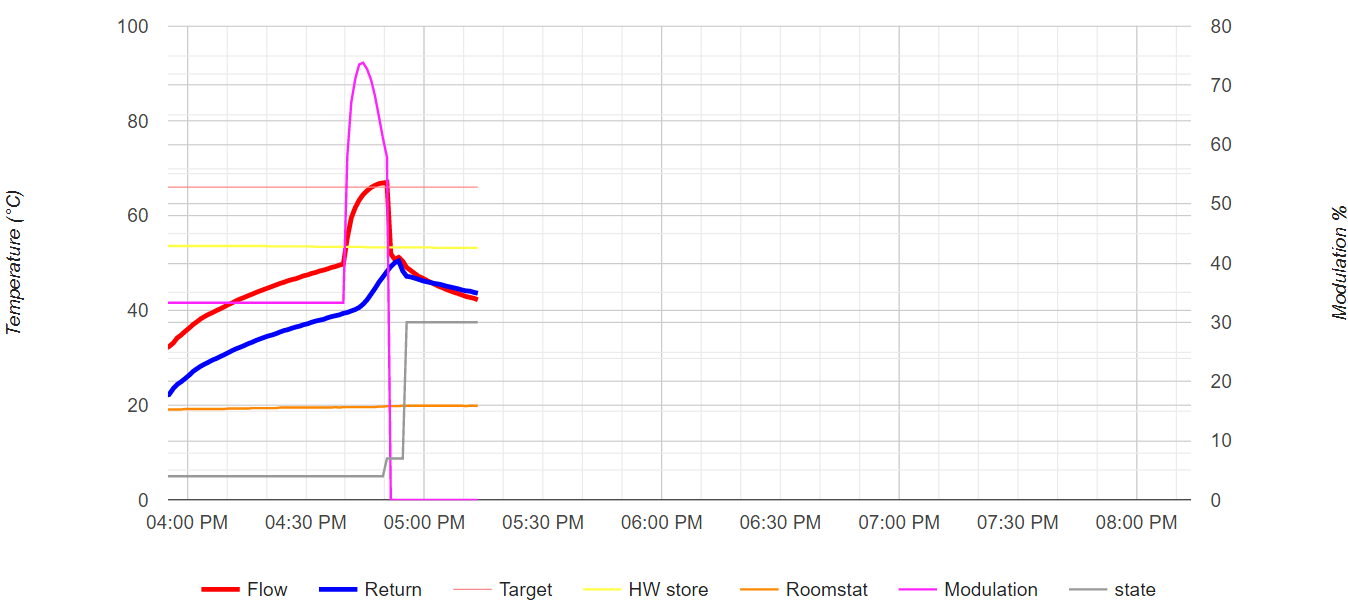
Clearly the manually set range-rating got overriden (possibly by the earlier ebusd write coming into effect some time later) and the FlowsetHcMax was ignored - other than triggering some action when exceeded. The action wasn't what you suggested though!

Sorry if I repeat some details, but I'd like to give you a clearer picture of my situation, maybe it helps.
My device is Vaillant AtmoTEC plus, directly wired to the ebus adapter, no other devices present. The ebus adapter is plugged in via USB to a Raspberry Pi with a Home Assistant on it. There is an ebusd addon running on HA within a container; https://github.com/LukasGrebe/ha-addons It is configured to connect via usb, ens:/dev/ttyUSB0 0 latency and mqtt json is enabled on it, default scan. I have an InfluxDB configured to save data that comes trough the mqtt to HA. I only capture data with this, except FlowsetHcMax. It changes only when a helper entity changes, with a help of automation script that takes value of the helper entity. I control that entity with some specific rules about external temperature and internal temperature, still figuring out my own curve and steps.
For my device FlowsetHcMax is the upper end of the temperature dial of the heating circuit in C degrees. If I roll that dial up, physically on the device and I change the value of this FlowsetHcMax, then that will be set as target temperature shown in FlowTempDesired temp value on the mqtt aswell.
maybe some relevant values i see in the mqtt: externalFlowTempDesired is 90, ExtFlowTempDesiredMin is 90, FlowTempMax is 116,06 ModulationTempDesired 40% OutdoorstempSensor -60,44 ReturnTempMax 0
I try keep my FlowTempDesired around 38-48 C degrees, depending on the external temperature, my rooms radiators have their own thermostats closing after the rooms reach the desired around 20-21 C temperatures (19 for bedroom), except my wc where I have the smallest radiator that will let water circulate trough even if all the others are closed to not hurt the pump with too much restriction.
I try to avoid controlling other values so far, since that dial is exactly what I used for setting temperature manually too. My heating device has no KW values advertised on mqtt and i was not changing values in the installer menu.
@mousetwentytwo I tried your FlowsetHcMax setting idea. Got some odd results. Earlier in the day I had been trying to range rate the boiler using PartloadHCKW but as mentioned in #294 and elsewhere, it doesn't appear to influence anything (despite being read back as if it had held and despite also being a writable installer parameter in the Level 1 menu).
OT question, but what card are you using? Could you share the code please?
Its not exactly a Card i'm using, but an input field and an automation
Automation:
alias: set_bai_desired_temperature
description: ""
trigger:
  - platform: state
    entity_id:
      - input_number.input_bai_desired_temperature
condition: []
action:
  - service: mqtt.publish
    data:
      payload: "{{ states('input_number.input_bai_desired_temperature') | int  }}"
      topic: ebusd/bai/FlowsetHcMax/set
mode: single
Input field is a helper entity that if you create it will show on auto dashboard or you can add it manually too. For safety I set it from 30 to 80 max, C degrees as value to be shown.
Hope it helped, let me know if you have more questions.
The graph is from @RadianM, I'm using Grafana in HA using Influx DB to present the captured data.