

 jmcnamara
rust_xlsxwriter Roadmap
rust_xlsxwriter is a Rust library that can be used to write text, numbers, dates and formulas to multiple worksheets in an Excel 2007+ XLSX file.
It is a port of the XlsxWriter Python module by the same author. I also actively maintain a C version libxlsxwriter and a Perl version Excel::Writer::XLSX. The Rust version will also try to address some limitations and frequently requested features of the previous versions, such as the separation of formatting and data writing.
The overall focus of rust_xlsxwriter is on performance, on testing, on documentation, and on fidelity with the file format created by Excel. Reading or modifying files is outside the scope of this library.
Update: As of v0.83.0 the library is feature complete with the Python version and all of the tasks below have been completed.
Phase 1: Basic functionality
- [x] mdBook documentation - Done: Working with rust_xlsxwriter
- [x] Support for worksheets decoupled from workbook to avoid ownership issues with more than one worksheet. Done: Creating Worksheets
- [x] Worksheet page setup functions. Done: Page Setup
- [x] Freeze panes. Done: set_freeze_panes()
- [x] Page breaks and cell selection. Done.
- [x] Document properties/metadata. Done
- [x] Worksheet protection Done
- [x] URL/Hyperlink support. Done: write_url()
- [x] Merge Range support. Done: merge_range()
- [x] Simulated autofit. Done: set_autofit()
- [x] Tab manipulation. Working with worksheet tabs
Phase 2: Medium functionality
- [x] Image support. Done: Image
- [x] Images in headers. Done: Headers and Footers
- [x] URLs in images.
- [x] Image/object positioning. Done
- [x] Embedded images. Done
- [x] Autofit - simulated: Done
- [x] Defined names. Done
- [x] Low memory mode. Done
- [x] In memory mode. Done: workbook.save_to_buffer()
- [x] Rich strings. Done
- [x] Dynamic functions . Done
- [x] Features/Optional dependencies.
- [x] Default row height. Done
- [x] Options to ignore Excel worksheet errors. Done
- [x] Cell formatting separate from data writing
- [x] Border formatting for a range
- [x] Checkboxes
- [x] Background images. Done
- [x] Worksheet outlines and grouping. Done
- [x] Add zip support for large (>4GB) files.
Phase 3: Larger functionality
- [x] Autofilters. Done
- [x] Charts. Charts had their own roadmap: #19
- [x] Tables. Done.
- [x] Conditional formatting. Done
- [x] Data Validation. Done
- [x] Sparklines. Done.
- [x] Serde serialization support Done
- [x] Cell Comments/Notes.Done
- [x] Textboxes. Example
- [x] VBA Macros. Done
- [x] Chartsheets. Done

Initial performance data:
$ hyperfine target/release/examples/app_perf_test ./c_perf_test "python py_perf_test.py"
Benchmark 1: target/release/examples/app_perf_test
  Time (mean ± σ):     447.2 ms ±   8.3 ms    [User: 402.8 ms, System: 39.4 ms]
  Range (min … max):   431.5 ms … 460.7 ms    10 runs

Benchmark 2: ./c_perf_test
  Time (mean ± σ):     362.5 ms ±   6.4 ms    [User: 305.2 ms, System: 53.0 ms]
  Range (min … max):   353.2 ms … 371.9 ms    10 runs

Benchmark 3: python py_perf_test.py
  Time (mean ± σ):      2.899 s ±  0.023 s    [User: 2.787 s, System: 0.088 s]
  Range (min … max):    2.868 s …  2.934 s    10 runs

Summary
  './c_perf_test' ran
    1.23 ± 0.03 times faster than 'target/release/examples/app_perf_test'
    8.00 ± 0.16 times faster than 'python py_perf_test.py'
Or in other words, the C version is the fastest and if we take that as 1 then the rust version is 1.2x (or 20%) slower and the Python version is 8x slower.
The Rust version is ~6.5x faster than the Python version.
$ hyperfine target/release/examples/app_perf_test "python py_perf_test.py"
Benchmark 1: target/release/examples/app_perf_test
  Time (mean ± σ):     450.8 ms ±   5.5 ms    [User: 406.8 ms, System: 39.1 ms]
  Range (min … max):   443.5 ms … 459.1 ms    10 runs

Benchmark 2: python py_perf_test.py
  Time (mean ± σ):      2.942 s ±  0.040 s    [User: 2.821 s, System: 0.090 s]
  Range (min … max):    2.877 s …  3.014 s    10 runs

Summary
  'target/release/examples/app_perf_test' ran
    6.53 ± 0.12 times faster than 'python py_perf_test.py'
Is polars support planned? I saw the python xlsxwriter have pandas support, I wonder if the rust xlsxwriter have any plans to support polars.

I wonder if the rust xlsxwriter have any plans to support polars.
Good suggestion. That was something that I was thinking about. I wrote the initial xlsxwriter integration into Pandas. I'll have a look in their GitHub issues/requests and see if there is any planned work.
Is it possible to use rayon or std thread scope (parallelism) to do each worksheet and at the end add in the final workbook?
This code was just a vain attempt: https://github.com/claudiofsr/rust-sped/blob/master/src/excel_alternative.rs

Is it possible to use rayon or std:: thread ::scope (parallelism) to do each worksheet and at the end add in the final workbook?
It wouldn't be easy. I've thought a good bit about this in the past in relation to the other language version of the library. The main issue is that the xlsx file format has a lot of interlinked "relationships" stored in .rel files. Worksheet strings are also stored in a shared hash table and referenced by id. These, more or less, need to be worked out sequentially and/or with some locking.
However, I would like the library to have the best performance possible (within the limits of the design and file format) so I'll take a look at what can be done.
Update: some backend parallelism was added in v0.44.0
Hi and thanks for the library! This is a really aweswome upgrade to the previous binding to the C lib. Just wanting to drop I would be really happy to see the tables functionality added. Would love to use that.

I would be really happy to see the tables functionality added
That will be the next major feature after I complete more of the chart feature.
@Christoph-AK see #41 for initial table support.
Update: completed in v0.40.0
Hi.. Thanks for the library!! I was in need of an active excel writer library in rust for my new project and this project seems to be most active and promising.
My project may depend on a lot of existing excel templates. I understand from the readme that currently editing an existing excel file is not supported. Any chances that this could be added in the future?

Any chances that this could be added in the future?
Unfortunately no, I don’t plan to tackle reading or rewriting XLSX files.
The XLSX structure is difficult to parse and rewrite for anything beyond basic data (and even that it can be hard for elements like dates).
Instead I’m going to concentrate my efforts to try give Rust a best in class XLSX writing library.
For additional context here is a reply that I gave to a similar request to the Python version of the library: https://github.com/jmcnamara/XlsxWriter/issues/653#issuecomment-607173901
Hopefully someone will step up at some point to combine one of the Rust XLSX readers with rust_xlsxwriter for a templating/rewriting solution.
I've uploaded a new crate called polars_excel_writer for serializing Polars dataframes into Excel Xlsx files using rust_xlsxwriter as a backend engine.
It provides two interfaces for writing a Polars Rust dataframe to an Excel Xlsx file:
-
ExcelWritera simple Excel serializer that implements the PolarsSerWritertrait to write a dataframe to an Excel Xlsx file. This is similar to theCsvWriterinterface. -
PolarsXlsxWritera more configurable Excel serializer that resembles the interface options provided by the Polars Pythonwrite_excel()dataframe method. There is still work in progress for this interface.One useful feature of
PolarsXlsxWriteris that you can mix Polars andrust_xlsxwritercode to access Excel features not available in the current interface.
I've added support for Conditional Formatting. See Working with Conditional Formats in the docs. #58
I have added support for Serde serialization in v0.57.0. See Working with Serde in the rust_xlsxwriter docs and the discussion thread #61.
Some additional serialisation features and helpers will be added in upcoming releases.
Do you have any plans regarding reaching version 1.0? You seem to make a new 0.x release every week or so. Many of them don't have any breaking changes, but still require me to manually bump the version in Cargo.toml to make sure that I don't miss any new bug fixes. It would be nice to actually utilize semantic versioning and indicate non-breaking releases with 1.x bumps. This way, my app would be able to depend on the major version and automatically receive library updates. Note that I'm not asking for any new stability commitments, you can release 2.0 as soon as you want to make a change. This model would already be more comfortable than a breaking bump on every release.
In theory, I assume that major numbers would also make the life easier for library authors who depend on rust_xlsxwriter. Currently, they have to either pin it to a very narrow minor version or define a range with an explicit upper bound and bump it every week.

Obligatory mention of https://github.com/obi1kenobi/cargo-semver-checks - might be worth including.
Do you have any plans regarding reaching version 1.0?
I plan to release a 1.x.x version once the feature set is ~ 100% of the Python feature set. Based on the task list above the current feature set is 25/33 features and based on ported integration test cases it is ~ 700/900. I would hope to get to 1.0.0 by the end of the year. Some of the remaining tasks are reasonable big though.
You seem to make a new 0.x release every week or so.
That will probably continue through this year (with an upcoming pause of 1-2 months while I work on some of the other language libraries/features).
Many of them don't have any breaking changes, but still require me to manually bump the version in Cargo.toml to make sure that I don't miss any new bug fixes.
Yes. Some, or many, of those could be patch level releases but most contain a reasonable level of new functionality.
The semver docs say:
- Minor version Y (x.Y.z | x > 0) MUST be incremented if new, backward compatible functionality is introduced to the public API. It MUST be incremented if any public API functionality is marked as deprecated. It MAY be incremented if substantial new functionality or improvements are introduced within the private code. It MAY include patch level changes. Patch version MUST be reset to 0 when minor version is incremented.
I am usually in the "MAY" category and sometimes in the "MUST".
Note that I'm not asking for any new stability commitments, you can release 2.0 as soon as you want to make a change. This model would already be more comfortable than a breaking bump on every release.
I think I would end up incrementing a large number of major versions as well. I don't know if that would be better or worse for the end user.
Anyway, overall I think you (and others) will just need to bear with me for the next year or so. The downside is that there will be several more bumps in minor versions but the (hopefully) upside is that there will be new substantive features added on a regular basis.
I have released rust_xlsxwriter v0.63.0 with support for embedding images into worksheets. See the Embedded Images example in the docs.
This can be useful if you are building up a spreadsheet of products with a column of images of each product. Embedded images move with the cell so they can be used in worksheet tables or data ranges that will be sorted or filtered.
This functionality is the equivalent of Excel's menu option to insert an image using the option to "Place in Cell" which is available in Excel 365 versions from 2023 onwards. I was a frequently requested feature for Excel and for the xlsxwriter variants.
I have released rust_xlsxwriter v0.64.0 with support for sparklines. See the Working with Sparklines section in the docs.
This is a somewhat niche feature and as far as I can tell not widely used in the Python version. However, it is needed for compatibility with Polars which is currently one of my priorities.

A +1 for low memory mode, in case such feedback is useful :)
It is useful. :-)
I've added support for Excel data validations to rust_xlsxwriter v0.70.0.
Data validation is a feature of Excel that allows you to restrict the data that a user enters in a cell and to display associated help and warning messages. It also allows you to restrict input to values in a dropdown list.
Here is an example:
use rust_xlsxwriter::{DataValidation, DataValidationRule, Workbook, XlsxError};

fn main() -> Result<(), XlsxError> {
    // Create a new Excel file object.
    let mut workbook = Workbook::new();
    let worksheet = workbook.add_worksheet();

    worksheet.write(1, 0, "Enter rating in cell D2:")?;

    let data_validation = DataValidation::new()
        .allow_whole_number(DataValidationRule::Between(1, 5))
        .set_input_title("Enter a star rating!")?
        .set_input_message("Enter rating 1-5.\nWhole numbers only.")?
        .set_error_title("Value outside allowed range")?
        .set_error_message("The input value must be an integer in the range 1-5.")?;

    worksheet.add_data_validation(1, 3, 1, 3, &data_validation)?;

    // Save the file.
    workbook.save("data_validation.xlsx")?;

    Ok(())
}
Output:
See DataValidation for details.
I've added support for adding VBA Macros to rust_xlsxwriter using files extracted from Excel files. This isn't very useful and it is also a little kludgy but it is a reasonably popular feature of the Python library and it has utility in some circumstance.
Also, this lays some of the groundwork for adding cell comments (now called Notes by Excel).
Explanation
An Excel xlsm file is structurally the same as an xlsx file except that it contains an additional vbaProject.bin binary file containing VBA functions and/or macros.
Unlike other components of an xlsx/xlsm file this data isn't stored in an XML format. Instead the functions and macros as stored as a pre-parsed binary format. As such it wouldn't be feasible to programmatically define macros and create a vbaProject.bin file from scratch (at least not in the remaining lifespan and interest levels of the author).
Instead, as a workaround, the Rust vba_extract utility is used to extract vbaProject.bin files from existing xlsm files which can then be added to rust_xlsxwriter files.
Here is an example:
use rust_xlsxwriter::{Button, Workbook, XlsxError};

fn main() -> Result<(), XlsxError> {
    // Create a new Excel file object.
    let mut workbook = Workbook::new();

    // Add the VBA macro file.
    workbook.add_vba_project("examples/vbaProject.bin")?;

    // Add a worksheet and some text.
    let worksheet = workbook.add_worksheet();

    // Widen the first column for clarity.
    worksheet.set_column_width(0, 30)?;

    worksheet.write(2, 0, "Press the button to say hello:")?;

    // Add a button tied to a macro in the VBA project.
    let button = Button::new()
        .set_caption("Press Me")
        .set_macro("say_hello")
        .set_width(80)
        .set_height(30);

    worksheet.insert_button(2, 1, &button)?;

    // Save the file to disk. Note the `.xlsm` extension. This is required by
    // Excel or it raise a warning.
    workbook.save("macros.xlsm")?;

    Ok(())
}
Output:
I've added support for cell Notes (previously called Comments) in v0.72.0.
See https://docs.rs/rust_xlsxwriter/latest/rust_xlsxwriter/struct.Note.html
Here is an example:
use rust_xlsxwriter::{Note, Workbook, XlsxError};
fn main() -> Result<(), XlsxError> {
// Create a new Excel file object.
let mut workbook = Workbook::new();
// Add a worksheet to the workbook.
let worksheet = workbook.add_worksheet();
// Widen the first column for clarity.
worksheet.set_column_width(0, 16)?;
// Write some data.
let party_items = [
"Invitations",
"Doors",
"Flowers",
"Champagne",
"Menu",
"Peter",
];
worksheet.write_column(0, 0, party_items)?;
// Create a new worksheet Note.
let note = Note::new("I will get the flowers myself").set_author("Clarissa Dalloway");
// Add the note to a cell.
worksheet.insert_note(2, 0, ¬e)?;
// Save the file to disk.
workbook.save("notes.xlsx")?;
Ok(())
}
And the output:
I didn't port some of the Python Note/Comment features such as note positioning since they weren't widely used and Excel's implementation tends to surprise people. If people ask of them I'll add them. The infrastructure is already in place.
Note, in versions of Excel prior to Office 365 Notes were referred to as "Comments". The name Comment is now used for a newer style threaded comment and Note is used for the older non threaded version. The newer Threaded Comments are unlikely to be added to rust_xlsxwriter due to fact that it relies on company specific metadata to identify the comment author.
As an aside the internal traits that I had put in place for other worksheet objects (images, charts, buttons) made this feature relatively easy to add. I really like this aspect of Rust where some of the abstractions can give very clean and easy to maintain/refactor code. Overall I really enjoy using Rust as a language.
I've uploaded version v0.74.0 of rust_xlsxwriter which adds methods to format cells separately from the data writing functions.
In Excel the data in a worksheet cell is comprised of a type, a value and a format. When using rust_xlsxwriter the type is inferred and the value and format are generally written at the same time using methods like Worksheet::write_with_format().
However, if required you can now write the data separately and then add the format using the new methods like Worksheet::set_cell_format(),Worksheet::set_range_format() and Worksheet::set_range_format_with_border().
For example you can now create border formatting like this with a single method call:
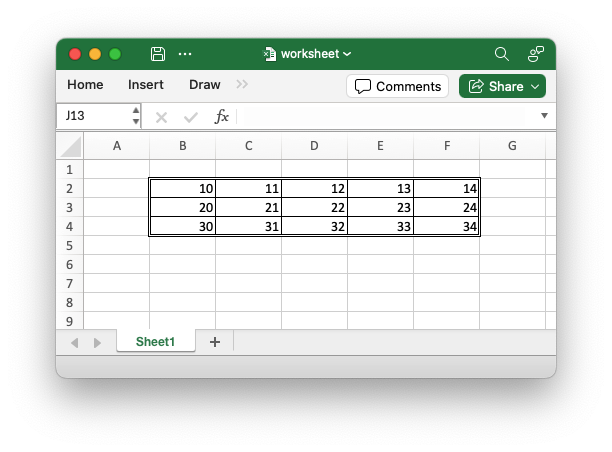
This has always been a heavily requested feature in the Python version but due to some different design decisions it was never easy to implement.
I've released v0.75.0 of rust_xlsxwriter which removes the dependency on the regex.rs crate for smaller binary sizes. The only non-optional dependency is now zip.rs.
An example of the size difference is shown below for one of the sample apps:
app_hello_world |
v0.74.0 | v0.75.0 |
|---|---|---|
| Debug | 9.2M | 4.2M |
| Release | 3.4M | 1.6M |
See the discussion at #108
Version v0.76.0 of rust_xlsxwriter is out with support for adding Textbox shapes to worksheets.
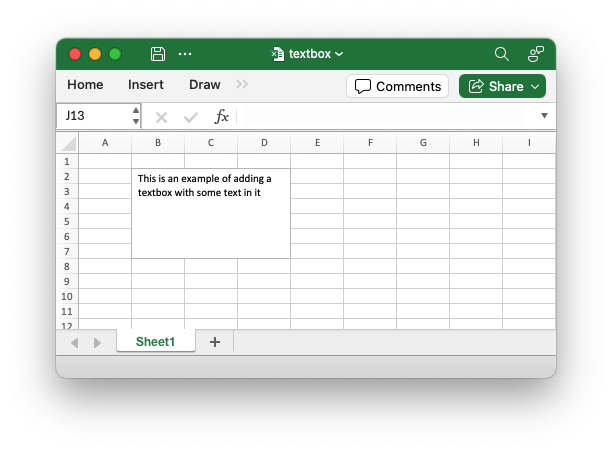
See the documentation for Shape.
This is the last of the "Larger functionality" features. We are probably on track to be feature complete with, or beyond, the Python version by the end of the year.
Folks, I am looking for some input on "constant_memory" mode for rust_xlsxwriter: https://github.com/jmcnamara/rust_xlsxwriter/issues/111
Released version v0.77.0 of rust_xlsxwriter with support for Chartsheets.
A Chartsheet in Excel is a specialized type of worksheet that doesn't have cells but instead is used to display a single chart. It supports worksheet display options such as headers and footers, margins, tab selection and print properties.
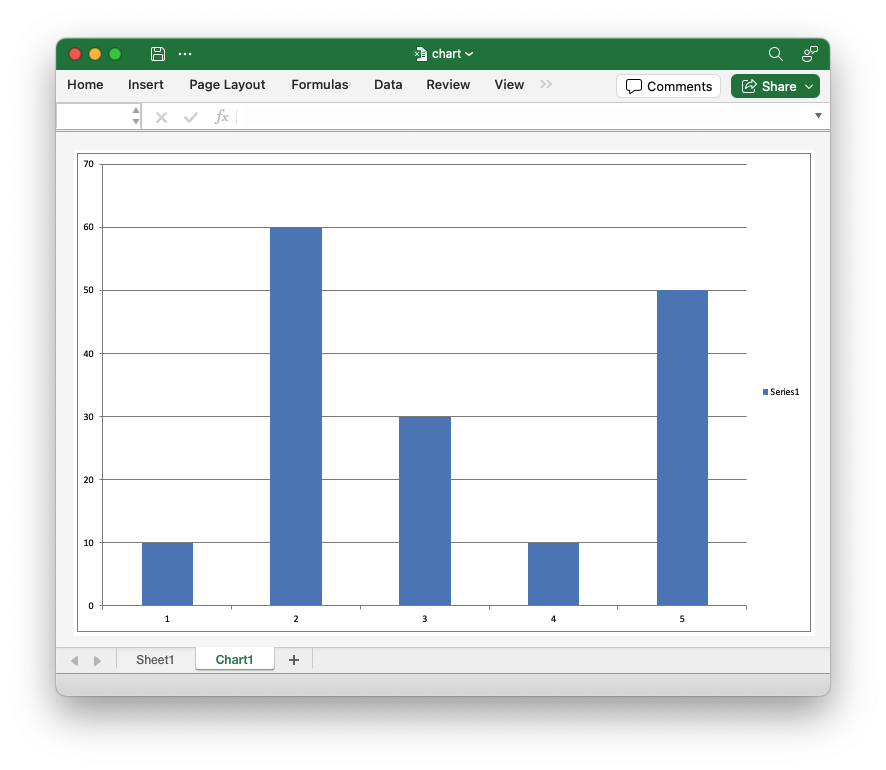
Chartsheets aren't widely used these days (as far as I can see) but end users sometimes request this feature.
I have an initial working version of the "constant memory" mode on the constant_memory branch (see #111 ). It currently has limited functionality but there is enough to allow me to benchmark the potential savings. I'm reposting the results here for a wider audience and hopefully some feedback/testing.
The memory usage profile is effectively flat (as designed):
| Cells | Standard - Size (MB) | Constant Memory - Size (MB) | Standard - Time (s) | Constant Memory - Time (s) |
|---|---|---|---|---|
| 100,000 | 16.213 | 0.021 | 0.101 | 0.088 |
| 200,000 | 32.405 | 0.021 | 0.214 | 0.179 |
| 300,000 | 52.794 | 0.021 | 0.335 | 0.276 |
| 400,000 | 64.793 | 0.021 | 0.443 | 0.369 |
| 500,000 | 76.792 | 0.021 | 0.564 | 0.468 |
| 600,000 | 105.569 | 0.021 | 0.673 | 0.564 |
| 700,000 | 117.567 | 0.021 | 0.768 | 0.669 |
| 800,000 | 129.567 | 0.021 | 0.874 | 0.799 |
| 900,000 | 141.566 | 0.021 | 1.002 | 0.862 |
| 1,000,000 | 153.565 | 0.021 | 1.081 | 1.022 |
Which looks like this:
Similarly to the Python version the performance is also slightly better (5-15%) in this mode. Lower time is better. However for numeric only/heavy data (which is the case in practice) the performance is more of less the same.
The tests were run like this:
./target/release/examples/app_memory_test 4000
./target/release/examples/app_memory_test 4000 --constant-memory
So the initial results are good. I'll continue with the functionality.
It would be good to have a few other eyes on this in #111.
