

 jmamma
sram test fails
Hi, opening this issue after asking for help over at elektronauts after running into some issues as a possible consequence of the (classic?) mistake of soldering the oled before the sd-card holder.
Before desoldering the oled screen all test firmwares ran successfully. After desoldering the sram test fails instantly, led, sd-card and encoder/button tests all still successful. Ram test gives the following error:
Megank0 mismatch 2200 MegaCommand SRAM Test 2200 SRAM Test Failed bank0 mismatch 2200
Tried several times, tried reseating the board just in case but the same error occurs. Before replacing the ram it would be great if anyone could shed any light on other possible causes than a damaged/faulty ram chip.
Here are pictures of my build:


Can you take a clearer version of the bottom side of the board. i want to see the traces around the sram chip clearly
thanks

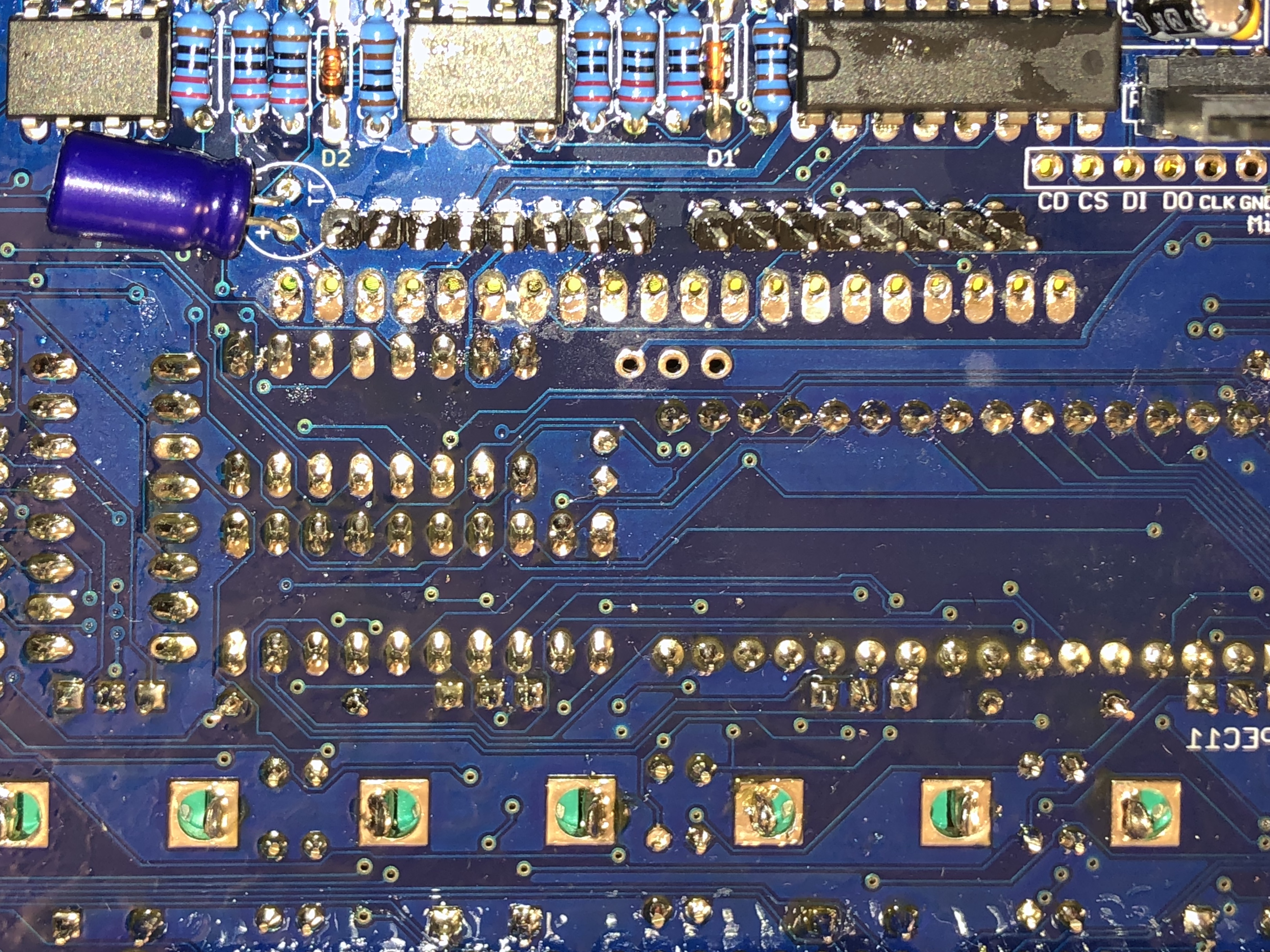
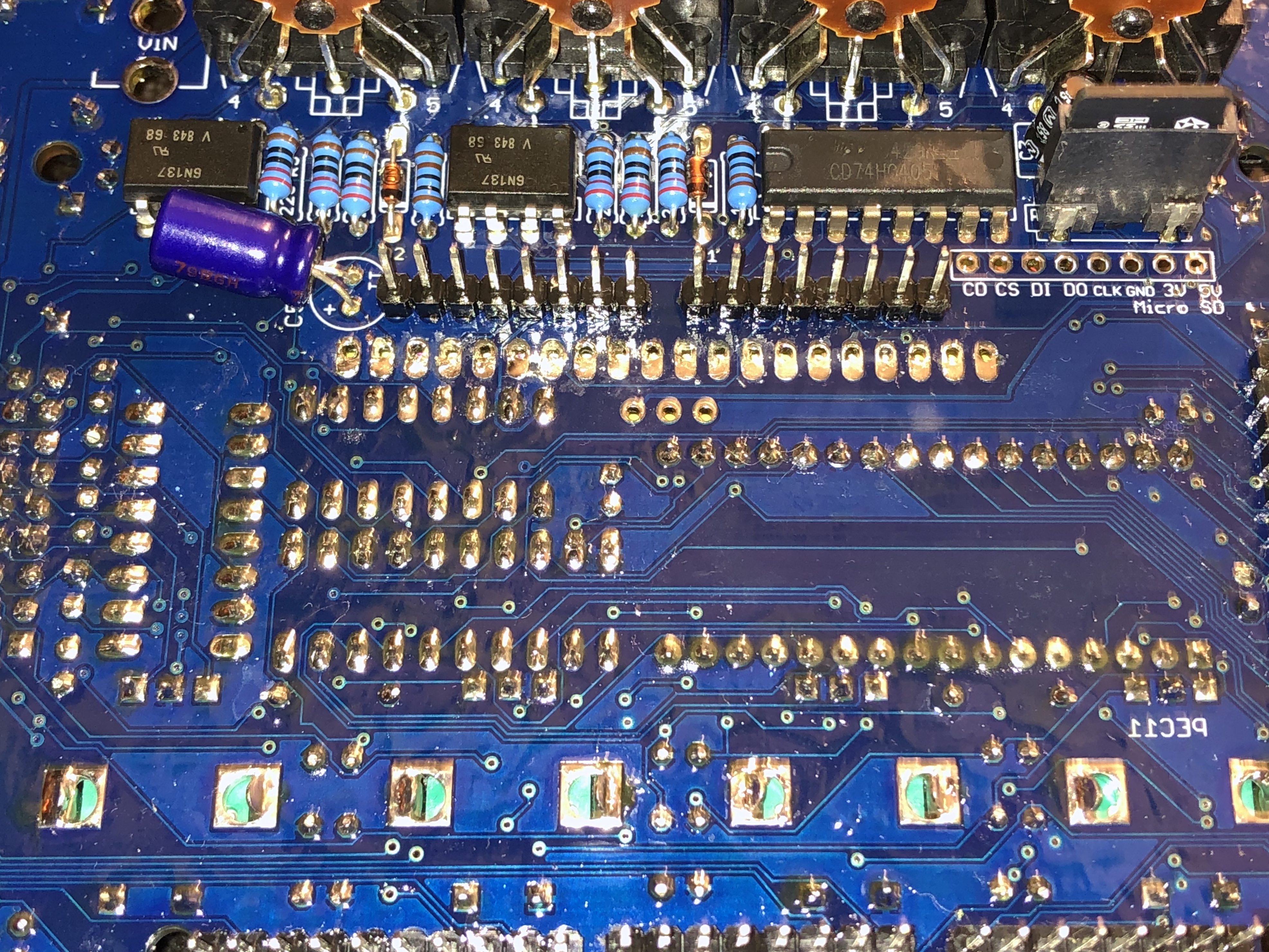
I get the same test error when I attempt to run the SRAM test with the arduino disconnected from the main board.
This means theres a connectivity problem somewhere.
Mest
2200

Failed bank0 zero reading
2200
MegaCommand SRAM Test
2200

Failed bank0 zero reading
2200
For sanity, reconnect the Arduino and try again. Check that all the male header pins are aligned correctly with the Arduino when attaching it.
Was the SRAM test working prior to the display problems?
Can you make sure that there are no short circuits between solder joints. I see a few spots where there is a little bit of solder that might be causing a short between two unrelated pads.
Do you own a multimeter?
Check that the SRAM chip is getting 5V. Pin32 connected to capacitor C4. https://docs.rs-online.com/6fa1/0900766b8139de13.pdf
and check GND.
The next step would be to verify the traces between the SRAM chip and the double row header. start with Power and GND and then work through the other traces. Keep a checklist.
--
Troubleshooting may seem daunting, but it's a digital circuit and we can number down the possibilities by working systematically.
I get the same test error when I attempt to run the SRAM test with the arduino disconnected from the main board.
This means theres a connectivity problem somewhere.
Mest
2200

Failed bank0 zero reading
2200
MegaCommand SRAM Test
2200

Failed bank0 zero reading
2200
For sanity, reconnect the Arduino and try again. Check that all the male header pins are aligned correctly with the Arduino when attaching it.
Was the SRAM test working prior to the display problems?
Can you make sure that there are no short circuits between solder joints. I see a few spots where there is a little bit of solder that might be causing a short between two unrelated pads.
Do you own a multimeter?
Check that the SRAM chip is getting 5V. Pin32 connected to capacitor C4. https://docs.rs-online.com/6fa1/0900766b8139de13.pdf
and check GND.
The next step would be to verify the traces between the SRAM chip and the double row header. start with Power and GND and then work through the other traces. Keep a checklist.
--
Troubleshooting may seem daunting, but it's a digital circuit and we can number down the possibilities by working systematically.
Thank you for the amazing support, really appreciate it! 1. Headers appear to be aligned correctly, reseating the board doesn't seem to make a difference. 2. Sram test was successful before desoldering the oled screen. 3. Cleaning the board seems to have helped a bit as the test now runs for for a while before giving the error:
2A00 SRAM Test Failed bank0 mismatch 2A00
Test seems to fail at the same point each time. 4. If I measure voltage between the large GND on the MC pcb and pin 32 on the sram my multimeter indicates a short. 5. I installed autodesk so I can systematically start working through the various test points. Will probably take me a while as I'm not used yet to navigating schematics.
I get around 4.5V reading across.
edit; Gave the board another clean and instantly got a bank0 read error, reconnected the usb cable and back to the initial bank0 mismatch error. Not sure if relevant.
I read 4.5V as well.
Now check GND (from double pin header) to the supply voltage of each chip
"edit; Gave the board another clean and instantly got a bank0 read error, reconnected the usb cable and back to the initial bank0 mismatch error. Not sure if relevant."
can't really make any conclusions at this stage.
If measuring voltages doesn't reveal anything unusual. Disconnect the arduino and start testing each trace. Start with connections from the double header to the SRAM chip. Then the SRAM chip to the 74HC573 octal latch.
It's getting late here. So i will check in the morning to see your progress.
I read 4.5V as well.
Now check GND (from double pin header) to the supply voltage of each chip
Consistently getting around 4.7 volts across. Except for the level shifter which shows around 3.3V.
"edit; Gave the board another clean and instantly got a bank0 read error, reconnected the usb cable and back to the initial bank0 mismatch error. Not sure if relevant."
can't really make any conclusions at this stage.
If measuring voltages doesn't reveal anything unusual. Disconnect the arduino and start testing each trace. Start with connections from the double header to the SRAM chip. Then the SRAM chip to the 74HC573 octal latch.
It's getting late here. So i will check in the morning to see your progress.
Ok, thanks again! Should keep me busy for a while. Have good night.
I checked continuity for all the traces to/from the ram ic with my multimeter and was not able to find any fault. Didn't measure resistance, just checked the traces. All firmware tests besides the ram test (and the oled test, am unable to test now) run successfully. Is it safe to assume that the ram chip needs to be replaced or am I jumping the gun?
My only other suggestion would be to re-flow the solder joints on the SRAM and octal latch. This would rule out a cold solder joint...
Another less scientific test would be to apply constant physical pressure to SRAM chip (with your thumb) and re-run the SRAM test. See if the test proceeds beyond 0x2200. This may reveal an intermittent connection...
Just be weary that desoldering the SRAM will be harder than removing the OLED. the pads are much smaller, and there is a high risk of stripping them from the board.
@frnktrpz also check the bank selection pin (PIN43)
You can enable the debug information in the test firmware, around line 57: https://github.com/jmamma/MegaCommand_Design/blob/3d7930fea5477b9c5ef57f928413bf8be208d8a9/TestFirmwares/megacommand_sram_test/megacommand_sram_test.ino#L57-L60
Uncomment these, and see if bank1 reading is correct but bank0 is not.

@yatli If bank select is not working, then it should read/write to the same bank.
Previously he was getting as far as 2A00
which is 2560 bytes.. I thought this may be indicative of an address line fault. But it doesn't line up with the addressing scheme.( It's been a while since I've looked at this. Maybe my interpretation is wrong.)
2^11 = 2048 2^10 = 1024 2^9 = 512
Ah, yes. But I still recommend printing out the values -- if we get the same wrong value from both banks it means something (I'm not sure what it is yet)
SRAM Test Failed bank0 mismatc
Yeah he's getting a mismatch. ~Which means the value read from bank 1 doesn't match the value read from bank 0.~
A static address line fault wouldn't cause this. A static bank select line fault wouldn't cause this.
The test FW doesn't compare bank1 read with bank0 read -- it compares both with the source random number, and when bank0 check fails, it doesn't report what's happening on bank1, just exit.
which is 2560 bytes.. I thought this may be indicative of an address line fault. But it doesn't line up with the addressing scheme.( It's been a while since I've looked at this. Maybe my interpretation is wrong.)
2^11 = 2048 2^10 = 1024 2^9 = 512
Hypothesis: 2^11 and 2^9 pins shorted?
https://andybrown.me.uk/2011/08/28/512kb-sram-expansion-for-the-arduino-mega-design/
reference ^
When choosing a latch we must ensure that it is fast enough to cope with the 16Mhz core clock of the Arduino. 74HC series latches are too slow. The datasheet recommends that we use the 74AHC series.
That's interesting.
yeah I just checked a few of my boards. I have a mix of 74AH and 74H. Presumably if this was a problem it would have come up in my testing.
I didn't know the difference between HC and AHC. But I'm sure the LS series won't work here due to clocking limits. :)
@frnktrpz please follow @yatli suggestion and uncomment the debug info from the SRAM test. Paste output here.
Cheers.
@frnktrpz please follow @yatli suggestion and uncomment the debug info from the SRAM test. Paste output here.
Cheers.
MegaCommand SRAM Test 2200 114 0 0 Failed bank0 zero reading 2200
This is the result. Pressing on the ram seems to make no difference.
And different from your first situation.
Megank0 mismatch
2200
MegaCommand SRAM Test
2200
SRAM Test Failed bank0 mismatch
2200
Sorry, I was a bit unclear.
First ran the test while pressing on the ram, which resulted in the same outcome. Then ran the test again with lines 57-60 commented out, and that gave the quoted output.