

 jlesage
Unable to get handbrake container to use Synology’s hardware acceleration
Hello there,
I need a hand please, I have a DS718+ Synology NAS and I have Handbreak running on a docker container, auto convert from the watch folder works perfectly but it is using a lot of CPU, so I’ve been looking into existing posts about issues with transcoding and QSV H.265 but I can’t get my container to use the hardware acceleration.
Here is the docker command I’m using:
sudo docker run -d -p 5800:5800 --name=handbrake1 --device /dev/dri/renderD128:/dev/dri/renderD128 --device /dev/dri/card0:/dev/dri/card0 -e USER_ID=0 -e GROUP_ID=101 -v /volume1/docker/Handbrake/Config:/config:rw -v /volume1/docker/Handbrake/Storage:/storage:ro -v /volume1/Movies/Watch:/watch:rw -v /volume1/Movies/Output:/output:rw jlesage/handbrake
I’m using the preset: Hardware/H.265 QSV 1080p
Here is the conversion error I’m getting.
[15:42:18] Starting Task: Encoding Pass [15:42:18] Skipping vfr filter [15:42:18] Skipping crop/scale filter [15:42:18] job configuration: [15:42:18] * source [15:42:18] + /watch/Twister (1996).mp4 [15:42:18] + title 1, chapter(s) 1 to 1 [15:42:18] + container: mov,mp4,m4a,3gp,3g2,mj2 [15:42:18] + data rate: 1962 kbps [15:42:18] * destination [15:42:18] + /output/.tPZkmO/Twister (1996).mp4 [15:42:18] + container: MPEG-4 (libavformat) [15:42:18] * video track [15:42:18] + decoder: h264 10-bit (yuv420p10le) [15:42:18] + bitrate 1575 kbps [15:42:18] + filters [15:42:18] + Format (format=yuv420p) [15:42:18] + Output geometry [15:42:18] + storage dimensions: 1920 x 794 [15:42:18] + pixel aspect ratio: 1 : 1 [15:42:18] + display dimensions: 1920 x 794 [15:42:18] + encoder: H.265 (Intel Media SDK) [15:42:18] + preset: speed [15:42:18] + profile: auto [15:42:18] + level: auto [15:42:18] + quality: 22.00 (ICQ) [15:42:18] + color profile: 1-1-1 [15:42:18] + chroma location: left [15:42:18] * audio track 1 [15:42:18] + decoder: Unknown (AC3) (5.1 ch) (384 kbps) (track 1, id 0x1) [15:42:18] + bitrate: 384 kbps, samplerate: 48000 Hz [15:42:18] + mixdown: Stereo [15:42:18] + encoder: AAC (libfdk_aac) [15:42:18] + bitrate: 160 kbps, samplerate: 48000 Hz [15:42:19] sync: expecting 162614 video frames [15:42:19] hb_display_init: using VA driver 'iHD' libva info: VA-API version 1.14.0 libva info: User environment variable requested driver 'iHD' libva info: Trying to open /opt/intel/mediasdk/lib/iHD_drv_video.so libva info: Found init function __vaDriverInit_1_14 libva info: va_openDriver() returns 0 ERROR: encqsvInit: MFXVideoENCODE_Init failed (-3) [15:42:19] encqsvInit: using encode-only (LowPower) path [15:42:19] encqsvInit: H.265/HEVC (null) profile @ level (null) [15:42:19] encqsvInit: TargetUsage 7 AsyncDepth 6 [15:42:19] encqsvInit: GopRefDist 3 GopPicSize 24 NumRefFrame 1 [15:42:19] encqsvInit: BFramesMax 2 BRefType off [15:42:19] encqsvInit: RateControlMethod ICQ ICQQuality 22 ERROR: Failure to initialise thread 'Quick Sync Video encoder (Intel Media SDK)' [15:42:19] ac3-decoder done: 0 frames, 0 decoder errors [15:42:19] h264-decoder done: 0 frames, 0 decoder errors [15:42:19] sync: got 0 frames, 162614 expected [15:42:20] Finished work at: Sat Nov 12 15:42:20 2022
[15:42:20] libhb: work result = 3
Encode failed (error 3). HandBrake has exited.
I know my device supports this but any idea how to enable it and make it visible to the docker container?
Thank you.

It's a known issue in HandBrake. You can use the lowpower=0 workaround. See #211 or #185.

I'm having similar issues trying various combinations of solutions in the issues.
-
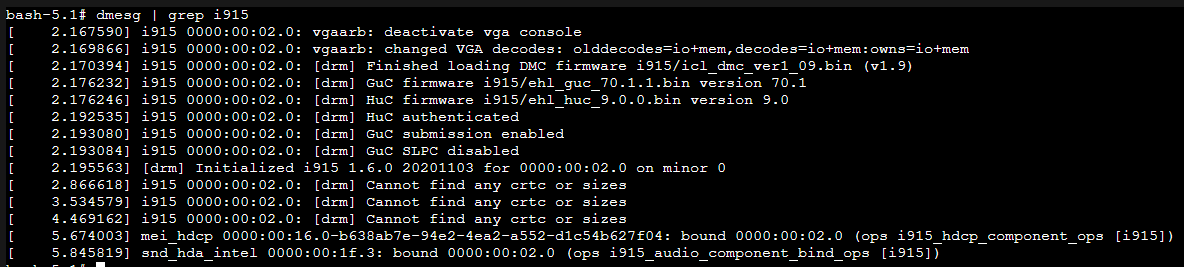
Permissions on /dev/dri It doesn't seem to be a problem via dmesg output in container. See attachment
-
I tried the lowpower=0 VideoOptionExtra, but that did not resolve anything.
-
I did similar to original issue reporter and QSV is reported as not supported in the logs. See attachment.

-
The Intel site clearly states support for QSV: N5105 Link
I noticed a PR in the handbrake repository that may be related: https://github.com/HandBrake/HandBrake/pull/4370
I tried various versions of the docker image: 1.23.x through latest with the same problem.
Maybe this is a problem with handbrake itself. Any other suggestions I can try?
Update
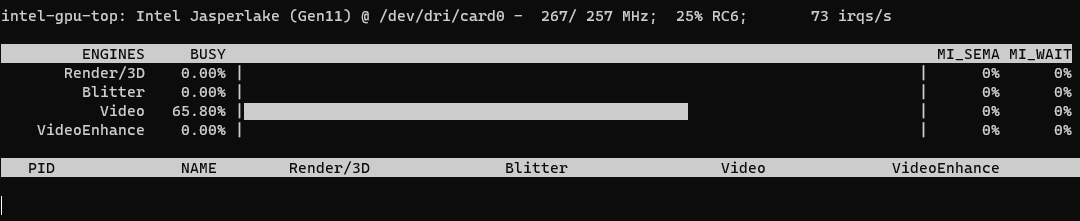
I am able to use ffmpeg on the host to encode with QSV:
 ffmpeg.txt

I've got a similar problem with the DS920+ (Intel Celeron J4125). Happens with every QSV profile, with and without lowpower=0.
[22:33:59] Compile-time hardening features are enabled
Cannot load libnvidia-encode.so.1
Cannot load libnvidia-encode.so.1
Cannot load libnvidia-encode.so.1
Cannot load libnvidia-encode.so.1
[22:34:00] hb_init: starting libhb thread
[22:34:00] thread 7fadbf73bb38 started ("libhb")
HandBrake 1.5.1 (2022062800) - Linux x86_64 - https://handbrake.fr
4 CPUs detected
Opening /watch/video.mkv...
[22:34:00] CPU: Intel(R) Celeron(R) J4125 CPU @ 2.00GHz
[22:34:00]  - logical processor count: 4
[22:34:00] Intel Quick Sync Video support: no
...
[22:34:02] Starting Task: Encoding Pass
[22:34:02] Skipping vfr filter
[22:34:02] Skipping crop/scale filter
[22:34:02] job configuration:
[22:34:02]  * source
[22:34:02]    + /watch/video.mkv
[22:34:02]    + title 1, chapter(s) 1 to 26
[22:34:02]    + container: matroska,webm
[22:34:02]    + data rate: 12260 kbps
[22:34:02]  * destination
[22:34:02]    + /output/.6jG7rg/video.mp4
[22:34:02]    + container: MPEG-4 (libavformat)
[22:34:02]      + chapter markers
[22:34:02]  * video track
[22:34:02]    + decoder: hevc 10-bit (yuv420p10le)
[22:34:02]    + filters
[22:34:02]      + Format (format=yuv420p)
[22:34:02]    + Output geometry
[22:34:02]      + storage dimensions: 1920 x 1036
[22:34:02]      + pixel aspect ratio: 1 : 1
[22:34:02]      + display dimensions: 1920 x 1036
[22:34:02]    + encoder: H.265 (Intel Media SDK)
[22:34:02]      + preset:  speed
[22:34:02]      + options: lowpower=0
[22:34:02]      + profile: auto
[22:34:02]      + level:   auto
[22:34:02]      + quality: 22.00 (QP)
[22:34:02]      + color profile: 1-1-1
[22:34:02]      + chroma location: left
[22:34:02]  * audio track 1
[22:34:02]    + name: German AC3 2.0
[22:34:02]    + decoder: Deutsch (AC3) (2.0 ch) (Dolby Surround) (192 kbps) (track 1, id 0x1)
[22:34:02]      + bitrate: 192 kbps, samplerate: 48000 Hz
[22:34:02]    + mixdown: Stereo
[22:34:02]    + encoder: AAC (libfdk_aac)
[22:34:02]      + bitrate: 160 kbps, samplerate: 48000 Hz
[22:34:02] sync: expecting 145158 video frames
ERROR: hb_qsv_param_default_preset: invalid pointer(s) param=0x7fadbf39caf8 videoParam=0x7fadbf39cc20 info=0 preset=0x7fadbf2f2a30
ERROR: encqsvInit: hb_qsv_param_default_preset failed
ERROR: Failure to initialise thread 'Quick Sync Video encoder (Intel Media SDK)'
[22:34:02] ac3-decoder done: 0 frames, 0 decoder errors
[22:34:02] hevc-decoder done: 0 frames, 0 decoder errors
[22:34:02] sync: got 0 frames, 145158 expected
[22:34:02] Finished work at: Sun Dec 11 22:34:02 2022

[22:34:02] libhb: work result = 3

Encode failed (error 3).
HandBrake has exited.

Did you look at the container's log (docker logs <container name>) ? During the startup it checks if QSV is usable.
@shrugal I have the same configuration as you and my QSV works. Here's my docker-compose.yml if it helps. The one issue I had was that I couldn't make the container start unless it was running as root (USER_ID=0) because it was complaining about initializing QuickSync, even though I run a Plex container from linuxserver as a non-root user without issues. :shrug:
services:
  handbrake:
    image: jlesage/handbrake
    container_name: handbrake
    environment:
      - USER_ID=0 # User has to be root or QSV doesn't seem to work
      - GROUP_ID=100 # Skip this if you don't care about your files being accessible to other user groups
    ports:
      - "5800:5800"
    volumes:
      - "/volume1/Docker/handbrake:/config:rw"
      - "/volume1/V/Transcode/storage:/storage:ro"
      - "/volume1/V/Transcode/watch:/watch:rw"
      - "/volume1/V/Transcode/output:/output:rw"
    devices:
      - /dev/dri:/dev/dri
    restart: unless-stopped
