

 jlesage
Keeps synchronizing never backs up
For the past 3 days I check in and my CrashPlan container is synchronizing never backing up. It seems get to 98% or so, then when I check back it is at 10%. Am I stuck in a sync loop?
I am running this on container station within my ts-677 qnap NAS. All software is the latest version, in fact few weeks ago I reinstalled, set it up. It was working before this seems to have just happened.

Is the entire /volume1 directory set for being backup ? If yes, there are some directories that should be excluded, like the one used by Docker.
Else, maybe you can look at Tools->History to see if there is anything useful.

No, only selected spots where I store my data, ie the actual shares I created in the Qnap GUI. I checked and it does not include where docker resides.
History seems to indicate that it is backing up. Even though it still says syncing!
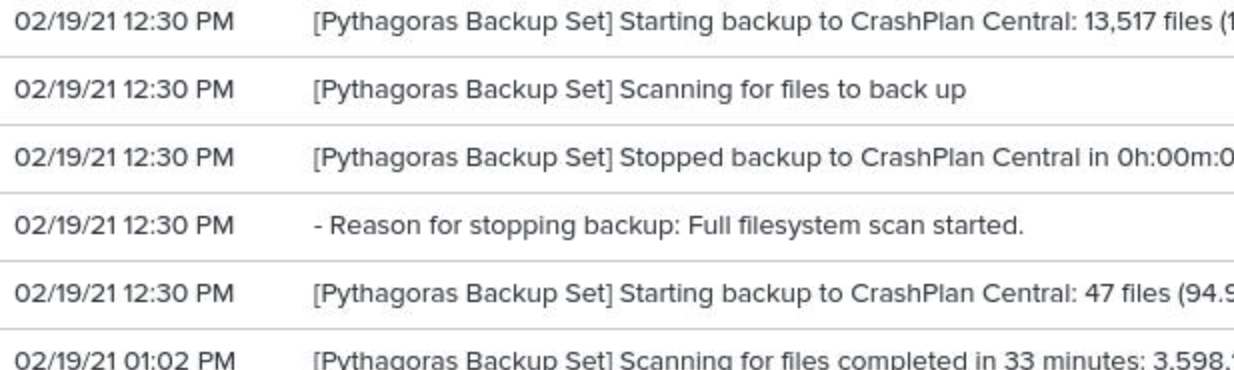
Maybe it is not able to finish the backup before full system scans ? Do you see the number of files to backup decreasing after the scan ?
After watching it reset for over two weeks, I have re-created the container. Jury I still out whether it has fixed anything.
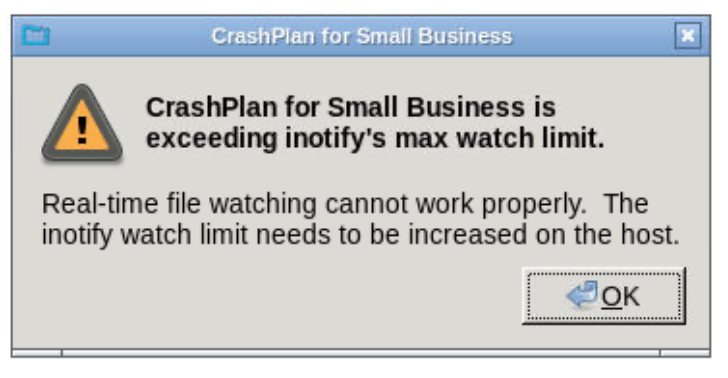
Not sure if this is related but I always get this message now. I am not sure why, I back 4.7 TB (10.7 on the Crashplan side) with 5 gigs memory designated to the container. The server, ts-677 has 30 gigs and Ryzen 1600, 3.2 GHz 6 cores (12 thread).
By the way, thank you thank you so much for creating this container and your ongoing support! You are a life saver!!!!!!!!
You need to increase the inotify limit on your host. See https://github.com/jlesage/docker-crashplan-pro#inotifys-watch-limit
For the memory, CrashPlan recommends allocating 1GB of memory per TB or data to backup. To which value did you set the CRASHPLAN_SRV_MAX_MEM environment variable ?
Thanks again for your help! It seems like the container is working now that I have rebuilt it.
To answer your question, the container claims that I am backing up 5.1 TB. It would appear that I have assigned 5120m (see below). Strange that I have never received that message now I do even with a new install.
I would love to give the container more memory, however I thought I read somewhere that if you go beyond 5120m, QTS (Qnap OS) because unstable. I don't know if that is specific to QTS, but I did notice when I upped it to 7168m it seemed to crash every other day.
docker pull jlesage/crashplan-pro
docker run -d
--name=CrashplanPro
-e USER_ID=0
-e GROUP_ID=0
-p 5800:5800
-p 5900:5900
-e TZ=America/New_York
-e CRASHPLAN_SRV_MAX_MEM=5120m
-v /share/CACHEDEV1_DATA/Virtualize/Containers/appdata/crashplan-pro/config:/config:rw
-v /share/CACHEDEV1_DATA:/storage:ro
-v /share:/share:rw
jlesage/crashplan-pro
If CrashPlan doesn't crash, then the memory limit may be fine. If you see it crashing again, you can have a look at /share/CACHEDEV1_DATA/Virtualize/Containers/appdata/crashplan-pro/config/log/service.log.0 for about the reason of the crash.
Thank you so much for your help! Just curious the message makes me feel like the lack of memory will cause it to not accurately detect file changes in qnaps OS. Is that correct?
The lack of memory will not affect the files change detection. However, the message about inotify limit will.