

 jitsi
jitsi
Build instructions?
How do I build the desktop client from source? The prebuilt binary rpm does not work with openSUSE, and the only "documentation" available here is a link to the website, which has nothing on the desktop client at all.

Have a look at the new-build branch. It has docs with build instructions, but is also under development and it might not start/work due to other not yet solved issues.

How do I build the desktop client from source? The prebuilt binary rpm does not work with openSUSE, and the only "documentation" available here is a link to the website, which has nothing on the desktop client at all.
Hello,
please have a look at this post.
Andrea

Greetings.
I am trying to use the "new-build" branch. I am working on Windows and I'd like to debug the project in Eclipse and make an installer/executable that can be used on Mac.
I am trying to following the Docs at https://github.com/jitsi/jitsi/blob/new-build/docs/building.md
My java version: java 11.0.13 2021-10-19 LTS Java(TM) SE Runtime Environment 18.9 (build 11.0.13+10-LTS-370) Java HotSpot(TM) 64-Bit Server VM 18.9 (build 11.0.13+10-LTS-370, mixed mode)
And Maven version is 3.8.4
I am failing to go through the very first step, mvn package. The build fails, and it is pointing me to the surefire-reports folder. This is what I am getting in TestCredentialsStorageService.txt:
Test set: TestCredentialsStorageService
Tests run: 6, Failures: 6, Errors: 0, Skipped: 0, Time elapsed: 0.148 s <<< FAILURE! - in TestCredentialsStorageService
warning(junit.framework.TestSuite$1) Time elapsed: 0.013 s <<< FAILURE!
junit.framework.AssertionFailedError:
Exception in constructor: testLoadPassword (java.lang.NullPointerException
at TestCredentialsStorageService.
warning(junit.framework.TestSuite$1) Time elapsed: 0.004 s <<< FAILURE!
junit.framework.AssertionFailedError:
Exception in constructor: testRemoveSavedPassword (java.lang.NullPointerException
at TestCredentialsStorageService.
warning(junit.framework.TestSuite$1) Time elapsed: 0.004 s <<< FAILURE!
junit.framework.AssertionFailedError:
Exception in constructor: testIsUsingMasterPassword (java.lang.NullPointerException
at TestCredentialsStorageService.
warning(junit.framework.TestSuite$1) Time elapsed: 0.002 s <<< FAILURE!
junit.framework.AssertionFailedError:
Exception in constructor: testChangeMasterPassword (java.lang.NullPointerException
at TestCredentialsStorageService.
warning(junit.framework.TestSuite$1) Time elapsed: 0.004 s <<< FAILURE!
junit.framework.AssertionFailedError:
Exception in constructor: testIsVerified (java.lang.NullPointerException
at TestCredentialsStorageService.
warning(junit.framework.TestSuite$1) Time elapsed: 0.011 s <<< FAILURE!
junit.framework.AssertionFailedError:
Exception in constructor: testIsStoredEncrypted (java.lang.NullPointerException
at TestCredentialsStorageService.
Any idea on how to overcome this?

Thank you so much for your reply! I was able to run the mvn package command with that!
I am having more problems down the road though, when using cmake =/
The docs say that Visual Studio, with Windows 10 SDK, is a prerequisite, in order to get CMake. I am trying to use MSYS2 instead, which also provides CMake. Would this work?
cmake -B cmake-build seems to run fine, without those Office and Outlook extras:
CMake Warning at windows/CMakeLists.txt:10 (message): OCSDK_DIR not set, skipping Office integration library
CMake Warning at addrbook/CMakeLists.txt:8 (message): MAPI_HEADERS_DIR not set, skipping Outlook Addressbook plugin
-- Configuring done -- Generating done -- Build files have been written to: C:/Users/joaduart/IdeaProjects/jitsi/native/cmake-build
But when I run cmake --build cmake-build --target install I get:
[1/4] Linking C executable windows\cleansweep\cleansweep.exe FAILED: windows/cleansweep/cleansweep.exe cmd.exe /C "cd . && C:\msys64\mingw64\bin\cc.exe -mwindows windows/cleansweep/CMakeFiles/cleansweep.dir/src/cleansweep.c.obj windows/cleansweep/CMakeFiles/cleansweep.dir/src/cleansweep.rc.obj -o windows\cleansweep\cleansweep.exe -Wl,--out-implib,windows\cleansweep\libcleansweep.dll.a -Wl,--major-image-version,0,--minor-image-version,0 windows/shared/libwin_shared.a -lkernel32 -luser32 -lgdi32 -lwinspool -lshell32 -lole32 -loleaut32 -luuid -lcomdlg32 -ladvapi32 && cd ." C:/msys64/mingw64/bin/../lib/gcc/x86_64-w64-mingw32/11.2.0/../../../../x86_64-w64-mingw32/bin/ld.exe: C:/msys64/mingw64/bin/../lib/gcc/x86_64-w64-mingw32/11.2.0/../../../../x86_64-w64-mingw32/lib/../lib/libmingw32.a(lib64_libmingw32_a-crt0_c.o): in function
main': C:/M/mingw-w64-crt-git/src/mingw-w64/mingw-w64-crt/crt/crt0_c.c:18: undefined reference toWinMain' collect2.exe: error: ld returned 1 exit status [2/4] Linking C shared library hid\libhid.dll [3/4] Linking CXX shared library globalshortcut\libglobalshortcut.dll ninja: build stopped: subcommand failed.
I haven't tried with msys2. It seems it can't handle WinMain as the application entry point (instead of the regular main(argc,argv)). I don't remember right noe why I choose WinMain, try simply changing it to main. No promises.
Btw, VS Community is free.
Sir, you have been very helpful so far, hope I am not being too needy with these problems that I've been finding. I'm tackling the next issue and I'm trying to understand if this is a consequence of the cmake workaround..
Okay, so I went to (...)\jitsi\native\windows\cleansweep\src\cleansweep.c and changed int CALLBACK _tWinMain to int CALLBACK main. This allowed me to successfully run cmake, or so it seems \o/
I've been trying to now build the dmg file. I'm using a Powershell and I am at (...)\jitsi\resources\install
There i run ./gradlew createDmg --stacktrace which is resulting in a failed build:
Configure project : Parsing versions: 2.14-SNAPSHOT / Jitsi-2.10-647-g266491c07-dirty
Task :getmacJre UP-TO-DATE Download https://api.adoptopenjdk.net/v3/binary/version/jdk-11.0.11+9/mac/x64/jre/hotspot/normal/adoptopenjdk?project=jdk
Task :createDmg FAILED
FAILURE: Build failed with an exception.
- What went wrong: Execution failed for task ':createDmg'.
A problem occurred starting process 'command 'C:\Users\joaduart\IdeaProjects\jitsi\resources\install/mac/build-dmg.sh''
Try: Run with --info or --debug option to get more log output. Run with --scan to get full insights.
Exception is: org.gradle.api.tasks.TaskExecutionException: Execution failed for task ':createDmg'. at org.gradle.api.internal.tasks.execution.ExecuteActionsTaskExecuter.lambda$executeIfValid$1(ExecuteActionsTaskExecuter.java:187) at org.gradle.internal.Try$Failure.ifSuccessfulOrElse(Try.java:268) at org.gradle.api.internal.tasks.execution.ExecuteActionsTaskExecuter.executeIfValid(ExecuteActionsTaskExecuter.java:185) at org.gradle.api.internal.tasks.execution.ExecuteActionsTaskExecuter.execute(ExecuteActionsTaskExecuter.java:173) at org.gradle.api.internal.tasks.execution.CleanupStaleOutputsExecuter.execute(CleanupStaleOutputsExecuter.java:109) at org.gradle.api.internal.tasks.execution.FinalizePropertiesTaskExecuter.execute(FinalizePropertiesTaskExecuter.java:46) at org.gradle.api.internal.tasks.execution.ResolveTaskExecutionModeExecuter.execute(ResolveTaskExecutionModeExecuter.java:51) at org.gradle.api.internal.tasks.execution.SkipTaskWithNoActionsExecuter.execute(SkipTaskWithNoActionsExecuter.java:57) at org.gradle.api.internal.tasks.execution.SkipOnlyIfTaskExecuter.execute(SkipOnlyIfTaskExecuter.java:56) at org.gradle.api.internal.tasks.execution.CatchExceptionTaskExecuter.execute(CatchExceptionTaskExecuter.java:36) at org.gradle.api.internal.tasks.execution.EventFiringTaskExecuter$1.executeTask(EventFiringTaskExecuter.java:77) at org.gradle.api.internal.tasks.execution.EventFiringTaskExecuter$1.call(EventFiringTaskExecuter.java:55) at org.gradle.api.internal.tasks.execution.EventFiringTaskExecuter$1.call(EventFiringTaskExecuter.java:52) at org.gradle.internal.operations.DefaultBuildOperationRunner$CallableBuildOperationWorker.execute(DefaultBuildOperationRunner.java:200) at org.gradle.internal.operations.DefaultBuildOperationRunner$CallableBuildOperationWorker.execute(DefaultBuildOperationRunner.java:195) at org.gradle.internal.operations.DefaultBuildOperationRunner$3.execute(DefaultBuildOperationRunner.java:75) at org.gradle.internal.operations.DefaultBuildOperationRunner$3.execute(DefaultBuildOperationRunner.java:68) at org.gradle.internal.operations.DefaultBuildOperationRunner.execute(DefaultBuildOperationRunner.java:153) at org.gradle.internal.operations.DefaultBuildOperationRunner.execute(DefaultBuildOperationRunner.java:68) at org.gradle.internal.operations.DefaultBuildOperationRunner.call(DefaultBuildOperationRunner.java:62) at org.gradle.internal.operations.DefaultBuildOperationExecutor.lambda$call$2(DefaultBuildOperationExecutor.java:76) at org.gradle.internal.operations.UnmanagedBuildOperationWrapper.callWithUnmanagedSupport(UnmanagedBuildOperationWrapper.java:54) at org.gradle.internal.operations.DefaultBuildOperationExecutor.call(DefaultBuildOperationExecutor.java:76) at org.gradle.api.internal.tasks.execution.EventFiringTaskExecuter.execute(EventFiringTaskExecuter.java:52) at org.gradle.execution.plan.LocalTaskNodeExecutor.execute(LocalTaskNodeExecutor.java:74) at org.gradle.execution.taskgraph.DefaultTaskExecutionGraph$InvokeNodeExecutorsAction.execute(DefaultTaskExecutionGraph.java:408) at org.gradle.execution.taskgraph.DefaultTaskExecutionGraph$InvokeNodeExecutorsAction.execute(DefaultTaskExecutionGraph.java:395) at org.gradle.execution.taskgraph.DefaultTaskExecutionGraph$BuildOperationAwareExecutionAction.execute(DefaultTaskExecutionGraph.java:388) at org.gradle.execution.taskgraph.DefaultTaskExecutionGraph$BuildOperationAwareExecutionAction.execute(DefaultTaskExecutionGraph.java:374) at org.gradle.execution.plan.DefaultPlanExecutor$ExecutorWorker.lambda$run$0(DefaultPlanExecutor.java:127) at org.gradle.execution.plan.DefaultPlanExecutor$ExecutorWorker.execute(DefaultPlanExecutor.java:191) at org.gradle.execution.plan.DefaultPlanExecutor$ExecutorWorker.executeNextNode(DefaultPlanExecutor.java:182) at org.gradle.execution.plan.DefaultPlanExecutor$ExecutorWorker.run(DefaultPlanExecutor.java:124) at org.gradle.internal.concurrent.ExecutorPolicy$CatchAndRecordFailures.onExecute(ExecutorPolicy.java:64) at org.gradle.internal.concurrent.ManagedExecutorImpl$1.run(ManagedExecutorImpl.java:48) at org.gradle.internal.concurrent.ThreadFactoryImpl$ManagedThreadRunnable.run(ThreadFactoryImpl.java:56) Caused by: org.gradle.process.internal.ExecException: A problem occurred starting process 'command 'C:\Users\joaduart\IdeaProjects\jitsi\resources\install/mac/build-dmg.sh'' at org.gradle.process.internal.DefaultExecHandle.execExceptionFor(DefaultExecHandle.java:241) at org.gradle.process.internal.DefaultExecHandle.setEndStateInfo(DefaultExecHandle.java:218) at org.gradle.process.internal.DefaultExecHandle.failed(DefaultExecHandle.java:369) at org.gradle.process.internal.ExecHandleRunner.run(ExecHandleRunner.java:87) at org.gradle.internal.operations.CurrentBuildOperationPreservingRunnable.run(CurrentBuildOperationPreservingRunnable.java:42) at org.gradle.internal.concurrent.ExecutorPolicy$CatchAndRecordFailures.onExecute(ExecutorPolicy.java:64) at org.gradle.internal.concurrent.ManagedExecutorImpl$1.run(ManagedExecutorImpl.java:48) at org.gradle.internal.concurrent.ThreadFactoryImpl$ManagedThreadRunnable.run(ThreadFactoryImpl.java:56) Caused by: net.rubygrapefruit.platform.NativeException: Could not start 'C:\Users\joaduart\IdeaProjects\jitsi\resources\install/mac/build-dmg.sh' at net.rubygrapefruit.platform.internal.DefaultProcessLauncher.start(DefaultProcessLauncher.java:27) at net.rubygrapefruit.platform.internal.WindowsProcessLauncher.start(WindowsProcessLauncher.java:22) at net.rubygrapefruit.platform.internal.WrapperProcessLauncher.start(WrapperProcessLauncher.java:36) at org.gradle.process.internal.ExecHandleRunner.startProcess(ExecHandleRunner.java:98) at org.gradle.process.internal.ExecHandleRunner.run(ExecHandleRunner.java:71) ... 4 more Caused by: java.io.IOException: Cannot run program "C:\Users\joaduart\IdeaProjects\jitsi\resources\install/mac/build-dmg.sh" (in directory "C:\Users\joaduart\IdeaProjects\jitsi\resources\install\build\install"): CreateProcess error=193, %1 is not a valid Win32 application at net.rubygrapefruit.platform.internal.DefaultProcessLauncher.start(DefaultProcessLauncher.java:25) ... 8 more Caused by: java.io.IOException: CreateProcess error=193, %1 is not a valid Win32 application ... 9 more
Get more help at https://help.gradle.org
BUILD FAILED in 8s 7 actionable tasks: 3 executed, 4 up-to-date
Do you think this is because I used msys' cmake, with that cleansweep change?
createDmg is to create the Mac image and can only run on a Mac. (Intel Macs, not Apple Silicon.)
Oh. I though it would allow me to create a dmg file, which then I could use to install Jitsi Desktop on a Mac. How can I make an installer/runnable Jar for Mac, here on windows then?
You can't, you need a Mac for that. You could use the GitHub Actions for it though, there are workflows present that you can reuse.
Okay, so no installer.. But it should still be possible to make a runnable Jar, no?
I was able to run the project from IntelliJ \o/ I configured a run configuration for the net.java.sip.communicator.launcher.SIPCommunicator class, passing the VM Options given at the Hacking Docs:
-Xbootclasspath/a:./lib
-Dlogback.configurationFile=./lib/logback.xml
-Dfelix.config.properties=file:./lib/felix-dev.properties
-splash:./resources/install/src/main/dist/splash.gif
-Djava.library.path=./lib/native/windows-x64
This made the client pop out, even though it is a big buggy, I can't drag the window around, for example:
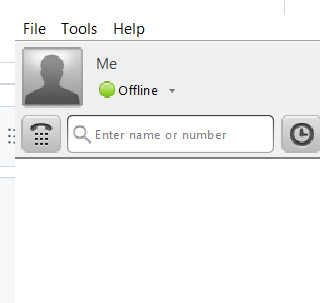
But works. I think that with the mvn package command, I'd have an executable jar somewhere. But maybe I am not understanding it right, and it just generates a multitude of Jars for each bundle. I can't run these results with these instructions though:

I tried to directly copy the contents of launch-classpath file:
PS C:\Users\joaduart\IdeaProjects\jitsi> java C:\Users\joaduart.m2\repository\org\apache\felix\org.apache.felix.main\7.0.1\org.apache.felix.main-7.0.1.jar;C:\Users\joaduart.m2\repository\org\apache\aries\spifly\org.apache.aries.spifly.dynamic.framework.extension\1.3.4\org.apache.aries.spifly.dynamic.framework.extension-1.3.4.jar;C:\Users\joaduart.m2\repository\ch\qos\logback\logback-classic\1.2.6\logback-classic-1.2.6.jar;C:\Users\joaduart.m2\repository\ch\qos\logback\logback-core\1.2.6\logback-core-1.2.6.jar;C:\Users\joaduart.m2\repository\org\slf4j\jul-to-slf4j\1.7.32\jul-to-slf4j-1.7.32.jar;C:\Users\joaduart.m2\repository\org\slf4j\jcl-over-slf4j\1.7.32\jcl-over-slf4j-1.7.32.jar;C:\Users\joaduart.m2\repository\org\slf4j\log4j-over-slf4j\1.7.32\log4j-over-slf4j-1.7.32.jar;C:\Users\joaduart.m2\repository\org\slf4j\slf4j-api\1.7.32\slf4j-api-1.7.32.jar Error: Could not find or load main class C:\Users\joaduart.m2\repository\org\apache\felix\org.apache.felix.main\7.0.1\org.apache.felix.main-7.0.1.jar Caused by: java.lang.ClassNotFoundException: C:\Users\joaduart.m2\repository\org\apache\felix\org.apache.felix.main\7.0.1\org.apache.felix.main-7.0.1.jar
I then tried to build a single runnable jar that I can use to execute the jitsi desktop, through the IntelliJ's artifacts. This seems to have been done okay, but now when I try to run the jar, with the arguments given in the Hacking docs:
java .\jitsi.jar -Xbootclasspath/a:./lib -Dlogback.configurationFile=./lib/logback.xml -Dfelix.config.properties=file:./lib/felix-dev.properties -splash:./resources/install/src/main/dist/splash.gif -Djava.library.path=./lib/native/windows-x64 Error: Could not find or load main class .\jitsi.jar
Is it me who is doing something wrong or it isn't possible to execute the Communicator this way? Also tried to run it this way:

Okay, so no installer.. But it should still be possible to make a runnable Jar, no?
No. Jitsi Desktop uses OSGi and the OSGi framework (Felix) relies on finding the individual jars.
I was able to run the project from IntelliJ \o/ I configured a run configuration for the net.java.sip.communicator.launcher.SIPCommunicator class, passing the VM Options given at the Hacking Docs:
-Xbootclasspath/a:./lib
-Dlogback.configurationFile=./lib/logback.xml
-Dfelix.config.properties=file:./lib/felix-dev.properties
-splash:./resources/install/src/main/dist/splash.gif
-Djava.library.path=./lib/native/windows-x64
This made the client pop out, even though it is a big buggy, I can't drag the window around, for example:
No idea why you wouldn't be able to move the window. If you can open any dialogs it should be fine from all I know.
But works. I think that with the
mvn packagecommand, I'd have an executable jar somewhere. But maybe I am not understanding it right, and it just generates a multitude of Jars for each bundle. I can't run these results with these instructions though:
The snippet is for Linux, you can't run cat or pwd in the Windows cmdline, and the classpath-separator is a ;. I'm too lazy atm to rewrite this as a Windows script.
I tried to directly copy the contents of launch-classpath file:
PS C:\Users\joaduart\IdeaProjects\jitsi> java C:\Users\joaduart.m2\repository\org\apache\felix\org.apache.felix.main\7.0.1\org.apache.felix.main-7.0.1.jar;C:\Users\joaduart.m2\repository\org\apache\aries\spifly\org.apache.aries.spifly.dynamic.framework.extension\1.3.4\org.apache.aries.spifly.dynamic.framework.extension-1.3.4.jar;C:\Users\joaduart.m2\repository\ch\qos\logback\logback-classic\1.2.6\logback-classic-1.2.6.jar;C:\Users\joaduart.m2\repository\ch\qos\logback\logback-core\1.2.6\logback-core-1.2.6.jar;C:\Users\joaduart.m2\repository\org\slf4j\jul-to-slf4j\1.7.32\jul-to-slf4j-1.7.32.jar;C:\Users\joaduart.m2\repository\org\slf4j\jcl-over-slf4j\1.7.32\jcl-over-slf4j-1.7.32.jar;C:\Users\joaduart.m2\repository\org\slf4j\log4j-over-slf4j\1.7.32\log4j-over-slf4j-1.7.32.jar;C:\Users\joaduart.m2\repository\org\slf4j\slf4j-api\1.7.32\slf4j-api-1.7.32.jar Error: Could not find or load main class C:\Users\joaduart.m2\repository\org\apache\felix\org.apache.felix.main\7.0.1\org.apache.felix.main-7.0.1.jar Caused by: java.lang.ClassNotFoundException: C:\Users\joaduart.m2\repository\org\apache\felix\org.apache.felix.main\7.0.1\org.apache.felix.main-7.0.1.jar
I then tried to build a single runnable jar that I can use to execute the jitsi desktop, through the IntelliJ's artifacts. This seems to have been done okay, but now when I try to run the jar, with the arguments given in the Hacking docs:
java .\jitsi.jar -Xbootclasspath/a:./lib -Dlogback.configurationFile=./lib/logback.xml -Dfelix.config.properties=file:./lib/felix-dev.properties -splash:./resources/install/src/main/dist/splash.gif -Djava.library.path=./lib/native/windows-x64 Error: Could not find or load main class .\jitsi.jar
Is it me who is doing something wrong or it isn't possible to execute the Communicator this way? Also tried to run it this way:
You can create a .msi for Windows with gradlew windowsZip signMsi -Papplication.target=x64 as mentioned at the end of the building doc.
To start Jitsi Desktop from within IntelliJ, please follow the instructions step-by-step in the hacking doc. Specifically, create an OSGi launch configuration, not a simple Java Application. Not sure if you did that in the step where the window actually appeared.
On Fedora I get the following when trying to run cmake -B cmake-build in the native folder:
cmake -B cmake-build – Configuring done CMake Error: The following variables are used in this project, but they are set to NOTFOUND. Please set them or make sure they are set and tested correctly in the CMake files: /path/to/jitsi/native/sysactivity/X11_Xss_INCLUDE_PATH used as include directory in directory /path/to/jitsi/native/sysactivity
– Generating done CMake Generate step failed. Build files cannot be regenerated correctly.
Edit: fixed this by installing the libXScrnSaver-devel package -_-

Hi,
I am trying to run "cmake -B cmake-build" on my MacOS, after running mvn package, which is resulting into:
CMake Error at /usr/local/Cellar/cmake/3.19.2/share/cmake/Modules/FindPackageHandleStandardArgs.cmake:218 (message): Could NOT find Sparkle (missing: SPARKLE_INCLUDE_DIR) Call Stack (most recent call first): /usr/local/Cellar/cmake/3.19.2/share/cmake/Modules/FindPackageHandleStandardArgs.cmake:582 (_FPHSA_FAILURE_MESSAGE) cmake/FindSparkle.cmake:19 (find_package_handle_standard_args) macosx/sparkle/CMakeLists.txt:6 (find_package)
-- Configuring incomplete, errors occurred! See also "/Users/Me/Desktop/jitsi-new-build/native/cmake-build/CMakeFiles/CMakeOutput.log".
I installed Sparkle with brew, using "brew install --cask sparkle", and have set an environment variable pointing to "/Applications/Sparkle Test App.app", but still go the same results. The mac is an Intel.
Any idea of how to deal with this?
I am completely new to CMake, so I didn't understood right away what was going on. Apparently, the FindSparkle.cmake file was not finding a file that would be saved in the SPARKLE_INCLUDE_DIR variable. I edited the file and pointed it to a folder that had said Header and was able to compile.
With this i was successfully able to run the cmake -B cmake-build command. New problems are arising in the next step, which is running cmake --build cmake-build --target isntall:
In file included from /Users/me/Desktop/jitsi-new-build/native/macosx/sparkle/net_java_sip_communicator_impl_sparkle_SparkleActivator.m:35: /Users/me/Desktop/jitsi-new-build/resources/install/src/mac/dist/Jitsi.app/Contents/Frameworks/Sparkle.framework/Versions/A/Headers/Sparkle.h:15:9: fatal error: 'Sparkle/SUUpdater.h' file not found #import <Sparkle/SUUpdater.h> ^~~~~~~~~~~~~~~~~~~~~ /Users/me/Desktop/jitsi-new-build/resources/install/src/mac/dist/Jitsi.app/Contents/Frameworks/Sparkle.framework/Versions/A/Headers/Sparkle.h:15:9: note: did not find header 'SUUpdater.h' in framework 'Sparkle' (loaded from '/Users/me/Desktop/jitsi-new-build/resources/install/src/mac/dist/Jitsi.app/Contents/Frameworks') 1 error generated. make[2]: *** [macosx/sparkle/CMakeFiles/sparkle_init.dir/net_java_sip_communicator_impl_sparkle_SparkleActivator.m.o] Error 1 make[1]: *** [macosx/sparkle/CMakeFiles/sparkle_init.dir/all] Error 2 make: *** [all] Error 2
I suppose that the cmake scripts need some further correction somewhere. I am currently trying to find out how to fix it. Any tips?
java -cp `cat target/launcher-classpath`:lib/:modules/launcher/target/classes `
  -Djava.library.path=$(pwd)/lib/native/linux-x64 `
  -Dfelix.config.properties=file:./lib/felix-dev.properties `
  net.java.sip.communicator.launcher.SIPCommunicator
The snippet is for Linux, you can't run
catorpwdin the Windows cmdline, and the classpath-separator is a;. I'm too lazy atm to rewrite this as a Windows script.
For windows users: I don't know if anyone cares, but since it caused me a lot of headache... I was able to put the following into a batch script (in the root folder of the repository) and then run that batch script from the command line. With this, a working jitsi client is started (when using the new-build branch):
mvn package -DskipTests

cd native
cmake -B cmake-build-x64 -A x64
cmake --build cmake-build-x64 --target install
cd ..

for /f "delims=" %%a in ('type .\target\launcher-classpath') do java -cp "%%a;lib/;modules/launcher/target/classes" -Djava.library.path=./lib/native/windows-x64 -Dfelix.config.properties=file:./lib/felix-dev.properties net.java.sip.communicator.launcher.SIPCommunicator
(Putting that command into a comand line directly gives me a syntax error about the for loop, only a batch script worked!)
My own problems start here: If I want to create an msi installer, it does not seem to work. If I do
cd ./resources/install/
./gradlew windowsZip signMsi -Papplication.target=x64
I get the error Task '.target=x64' not found in root project 'jitsi'.
But, luckily, with only the following I can get at least a working jitsi.exe in jitsi\resources\install\build\install\wix\target
.\gradlew windowsZip
Nice!

@ibauersachs after running the script and try to run the jitsi.exe or the for loop I'm getting a strange compilation error `Exception in thread "main" java.lang.Error: Unresolved compilation problems: logger cannot be resolved logger cannot be resolved logger cannot be resolved logger cannot be resolved logger cannot be resolved logger cannot be resolved
    at net.java.sip.communicator.launchutils.LaunchArgHandler.<init>(LaunchArgHandler.java:187)
    at net.java.sip.communicator.launchutils.LaunchArgHandler.getInstance(LaunchArgHandler.java:202)
    at net.java.sip.communicator.launcher.SIPCommunicator.handleArguments(SIPCommunicator.java:136)
    at net.java.sip.communicator.launcher.SIPCommunicator.main(SIPCommunicator.java:103)`
