

 jinek
jinek
Startup error: "Invalid controller"
Repro steps:
- Create project with default Avalonia MVVM template
- Modify Program.cs
    internal class Program
    {
        // Initialization code. Don't use any Avalonia, third-party APIs or any
        // SynchronizationContext-reliant code before AppMain is called: things aren't initialized
        // yet and stuff might break.
        [STAThread]
        public static void Main(string[] args)
        {
            TaskScheduler.UnobservedTaskException += (_, args) =>
            {
                Environment.FailFast("Exception in unobserved task",
                    new InvalidOperationException("Exception happened in unobserved Task (case 2)",
                        args.Exception));
            };

            //todo: setup error handler
            AppBuilder.Configure<App>()
                .UseConsolonia()
                .UseAutoDetectedConsole()
                .LogToException()
                .StartWithConsoleLifetime(Array.Empty<string>());
        }
    }
- Modified App.cs
    public partial class App : Application
    {
        public override void Initialize()
        {
            AvaloniaXamlLoader.Load(this);
        }

        public App()
        {
            var baseUri = new Uri($"avares://{typeof(App).Namespace}");
            Styles.Add(new TurboVisionDarkTheme(baseUri));
        }

        public override void OnFrameworkInitializationCompleted()
        {
            ((IClassicDesktopStyleApplicationLifetime) ApplicationLifetime).MainWindow = new MainWindow();
            base.OnFrameworkInitializationCompleted();
        }
    }
- Run the app.
- This exception is thrown:
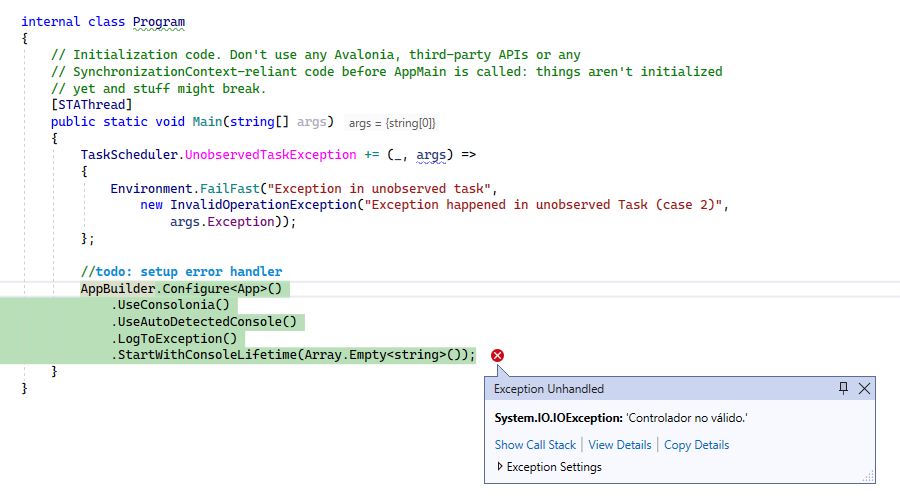
System.IO.IOException: 'Invalid controller.'
Stack Trace:
at System.ConsolePal.set_CursorVisible(Boolean value) at Consolonia.PlatformSupport.Win32Console..ctor() at Consolonia.PlatformSupport.PlatformSupportExtensions.UseAutoDetectedConsole[TAppBuilder](TAppBuilder builder) at AvaloniaApplication4.Program.Main(String[] args) in E:\Repos\AvaloniaApplication4\AvaloniaApplication4\Program.cs:line 26
Installed Packages
 <ItemGroup>
    <PackageReference Include="Avalonia" Version="0.10.18" />
    <PackageReference Include="Avalonia.Desktop" Version="0.10.18" />
    <!--Condition below is needed to remove Avalonia.Diagnostics package from build output in Release configuration.-->
    <PackageReference Condition="'$(Configuration)' == 'Debug'" Include="Avalonia.Diagnostics" Version="0.10.18" />
    <PackageReference Include="Avalonia.ReactiveUI" Version="0.10.18" />
    <PackageReference Include="Consolonia.PlatformSupport" Version="0.10.18-alpha-134" />
    <PackageReference Include="Consolonia.Themes.TurboVision" Version="0.10.18-alpha-134" />
    <PackageReference Include="XamlNameReferenceGenerator" Version="1.3.4" />
  </ItemGroup>

Thank you for details! May I ask which terminal are you running it in? Default CMD on Windows?

@SuperJMN I probably found the solution. You have to manually change output type from WinExe to Exe at your csproj file.
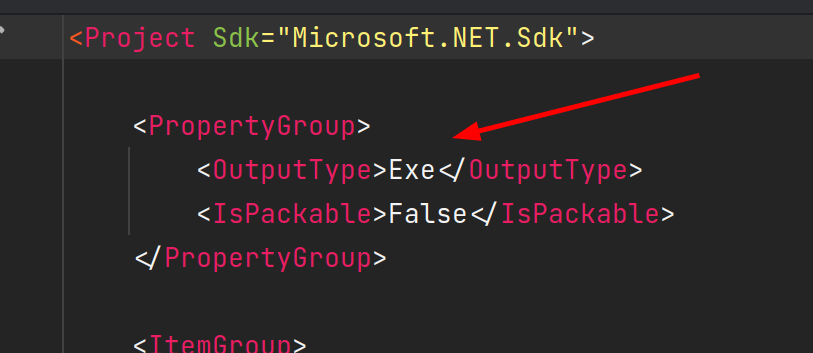
Same error can happen if running in unsupported terminals or output or input are redirected. Some similar issues: https://github.com/Mpdreamz/shellprogressbar/issues/22 https://github.com/dotnet/runtime/issues/28625#issuecomment-460736213
I will close this one, it's just matter to set the output type. We will introduce project template with correct type within this task https://github.com/jinek/Consolonia/issues/11