jimradford
Alt+Tab superputty window randomly does not come to foreground, tabs have no focus when it does
What steps will reproduce the problem?
1. Open superputty with multiple tabs and a horizontal split screen
2. Alt+Tab between windows applications


What is the expected output? What do you see instead?
Randomly superputty window will not come to the foreground, some times it does
but then the focus is not on the tab you were working. Actually there is now
focus at all. Need to click on a tab to start typing.

What version of the product are you using? On what operating system?
1.4.0.1 windows XP 64-bit

Please provide any additional information below.
Original issue reported on code.google.com by [email protected] on 3 Dec 2012 at 12:42

Got the same issue here

Version:
1.4.0.1 on win 7 64-bit
Original comment by [email protected] on 14 Dec 2012 at 2:44
Got the same issue here

Version:
1.4.0.1 on Win 7 64-bit
Original comment by [email protected] on 14 Feb 2013 at 12:53
Got the same issue here

Version:
1.4.0.2 on Win XP 32-bit
Original comment by [email protected] on 28 Feb 2013 at 10:10
yeah, something changed and the hack/hook i'm using it's being picked up.

I also see it taking 2x to switch forward to another app...not sure I can
address that but I might be able to get something going to focus the doc when
sp is alt-tabbed into focus
Original comment by [email protected] on 17 Mar 2013 at 7:28
I see this is listed in 1.4.0.3 changelog but the issue was still there in
1.4.0.3? I have just updated to 1.4.0.4 to see if it is any better. In 1.4.0.3
SuperPutty sometimes "broke" task switching completely in Win7 x64 in addition
to the above problems (losing focus of the tab on task switching or seemingly
randomly, tab switching with ctrl-tab stops working seemingly randomly).
Original comment by vojamo on 3 Jul 2013 at 7:37
I think I am going to move away from SuperPutty. Its very basic to switch
between tabs and between applications while working.
Both of these features are  buggy.

I understand this is a free tool, but please dont give up on bug fixing!
Original comment by [email protected] on 3 Oct 2013 at 8:59
Same here 1.4.0.8 but it is not randomly : When i have several program opened (like a code editor, Word ou Firefox) and SuperPutty with one session, the ALT + TAB is not working as expected . I'm not switched to the other program, but I stay on SuperPurry. I have to ALT TAB twice.
To reproduce :
- open super putty, and open an SSH session
- open cmd.exe
- set focus on cmd.exe, then set focus on Super Putty
- do ONE ALT+TAB : focus is not set on cmd, but leave on super putty (on the session panel)
- do an other ALT TAB : focus is now set on cmd.
I use Windows Seven 64.

Just found this thread by accident. It might be a Windows 10 bug.
Try to disable "Snap Windows" under System > Settings > Multitasking.
https://stackoverflow.com/a/63429362/1066234
Maybe it helps to fix the problem.

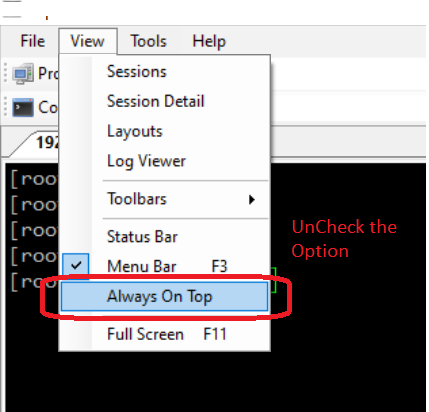
I was facing the same issue. I disable the "Always on Top" option available under the View menu. Then ALT+TAB worked fine.