

 jgraph
Reorder line and column position in table
It is not possible to switch line/column position or do transposition of a table in a text box. It should be a core feature of the core editor.

Does this help a bit for reordering? https://www.diagrams.net/blog/tables "do transposition of a table in a text box." - not sure how this should look like. Please provide an example/screen shot or other

I'm using the Diagram.net with the Diagram.net for Notion extension. I don't see the feature you sent to me. Transposition is just inversing rows and column (columns become rows and rows become colums).
I got the problem, textbox table have almost no features compared to the standalone ones.
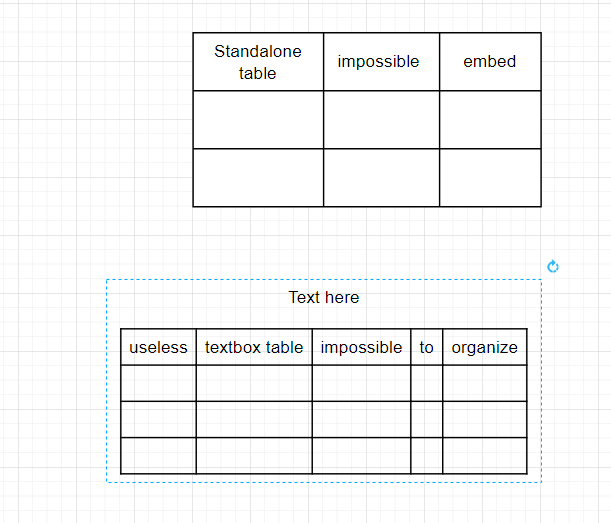
It would be useful to have the same features for both table.
I found a workaround while waiting the feature to be fully supported! There is a web app called TablesGenerator that allow you to edit HTML tables. You can copy/paste your table data from and to Draw.io to edit it in a more user-friendly way.
- Check first that your table has no empty space in the first cell (the top left one) and the last cell (the bottom right one). Insert non-breaking space if necessary (SHIFT+SPACE).
- Select the table (move the cursor diagonally from the first cell to the last cell).
- Paste the data in table generator, edit it as you want.
- Then CHECK DO NOT GENERATE CSS, generate the html code and copy it to the clipboard.
- Now paste it back to Draw.io, paste the code directly in any location without using a textbox. Otherwise you'll just get the raw html text. You can then copy it again to any textbox from there.
This issue has been automatically marked as stale because it has not had recent activity. It will be closed if no further activity occurs. Thank you for your contributions. See the FAQ for more information.
![stale[bot] avatar](https://avatars.githubusercontent.com/in/1724?v=4 "Published by a pub.dev verified publisher")