
drawio
 drawio copied to clipboard
 jgraph
The edges can look totally different even when all properties are identical (some undefined property controls their shape!)
Preflight Checklist
- [x] I agree to follow the Code of Conduct that this project adheres to.
- [x] I have searched the issue tracker for a feature request that matches the one I want to file, without success.
Describe the bug Although I have set all properties identically, I am getting different shapes of edges, as their curve is quite different, as shown below: This messes up the diagram.
Worse, I cannot make them identical by copying the style from one edge and pasting it on the other.
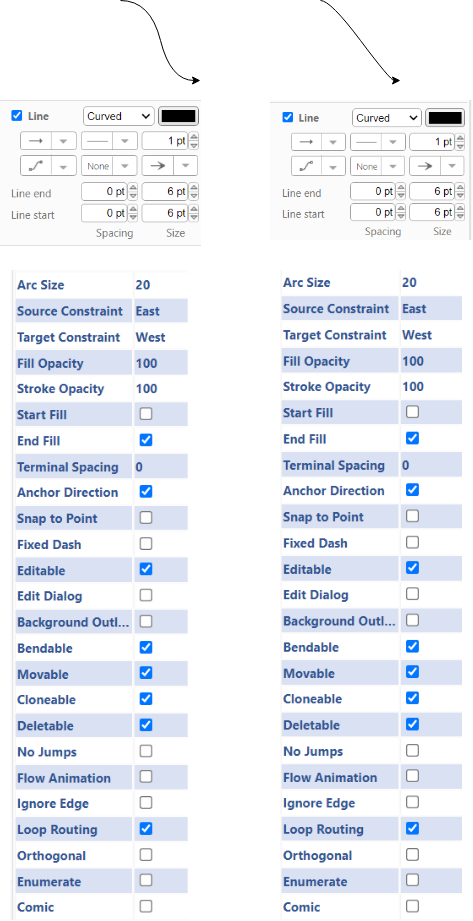
This problem is there in both versions of draw.io: online and desktop.
To Reproduce Steps to reproduce the behavior: I do not know how to reproduce this problem, but I am enclosing a simple file with just two edges. Sample edges with different curvature.zip
Both edges have exactly identical properties, but they have totally different curvature, as if they are two bezier curves having different control vectors.
Expected behavior Edges that have identical properties must look identical.
Screenshots See above
draw.io version (In the Help->About menu of the draw.io editor):
- draw.io version 18.0.6
Desktop (please complete the following information):
- OS: Windows 10 Home 64 bits (applicable to the Desktop version of Draw.io)
- Browser Brave version 1.38.117 (applicable to the online version of Draw.io)
Smartphone (please complete the following information): Not applicable (never tried)
Additional context This problem is there in both versions of draw.io: online and desktop.

I can confirm that Copy Style and Paste Style does not seem to work, but using Edit Style you can see that the style is not the same. Copying the style manually from one arrow to the other (using the Edit Style button) works.

Thanks for confirming!
It means that there are two distinct problems here:
- The Properties panel does not reflect the properties correctly.
- The copy style + paste style operation fails to work in this case.
Both need to be rectified.
This issue has been automatically marked as stale because it has not had recent activity. It will be closed if no further activity occurs. Thank you for your contributions. See the FAQ for more information.
![stale[bot] avatar](https://avatars.githubusercontent.com/in/1724?v=4 "Published by a pub.dev verified publisher")