

 jgraph
In mindmaps, the ALT+SHFT+Arrow hotkey works erratically (where "Arrow" means Up and Down key)
Preflight Checklist
- [x] I agree to follow the Code of Conduct that this project adheres to.
- [x] I have searched the issue tracker for a feature request that matches the one I want to file, without success.
Describe the bug In mindmaps, the ALT+SHFT+Arrow hotkey works erratically (where "Arrow" means Up or Down key) (see Additional context at bottom)
To Reproduce Steps to reproduce the behavior:
- Create a mindmap as shown here
- The method to add shapes is shown here
- Accordingly, I selected a node and pressed ALT+SHFT+Arrow.
Instead of creating a node to the right, it created a shape below the present node and connected it from left.
Note that the current node has
Expected behavior even online version of Draw.io also has the same problem.
Screenshots
This is the result of ALT+SHFT+DowntArrow:
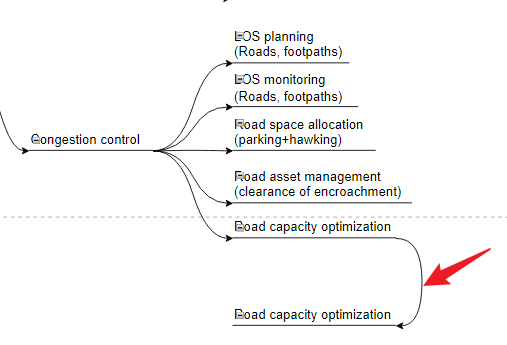 (Instead of creating a node on the right below the other child nodes, it creates a node below the current node, and connects to it from the right.)
This is the result of ALT+SHFT+UpArrow:
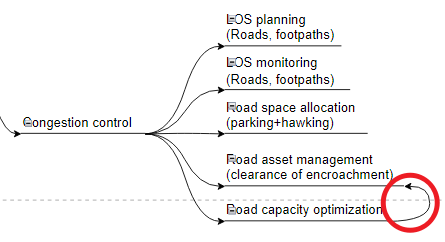 (Instead of creating a peer node above the current node, it creates a edge that connects to an existing node above.)
draw.io version (In the Help->About menu of the draw.io editor):
- draw.io version 18.0.3
Desktop (please complete the following information):
- Windows 10 Home, 64 bits
Additional context
