

 jgraph
Drawio-desktop fails to autoupdate
Preflight Checklist
- [x] I agree to follow the Code of Conduct that this project adheres to.
- [x] I have searched the issue tracker for a feature request that matches the one I want to file, without success.
You must agree to search and the code of conduct. You must fill in this entire template. If you delete part/all or miss parts out your issue will be closed.
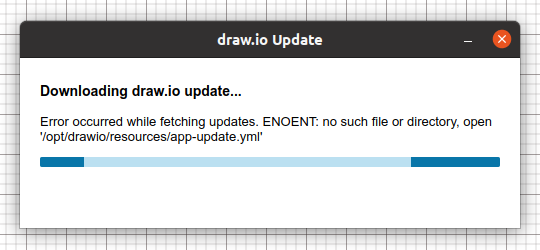
Describe the bug At launch a pop up asked me if I wanted to auto-update the app and clicked yes, then it immediately failed, the progress bar on the message box is on an infinite loop saying :
Downloading draw.io update... Error occurred while fetching updates. ENOENT: no such file or directory, open '/opt/drawio/resources/app-update.yml'
To Reproduce Steps to reproduce the behavior:
- Go to 'Help' menu and click on 'Check for updates'. 1bis. Or alternatively I can relaunch the app and the automatic check for updates launch the auto-update popup messagebox.
- Click on 'Yes' when the message box says that a new version is available and asks "would you like to download and install new version?"
- See error
Expected behavior Auto-update and install process of new version effectively works.
Screenshots
draw.io version (In the Help->About menu of the draw.io editor):
- draw.io version 16.5.1 installed from the deb package
Desktop (please complete the following information):
- OS: Ubuntu 20.04.4 LTS 64 bits
Additional context My /opt/drawio/resources only contains one file : /opt/drawio/resources/app.asar
Here is the log I get when I launch the app from the console:
~$ drawio 11:36:44.614 › Checking for update 11:36:45.016 › Found version 17.2.1 (url: drawio-x86_64-17.2.1.AppImage) 11:36:45.016 › @update-available@ { version: '17.2.1', files: [ { url: 'drawio-x86_64-17.2.1.AppImage', sha512: 'cv9NQ5OIRnfBKkPLK8LQlJKpACamd95EDJA5QKlNATAA9NM8Y54klh49WijKV65YrJIYT17BabQ7YPPbuTJnFw==', size: 132579939, blockMapSize: 139895 } ], path: 'drawio-x86_64-17.2.1.AppImage', sha512: 'cv9NQ5OIRnfBKkPLK8LQlJKpACamd95EDJA5QKlNATAA9NM8Y54klh49WijKV65YrJIYT17BabQ7YPPbuTJnFw==', releaseDate: '2022-03-24T11:14:54.951Z', releaseName: '17.2.1', releaseNotes: '
Releases Notes for 17.2.1
\n' + 'Windows Installer
\n' + '
\n' + 'Windows No Installer
\n' + 'macOS - Universal
\n' + 'Linux - deb, snap, AppImage or rpm
\n' + 'Google Chrome OSWindows intel x32 releases are marked -ia32-
\n' + 'ChangeLog:
\n' + '\n' + '
' } null 11:36:56.196 › Downloading update from drawio-x86_64-17.2.1.AppImage 11:36:56.207 › Error: Error: ENOENT: no such file or directory, open '/opt/drawio/resources/app-update.yml' 11:36:56.208 › @error@ Error: ENOENT: no such file or directory, open '/opt/drawio/resources/app-update.yml' (node:21943) UnhandledPromiseRejectionWarning: Error: ENOENT: no such file or directory, open '/opt/drawio/resources/app-update.yml' (Use- Adds defensive code to try to deal with case of machine suddenly powering off and corrupting the saved file.
\n' + '- Updates to draw.io core 17.2.1. All changes from 16.5.2 to 17.2.1, inclusive, are added in this build.
\n' + 'drawio --trace-warnings ...to show where the warning was created) (node:21943) UnhandledPromiseRejectionWarning: Unhandled promise rejection. This error originated either by throwing inside of an async function without a catch block, or by rejecting a promise which was not handled with .catch(). To terminate the node process on unhandled promise rejection, use the CLI flag--unhandled-rejections=strict(see https://nodejs.org/api/cli.html#cli_unhandled_rejections_mode). (rejection id: 1)
...and the drawio --trace-warnings console flag does the exact same log.
I also tried to launch it with sudo with no result :
~$ sudo drawio [sudo] Password for Robou : [0325/175853.005745:FATAL:electron_main_delegate.cc(290)] Running as root without --no-sandbox is not supported. See https://crbug.com/638180. Trappe pour point d'arrêt et de trace


Still happening with latest?
I just tried again with my same 16.5.1 version and it is still the same error message.
I also tried lauching drawio with SUDO and here is the answer:
[0609/105740.329164:FATAL:electron_main_delegate.cc(290)] Running as root without --no-sandbox is not supported. See https://crbug.com/638180.
I don't want you to try with 16.5.1, I want you to try the latest version...
I installed the v19.0.2 .deb version over my 16.5.1.
Not exactly the same behavior : when I click on Check for Updates, nothing happens. Console doesn't prompt anything except APPIMAGE env is not defined, current application is not an AppImage.
I uninstalled and installed again the 19.0.2.deb and nothing more happened.
But I tried with the 19.0.2.AppImage and it is working correctly : at first launch it automatically prompted the "new version available" popup, and the autoupdate to 19.0.3 worked correctly.
This issue has been automatically marked as stale because it has not had recent activity. It will be closed if no further activity occurs. Thank you for your contributions. See the FAQ for more information.
![stale[bot] avatar](https://avatars.githubusercontent.com/in/1724?v=4 "Published by a pub.dev verified publisher")