

 jgraph
Indentations disappear when pasting text
Preflight Checklist
- [ x ] I agree to follow the Code of Conduct that this project adheres to.
- [ x ] I have searched the issue tracker for a feature request that matches the one I want to file, without success.
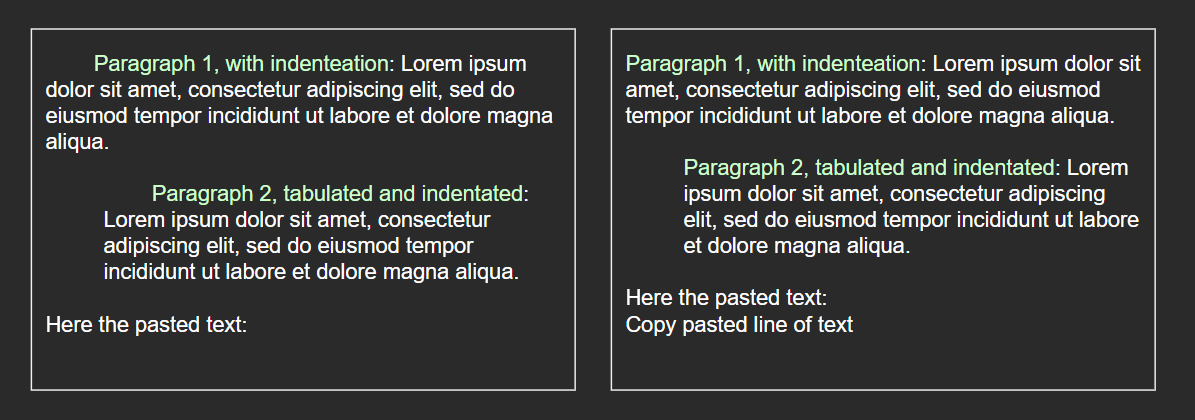
Describe the bug When pasting text into a shape any indentation at the start of any paragraph within the same shape disappears. This does not happen when you tabulate the whole paragraph, unless is a 1 line paragraph or it has indentation as well.
To Reproduce Steps to reproduce the behavior:
- Go to shapes and create a rectangle (bug appears on every shape I've tested).
- Write a paragraph and add an indentation at the beginning of the first line.
- Copy a word (or any amount of characters) and paste it anywhere inside the same shape.
- Indentation disappears and has to be entered manually again.
Expected behavior Tabulations already at the beginning of paragraphs (indentations) are expected to persist regardless any addition of text by copy-pasting, specially if the text was added in a different line of text in the shape.
Screenshots
draw.io version
- draw.io version 15.8.4 (experienced this problem in every version I've tested)
Desktop
- OS: W10
Additional context While taking the screenshots for this bug I encountered a second bug that so far I don't know how to replicate: (In the future I plan to post about that bug too, as soon as I know how to replicate it.) Notice I was trying to create a line with the following text "Here the pasted text: Copy pasted line of text" but couldn't put both phrases in the same line. Putting the text cursor in the beginning of the added line and pressing backspace results in the last character of the previous line to be deleted without merging the lines.

Hi, any updates on this issue? I got the same issue at MacOS with all versions I have upgraded :(


This issue has been automatically marked as stale because it has not had recent activity. It will be closed if no further activity occurs. Thank you for your contributions. See the FAQ for more information.
![stale[bot] avatar](https://avatars.githubusercontent.com/in/1724?v=4 "Published by a pub.dev verified publisher")
In case anyone wanted to do this for pasting source code to visualize in drawio, here is a workaround:
- replace all " " spaces in your code with another inivisible char:
- E.g.:
U+2007 Figure Space   " "
- E.g.:
- Now copy and paste, these characters are preserved
