

 jgraph
Issue with text spacing and alignment.
Preflight Checklist
- [x] I agree to follow the Code of Conduct that this project adheres to.
- [x] I have searched the issue tracker for a feature request that matches the one I want to file, without success.
Describe the bug When aligning text to top, the spacing affects it differently than when aligning text to bottom.
To Reproduce Steps to reproduce the behavior:
- Create two text boxes
- Select one text box and align to bottom
- Select the other text box and align to top
- Notice the difference in spacing
Expected behavior The spacing between the top of the text and the top of the text box that was aligned to the top should be the same as the spacing between the bottom of the text and the bottom of the text box that was aligned to the bottom.
Screenshots

draw.io version (In the Help->About menu of the draw.io editor):
- diagrams.net 14.4.3
Desktop (please complete the following information):
- OS: Microsoft Windows 10 Version 2004 (OS Build 19041.804)
Additional context Add any other context about the problem here.

Hi,
so you experimented with Spacing in Text tab when text box is selected. Could you copy/paste code for both text boxes please? Select one and click Ctrl+e and do the same for the 2nd box.
Thanks,

This is the code for the 1st text box:
text;html=1;strokeColor=none;fillColor=none;align=center;verticalAlign=middle;whiteSpace=wrap;rounded=0;
This is the code for the 2nd text box:
text;html=1;strokeColor=none;fillColor=none;align=center;verticalAlign=middle;whiteSpace=wrap;rounded=0;
The issue is still present when I remove all code from the text boxes as well.
Are you not seeing this issue when you try to replicate it yourself?
The label used to test with should include the highest ascending character in that font family.

New test with all characters
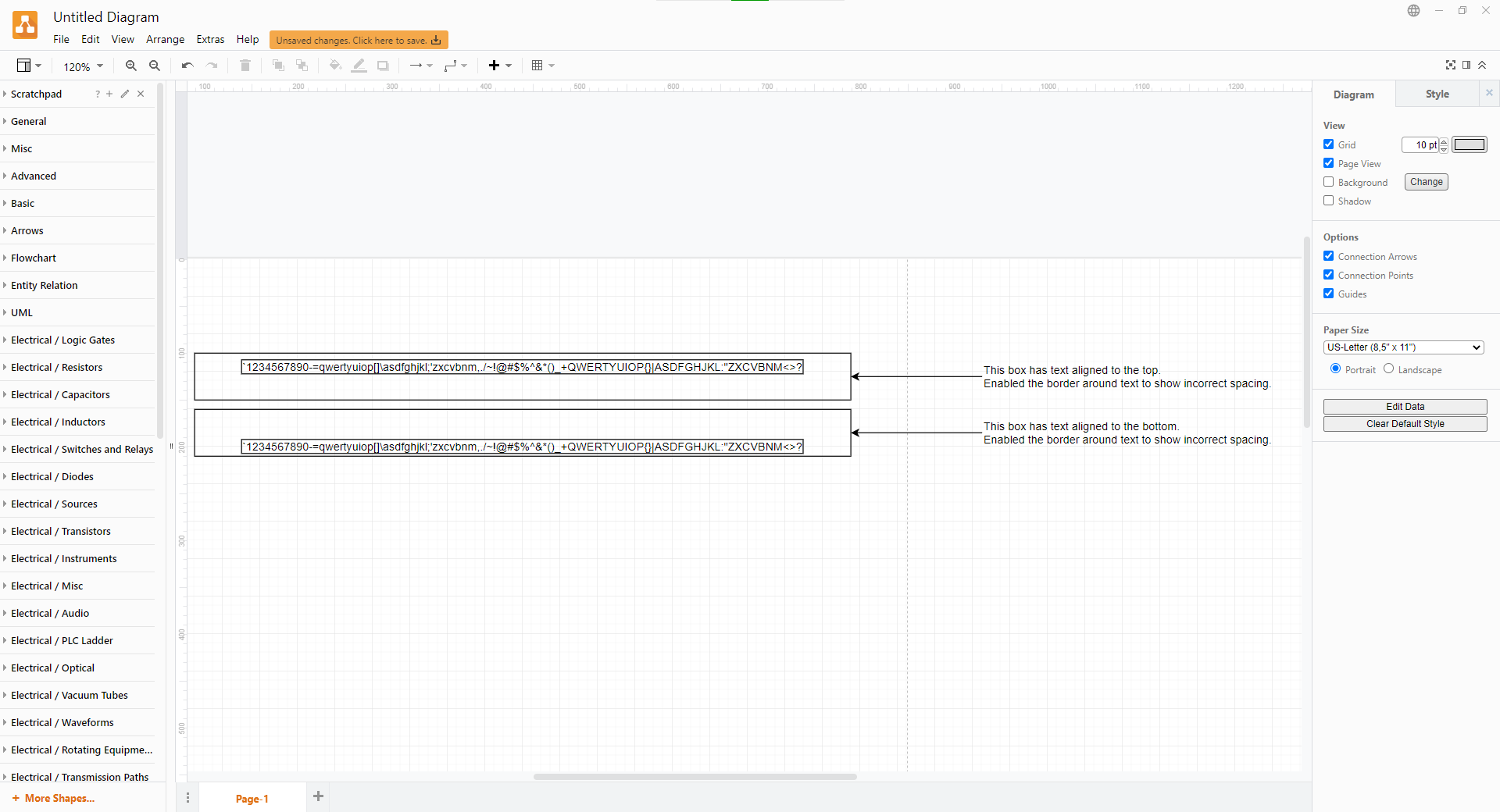
This is the style window of the top aligned text box

This is the style window of the bottom aligned text box

This issue has been automatically marked as stale because it has not had recent activity. It will be closed if no further activity occurs. Thank you for your contributions. See the FAQ for more information.
![stale[bot] avatar](https://avatars.githubusercontent.com/in/1724?v=4 "Published by a pub.dev verified publisher")