

 jgraph
drawio snap cannot access removable media
I have tried to plugin the removable media through snap connect option but it was not working.

Hi,
What exact steps did you perform? What desktop app version are you using (can be seen under Help)?
Regards,

The permission to removable-media is not present in draw.io which would not allow users if they want to modify or store files in other than /home/user directory.
For example, please look at the snap permission of vlc
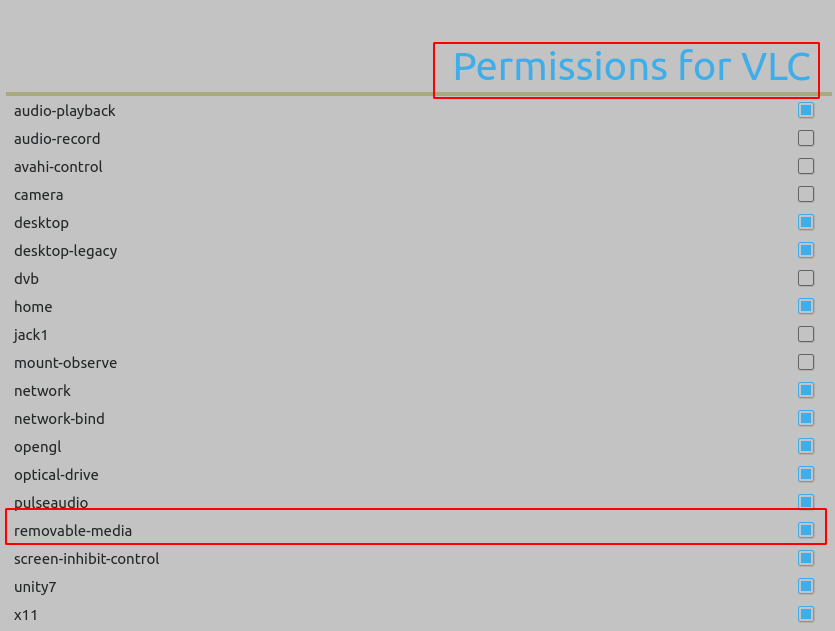
Compare to drawio, its missing, therefore, we can not access any files from USB pendrive or harddrive because drawio snap app does not have access to /media

You can have a look on the official snapcraft page
https://snapcraft.io/docs/removable-media-interface
https://askubuntu.com/questions/1034030/how-to-get-access-to-usb-storage-from-the-application-installed-as-snap
@karimmd Should we do anything from our side to fix this, or there will be a release to add the permissions?.

@karimmd Should we do anything from our side to fix this, or there will be a release to add the permissions?.
I have switched to deb package of draw.io
I've installed drawio with the --devmode option and I now have access to removable-media
sudo snap install drawio --devmode

I've installed drawio with the --devmode option and I now have access to removable-media
sudo snap install drawio --devmode
Let me try that. Thanks for your feedback.
Another workaround is to create a symlink in your home directory to the data you need to access.
Another workaround is to create a
symlinkin your home directory to the data you need to access.
Did you try this? I ask because I have the same issue. ~/Downloads -> /media/LinExt/Downloads/ symlinked on my laptop. And it is impossible to start draw.io, even for the first time.
I've installed drawio with the --devmode option and I now have access to removable-media
It sounds too straight design. devmode turn off any Snap restriction. Allow access to removable media != allow full access.
Looks like Removable-media interface could be added by developers, as mentioned there https://snapcraft.io/docs/snapcraft-interfaces


Using Snap Try I've changed the snap.yaml to add removable-media and it works as expected. But doing this every time there is a new release is cumbersome.
After digging around, I've found, probably, it is only need to add
"snap": {
  "plugs": [
    "default",
    "removable-media"
  ]
}
to electron-builder-snap.json in order to electron build the snap with removable-media interface enabled, as other projects already do it.
I hope this information helps fast forward the fix of this issue.

I've installed drawio with the --devmode option and I now have access to removable-media
sudo snap install drawio --devmode
It worked for me! Thank you

Running snap connect drawio:removable-media solved the problem for me.

We've added the suggested build config. I don't see any other suggestions in the thread, so I will close with the workaround being to run snap connect drawio:removable-media if you can't get it working another way.
