

 jgraph
Application name missing in Confirm Update dialog
Preflight Checklist
- [x] I agree to follow the Code of Conduct that this project adheres to.
- [x] I have searched the issue tracker for a feature request that matches the one I want to file, without success.
The issue and how to reproduce
When I started the application on Windows 10 by clicking the draw.io icon in the start menu, the following dialog appeared:
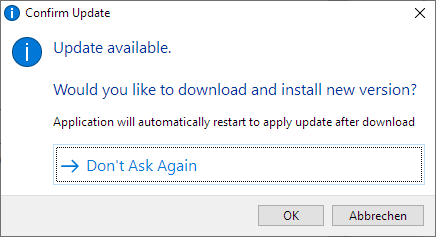
The confirmation dialog is too general: The prompt does not name the application that is to be updated. The problem with this is that users are justifiably unsure if the reference between the query and the application startup that is currently running is not obvious (this can easily happen on slower systems, e.g., right after Windows boots).
Expected behavior
Include the application name at least once in the confirmation dialog.
For example, the sentence Update for draw.io available. instead of the general Update available. would already suffice.
Versions specification
- draw.io version: 20.8.10
- OS: Windows 10 Pro Version 22H2
(draw.io version after the update: 20.8.16)

This issue has been automatically marked as stale because it has not had recent activity. It will be closed if no further activity occurs. Thank you for your contributions. See the FAQ for more information.
![github-actions[bot] avatar](https://avatars.githubusercontent.com/in/15368?v=4 "Published by a pub.dev verified publisher")
It's unclear to me why this can not be fixed easily. So I changed the summary to be easier to decode. Hope that helps, thanks in advance for considering a quick fix.
This issue has been automatically marked as stale because it has not had recent activity. It will be closed if no further activity occurs. Thank you for your contributions. See the FAQ for more information.
