

 jestjs
[Bug]: Wrong verbose output with multiple projects
Version
28.1.1
Steps to reproduce
- Clone https://github.com/bboltze/jest-wrong-verbose-output-repro
- Run
npm install - Run
npm run testand watch the numbers for tests in the output while the test is running. - Note the numbers for tests in the output when the tests have finished.
Expected behavior
The numbers for passed / total tests should climb up to 60 while the tests are running.
Actual behavior
While the tests are running, the numbers for passed / total tests climb higher than 60 while there are only 60 tests in the repository.
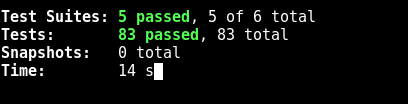
When the tests have finished, the numbers change to the correct ones:

Additional context
The reason this is happening:
(1) Jest is configured to use two projects:
 projects: [
    {
      displayName: 'project-01',
      testEnvironment: 'node',
      testMatch: [`**/test/project-01/**/*.test.js`],
    },
    {
      displayName: 'project-02',
      testEnvironment: 'node',
      testMatch: [`**/test/project-02/**/*.test.js`],
    }
  ],
(2) Since there are two projects, two test runners are created (https://github.com/facebook/jest/blob/main/packages/jest-core/src/TestScheduler.ts#L212). However, since they both have the same config.runner, only one of them is stored in testRunners. Which one is basically random.
This runner is used to run all tests.
(3) Each time a test case finishes, onTestCaseResult(test, testCaseResult) is called with test beeing constructed like this (https://github.com/facebook/jest/blob/main/packages/jest-core/src/TestScheduler.ts#L260):
const test = {
  context,
  path: testPath
};
Here, context is the context associated with the randomly selected test runner, which might be different from the actual context of the test.
(4) This eventually calls Status.addTestCaseResult which adds the test to this._currentTestCases (https://github.com/facebook/jest/blob/main/packages/jest-reporters/src/Status.ts#L120).
So all tests end up in this._currentTestCases with the same context.
(5) When a test finishes, Status.testFinished is called which tries to remove all test cases in the test from this._currentTestCases like this (https://github.com/facebook/jest/blob/main/packages/jest-reporters/src/Status.ts#L145):
this._currentTestCases = this._currentTestCases.filter(({test}) => {
  if (_config !== test.context.config) {
    return true;
  }
  return test.path !== testFilePath;
});
Since all the test cases have been added with the same context, the first check will always succeed for tests from the project that was not randomly selected when creating the test runner.
These test cases will never be removed from this._currentTestCases, even after their test suite has finished.
(6) Since the test cases in this._currentTestCases are added to the numbers shown while the tests are running (https://github.com/facebook/jest/blob/main/packages/jest-reporters/src/getSummary.ts#L127), these numbers will be wrong. They will include test cases from suites that have passed and that are from the project that was not selected when creating the test runner twice.
Environment
System:
    OS: Linux 5.10 Gentoo/Linux
    CPU: (8) x64 Intel(R) Core(TM) i7-7820HQ CPU @ 2.90GHz
  Binaries:
    Node: 14.17.0 - ~/.nvm/versions/node/v14.17.0/bin/node
    Yarn: 1.22.10 - ~/.nvm/versions/node/v14.17.0/bin/yarn
    npm: 6.14.13 - ~/.nvm/versions/node/v14.17.0/bin/npm
  npmPackages:
    jest: ^28.1.1 => 28.1.1

This issue is stale because it has been open 30 days with no activity. Remove stale label or comment or this will be closed in 30 days.
![github-actions[bot] avatar](https://avatars.githubusercontent.com/in/15368?v=4 "Published by a pub.dev verified publisher")

This issue is stale because it has been open 30 days with no activity. Remove stale label or comment or this will be closed in 30 days.
This issue was closed because it has been stalled for 30 days with no activity. Please open a new issue if the issue is still relevant, linking to this one.
This issue was closed because it has been stalled for 30 days with no activity. Please open a new issue if the issue is still relevant, linking to this one.
This issue has been automatically locked since there has not been any recent activity after it was closed. Please open a new issue for related bugs. Please note this issue tracker is not a help forum. We recommend using StackOverflow or our discord channel for questions.