

 jesseduffield
Non-colored diff in default "unstanged changes" view.
When I move through the files in the Files view their diffs appear in the pane on the right -- but the diffs are not colored. Both the + and - are yellow. When I hit enter on a file to select hunks, the diffs are then in the desired red/green color. Strange... why are the diffs colored only after hitting enter on a file?
Expected behavior Both diff views should have their diffs colored the same way (in my case, I'd like the red/green for removed/added lines).
Desktop (please complete the following information):
- OS: Linux Mint 20
- Lazygit Version: 0.23.2

When you hit enter on a file, we switch from showing whatever the git show command gave lazygit, to showing a diff that we colour ourselves. The reason for this is that it can take a long time to parse large diffs so we only show a slice of what is given to lazygit until you hit enter and commit to staging lines/hunks.
I wonder if lazygit is mistaking the colour scheme of the pty in which it's called to be low-quality. Is this an issue that's only recently appeared on that OS or is this your first time using lazygit?

I've been using lazygit for a couple of months now, and as far as I can remember it's always been that way for me. Can you confirm, what command is used to show the diffs prior to hitting enter? Is it git diff or git show? Note that when I run both git diff and git show in the terminal, I get the red/green colored output, but somehow it is suppressed in lazygit. Let me know if you want screenshots. Are there any settings or configs that I can tweak to try to fix it or do you think this is a lazygit issue?
Also, I tried with both the Gnome terminal emulator as well as the Alacritty terminal emulator but I get the same.
@jesseduffield Could you point me to the place in the code where it displays the unparsed diff (i.e., the diff before hitting enter)? I want to try to debug this myself, but I'm finding it a bit hard to find the place in the code where that particular diff is processed before printing out on the screen.
I'm pretty sure pkg/gui/files_panel.go:60 and pkg/commands/files.go:161 are the places you want. Let me know if I'm wrong about that!
Yes you are right about that; I spent some time looking there and manually setting all of the colorArgs to always, but that didn't seem to help. I traced it to where it runs the pty command (in gui/pty.go in the newPtyTask command), but I'm not familiar enough wtih the GUI framework your using to understand how it gets from that command invocation onto the screen, there appears to be some hidden magic somewhere.
By the way, here is a screenshot of what I am seeing:

As you can see, there actually is some color there (the added/removed lines are a different color from the other lines) but they are not red and green. When I run git diff at the command line though I do get the red and green. Any idea what that could be? Thx
hmm interesting. This could be an issue with how the pty package runs on your os. If you look in the vendor directory there are a few different implementations:
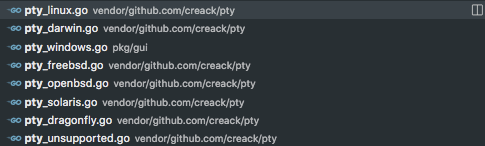
Or perhaps it's a matter of the right TERM env var being passed along with the git diff command: the command might be returning a simplified colour scheme based on that env var
I am running on Linux (I've tested on various Debian/Linux based distros; nothing out of the ordinary), and verified that it is using the pty_linux.go module. I also changed the git diff command to an echo command that just echos a file that contains colored text, to eliminate the possibility of any problems with git itself. My TERM variable is set to xterm-256color; I tried setting it to some other values and/or unsetting it in the command by prefixing the git diff command with env TERM=... git dif ... but to no avail. At this point I'm not sure where else to look, so I raised an issue in the pty repo (creack/pty/issues/112) to see if that maintainer has any idea.
Any additional info that you could add to the pty issue above that I created that could help the maintainer help us would be appreciated!
ugh... finally found the cause of this. It is due to the following section in my ~/.gitconfig file:
[color "diff"]
    meta         = "#bdae93"
    frag         = "#d3869b"
    old          = "#af3a03"
    new          = "#b8bb26"
    func         = "#f9f5d7"
    context      = "#928374"
When I comment out that section, lazygit displays the expected colors. I suppose I can just remove this now that I only use lazygit to view diffs, but out of curiosity, is there any way that we can make lazygit work with those colors?
@jesseduffield Curious if this is now better understood? I have an interesting discrepancy in colours when switching between the preview of the diff (e.g. moving around files in the "Files" section), which seems to just be the pure output of git diff and is colorised as I would expect, and the colours when I step into "Unstaged changes", which revert back to the default git ones (brighter greens and reds in my case).
How exactly is the interactive staging diff created? And is it possible to control the colours used there?

How exactly is the interactive staging diff created? And is it possible to control the colours used there?
The colors are hard-coded to green and red. It would be possible to add entries for these to our theme config, or even take the colors configured for git (I'd prefer the latter, I think).
If you see a discrepancy from the normal diff, this would be either because you are using a custom pager that has its own idea how to color the diff, or you have a custom config for git like @no-more-secrets showed above.

Indeed I do have a custom configuration for git diff, I was just hoping this could be used everywhere instead of just the non interactive view. Would be great to make the styles you linked to above configurable, but I have to admit I am not familiar enough with Go to be able to do this quickly...
I can look into this when I find some time next week, shouldn't be too hard.
Any update on this? Love the theming ability/integration with delta and would love the interactive staging colors to match the delta theme. Many thanks in advance!

I briefly looked into using git's colors for our staging view a while ago, and found that it would be a lot more work than I had thought, because git supports a pretty complex set of values (see https://git-scm.com/docs/git-config#Documentation/git-config.txt-color). We might decide to only support the most important subset of this syntax, e.g. only color names and hex values, but it still doesn't totally fit our own use of colors. I'm not interested in working on this myself, but if anybody else wants to, go ahead.
An alternative would be to add colors to our theme config, which you could then set to match your git config. That would be more work for the user, but probably much easier for us. I'm not interested in working on this either, though; I'd much rather spend my time on actual functionality improvements rather than cosmetics.
