
optidef
 optidef copied to clipboard
 jeslago
Personalized environments
To whomever could be interested.
I find optidef library extremely useful, nevertheless, I think a little more flexibility could help a lot the users.
I have recently come to this conclusion since I have the need to describe an optimization problem which is lexicographic too.
As an example, rather than write
min f(x)
s.t. g(x) <= 0
I need
lex min f_1(x), f_2(x), f_3(x)
s.t. g(x) <= 0
where "lex" stands for "lexicographic".
Even though the use of multiple function is already supported by the library, the same is not true for the lexicographic optimization.
Indeed, as far as I know, the only types of optimization supported by optidef are "min", "max", "argmin", "argmax".
From here the question: could be useful to give the user the possibility to declare personalized/customized environments? Of course, for me the answer is yes.
For instance, a possible name for the environment I need could be "minl" or "lmin", which would be used as
\begin{lmin}|s|
{}{f_1(x), f_2(x), f_3(x)}{}{}
\addConstraint{g(x)}{\le 0}{}
\end{lmin}
while the long format could print out either "lexicographic minimize" or "lex minimize".
Is there anyone who agree with my consideration on the usefulness of personalized environment?
(congrats for the quality of the library)

I second this: I would find a similar use for feasibility problems, i.e. find x subject to Ax=b

I have implemented this functionality using three environment customopti, customopti*, customopti!. The syntax remains the same but the new environments requires 5 mandatory parameters instead of 4. The first mandatory parameter is now the problem name, e.g.\ find. The syntax is as follows:
\begin{customopti}
	{Problem name}{variables}{cost function}{label}{result}
	\addConstraint{.....}{....}{....}
	\addConstraint{.....}{....}{....}
\end{customopti}
What do you think of the names? Can you think of anything better than customopti?
I have to change quite a lot of code to add this functionality, so I will not make it official until it has been tested enough. Would it be possible for any of you to try the new version of the library in different problems (both using the standard environments like mini/mini! and the new ones? I want to make sure the library aligns all problems as expected.
MWE
\documentclass{article}

\usepackage[nocomma]{optidef}

\begin{document}

\begin{customopti!}
	{Find}{x,y}{f(x,y)}{}{}
	\addConstraint{g(x,y)}{=0}{}
	\addConstraint{h(x,y)}{\leq0}{}
\end{customopti!}

\begin{customopti}|l|[2]<b>
{lex~min}{x,y}{f(x,y)}{}{}
	\addConstraint{g(x,y)}{=0}{}
	\addConstraint{h(x,y)}{\leq0}{}
\end{customopti}

\end{document}

I'll put testing this on my list. I'll have to interleave doing this with writing optimization papers :)
Actually, I copied and pasted the code you typed but it does not recognize the environments, neither customopti! nor customopti. Where am I wrong?
About the environment name, opti could be a fine solution too, leaving the "customized", i.e., "general purpose" aspect implicit. I am aware that someone could think that it refers to an environment like
opt f(x)
s.t. g(x) <= 0
in the short form and
optimize f(x)
subject to g(x) <= 0
in the long one. However, I don't see too many problems with that.
Did you download the optidef.sty file from the repository and added it to the root directory where you document is?
Hi!
I work on overleaf and there is no need to put your library in the root is it is kind of default package, I mean you can included it straightforwardly by \usepackage{} command.
In fact, I tried the following approaches:
- to copy and past your code as is
- to download optidef.sty from CTAN and add it to the root folder
- to rename the package as newoptidef.sty and the inclusion as well, i.e.,
\usepackage{newoptidef.sty}
In all the three cases the error was "Environment not defined". I also searched for the word "customopti" in the .sty file, but I didn't find any match. Probably, I am using the wrong version of the package.
The problem is that the updated package is not on CTAN. I will only update the package in CTAN (and the documentation) once I am sure this new feature works as expected.
So the only place where the package has been updated is in github. That means that the default package in Overleaf is the old version. What you can do is download optidef.sty from github, and then add it to the root folder of your overleaf project. That should solve the issue.
Hi! Finally I did it.
I tested the package with elsarticle.cls (from elsevier), svjour.cls (from optimization letters) and amcs.cls (from applied mathematics and computer science). I am happy to say that everything went fine.
At the moment, I guess we may think to close the issue.
Hi! It is great to read about this new feature! Similar to this, I am facing worst-case optimization problems, such as
min   max     f(a,b)
 a     b
where the objective function depends on two variables and each variable is used with a different optimization function (min and max). Can I typeset such problems with optidef?
Many Thanks!

@fdmnl Good point! I think we cannot separately specify the variables yet. Such a feature is reasonable and absolutely useful. I am afraid it could need a lot of re-designing to be implemented.
To implement such a feature it is not that easy, but it could be done I guess.
An easy hack is to use the new customopti enviroment and use the field where you define the optimization problem to add as many custom expressions as you want.
For instance:
\begin{customopti!} {\underset{\displaystyle \mathit{x}}{max}\quad\underset{\displaystyle \mathit{y}}{min}}{}{f(x,y)}{}{} \addConstraint{g(x,y)}{=0}{} \addConstraint{h(x,y)}{\leq0}{} \end{customopti!}
Would display like this:
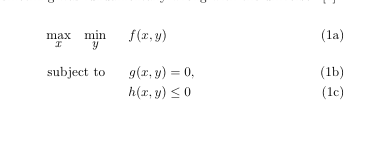
The problem with this hack is that it assumes that the font for math can be replicated with \mathit. If that is not the case with your document, you might need to take care of that.
I have just found out about your package. I really appreciate how you implemente the \addConstraint commands. I will start writing optimization problems soon, and your package was a delightful discovery.
On the other hand, I think there should be options to change key words, in a babel sense. The main concept is always enable change of word when language might be an issue.
Let me show a small contribution below.
MWE -- main file
\documentclass{article}
\usepackage{optidef}

% New word to substitute "subject~to"
%\TxtSubjectTo{restricted~to} %Portuguese: restrito~a
%\TxtSubjectTo{}
\TxtSubjectTo{Potato}

\begin{document}
\begin{mini}
  {w,b,\xi}{\frac{1}{2}w^{t}w+C\sum_{i=1}^{N}{\xi_{i}}}
  {}{}
  \addConstraint{y_{i}(w\phi(x_{i}+b))+\xi_{i}-1}
  \addConstraint{\xi\geq0}{}
\end{mini}
\end{document}
Change in optidef.sty before "% OBJECTIVE COMMAND DEFINITION" I added
\def\@TxtSubjectTo{subject~to}
\newcommand{\TxtSubjectTo}[1]{%  [subject~to]
  \gdef\@TxtSubjectTo{#1}
}
and replaced every instance of "subject~to" with "@TxtSubjectTo", such as
\newcommand{\bodyobj}[4]{%
	\ifthenelse{\isempty{#4}}{%
		&\underset{\displaystyle #1}{\mathrlap{\mathrm{#3}}\phantom{\mathrm{\@TxtSubjectTo}}} \quad #2\span\span\span\span
	}{%
		#4~ &\underset{\displaystyle #1}{\mathrlap{\mathrm{#3}}\phantom{\mathrm{\@TxtSubjectTo}}} \quad #2\span\span\span\span
	}%
}
The same could be applied to other words such as "minimize" and "maximize" in a more polished final implementation.
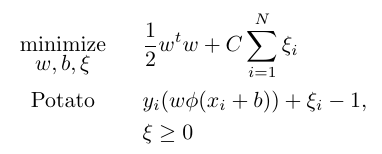
The solution I implemented derives from commands such as "\author" and "\title" explaned in this link.
Another possible and interesting solution is to apply the kvoptions using keys to insert the local words.
Please, let me when futures updates have been released.

@fhz_br
-
At the moment the functionality that you request can be accomplish with
customoptiright? This is just a more automated way for language support, correct? -
You can add a new issue for this. To be honest, the time that I have left to work on the toolbox is very limited, but if it is the backlog I can pick it whenever I have some time.
Hi @jeslago,
- you request can be accomplish with
customoptiright?
Note exactly. customopti enables the change of the "minimize" string, but not the "subject to" string. You wrote "subject~to" in each place where it should be written instead of creating a variable with its contents. This variable could be replaced to any other word, which suits better for other languages.
2. You can add a new issue for this
Ok, I will add this as a new issue. By the way, would you like a copy of the version I changed myself? I'm sure how to send it or even if the quick solution I came up is satisfactory.