

 jens-maus
Problem with HA Supervisor 2022.08.03
Describe the issue you are experiencing
22-08-10 21:02:04 WARNING (MainThread) [supervisor.addons.addon] Watchdog found addon RaspberryMatic CCU is unhealthy, restarting...
After some minutes since supervisor update, looping restart of raspimatic addon.
Describe the behavior you expected
No restart.
Steps to reproduce the issue
...
What is the version this bug report is based on?
3.65.6.20220723
Which base platform are you running?
ha-addon (HomeAssistant Add-on)
Which HomeMatic/homematicIP radio module are you using?
n/a
Anything in the logs that might be useful for us?
22-08-10 21:02:04 WARNING (MainThread) [supervisor.addons.addon] Watchdog found addon RaspberryMatic CCU is unhealthy, restarting...
Additional information
No raspimatic update, just a supervisor update from 2022.07.xx to 2022.08.03.

It seems the HA developers have enabled their docker environment to respect docker-based health checks starting with supervisor 2022.07.1 (see https://github.com/home-assistant/supervisor/pull/3725). And as the RaspberryMatic docker container in fact comes with a health check definition which seems to become unhealthy HA is immediately restarting the RaspberryMatic docker container.
Thus, we need to identify the root cause why the health check does not seem to work in case of HomeAssistant and correct that for the next release.

Same problem here with HA Supervisor 2022.08.03. Contant reboots and error messages about missing devices. It seems that it cannot find any HM-RF devices.

BTW: see here for the Docker healthcheck statement which seem to return false for some reason:
https://github.com/jens-maus/RaspberryMatic/blob/64e4ae409e635aaa5e81e52a314c0e69da977c1c/buildroot-external/board/oci/Dockerfile#L21-L22
Thus, as can be seen the healthcheck is fully based on asking monit if all enabled services are correctly started and if not the healthcheck is returning false and HA seems to restart the docker container then.
Can someone (@ProfDrYoMan or @Baxxy13) please try to reproduce if this issue even happens in a clean RaspberryMatic CCU add-on installation within HomeAssistant?
I may be able to test that later today. Strangely, I had left the add-in shutdown overnight and I started it up about an hour ago. It started fine and detected all HM-RF along with HM-IP devices. It's still running and I'll keep an eye on it. The problem started immediately after updating the supervisor yesterday, as I got an alert from HA that it had lost the connection to RaspberryMatic. The RM dashboard was giving alerts that some devices were missing (all the HM-RF devices) so I guess that was the reason that the healthcheck was failing? I'm using the HB-RF-ETH board with firmware 1.3 and the RPI-RF-MOD module.
It’s not an issue on the Raspimatic side.
Disable the watchdog on the addon page of Raspimatic in HA and it just keeps working.
I thought I had done that last night and it made no difference, but I could be wrong as it was late. It's still working now, but that doesn't explain why it could not find my HM-RF devices. I don't have many, so perhaps I should just get rid of them given their age.
My one and only old HM-RF device is working and updating sensor data.
That
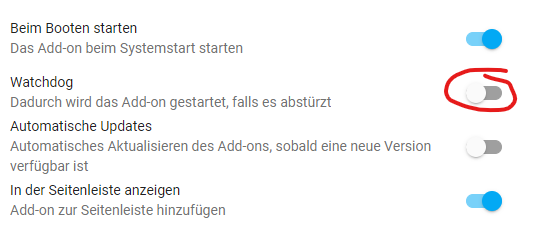 helped me for now, although it should not be a permanent fix.
Log output of the add-on: Mounting /data as /usr/local (Home Assistant Add-On): OK Identifying host system: oci, OK Initializing RTC Clock: onboard, OK Running sysctl: OK Checking for Factory Reset: not required Checking for Backup Restore: not required Initializing System: OK Starting logging: OK Init onboard LEDs: init, OK Starting irqbalance: OK Starting iptables: OK Starting network: eth0: link up, fixed, firewall, inet up, 172.30.33.0, OK Identifying Homematic RF-Hardware: ....HmRF: HM-MOD-RPI-PCB/HB-RF-USB@usb-0000:00:1d.0-2, HmIP: HM-MOD-RPI-PCB/HB-RF-USB@usb-0000:00:1d.0-2, OK Updating Homematic RF-Hardware: HM-MOD-RPI-PCB: 2.8.6, not necessary, OK Starting hs485dLoader: disabled Starting xinetd: OK Starting eq3configd: OK Starting lighttpd: OK Starting ser2net: disabled Starting ssdpd: OK Starting sshd: OK Starting ha-proxy: OK Starting NUT services: disabled Initializing Third-Party Addons: OK Starting LGWFirmwareUpdate: ...OK Setting LAN Gateway keys: OK Starting hs485d: disabled Starting multimacd: .OK Starting rfd: .OK Starting HMIPServer: .........OK Starting ReGaHss: .OK Starting CloudMatic: OK Starting Third-Party Addons: OK Starting crond: OK Setup onboard LEDs: booted, OK Finished Boot: 3.65.6.20220723 (raspmatic_oci_amd64)
Yes, that's the same as what I am now seeing. I wasn't aware that Supervisor updates are applied automatically, and yesterdays 2022.08.03 was an update from 2022.07.0. See here for more info: https://community.home-assistant.io/t/latest-supervisor-version/448727
So my HM-RF problems may be a separate issue, I will try anoter reboot later today.
I had the same problem. After supervisor update to 2022.08.03 always connection aborts. Raspberrymatic always restarted. Then I deactivated the watchdog. The system did not restart anymore. Since a few hours I have enabled the watchdog again and the system runs stable again.
My system is running on a PI 4 with HmIP-RFUSB

Good to read that disabling the HA watchdog seems to workaround this new issue. However, some investigation seems to be necessary why monit seems to come into a state that it reports false to the monit report down command returns != 0 meaning that some service is down, thus HA decides to restart the container.
I actually cannot reproduce this problem in my 3 Testsystems. 2x Homeassistant-OS as VM on Proxmox 1x Homeassistant-OS on Pi4B
All with RaspberryMatic AddOn (but only actual Nightly's on the VM's and latest stable + nightly on Pi4B). All Systems:
Home Assistant 2022.8.2
Supervisor 2022.08.3
Operating System 8.4
Frontend 20220802.0 - latest
Are you sure the problem depends on "Supervisor 2022.08.3" or maybe "Homeassistant Core 2022.8.3" which i havn't installed yet?

Update for Core 2022.08.03 was installed on my side one day before Supervisor 2022.08.03. The issue started after the supervisor restarted all the dockers. There was also an issue with MariaDB for recorder that needed a restart, but worked flawless afterwards. Raspimatic got restarted all 3 to 5 min.
I also restarted the complete Proxmox with full power down. Did not help.
Hmm, i've updated The Pi4B...
Home Assistant 2022.8.3
Supervisor 2022.08.3
Operating System 8.4
Frontend 20220802.0 - latest
Neither the nightly nor the stable RM-HA-AddOn shows problems with "Watchdog enabled" in the AddOn settings. Restart of the AddOn / HA / Host also shows no problems.
Stopped addon, enabled watchdog, started addon, after 3 min watchdog hit with log message above. Nothing else in any logs that might help.
20220723 Raspimatic 2022.8.3 core 2022.08.3 supervisor 8.4 os 20220802.0 fronted
Proxmox latest on 64 Bit i5 with zfs ssd.
@ProfDrYoMan Please start the addon with watchdog disabled, then login via ssh an execute monit report down. Then report the output of it.
I have the same issue. Disabling watchdog helps.
@jens-maus I tried your command, but I was not quite sure how to access raspberrymatic via ssh. So I went via Terminal Add-on, then docker exec. This is what I get:
➜  ~ docker exec -it 8a6d0d3b5d4d /bin/sh
/ #
/ # whoami                                                                                                                                                        │
root
/ # monit report down                                                                                                                                             │
/etc/monitrc:373: Cannot include file '/usr/local/etc/monit-redmatic.cfg' -- No such file or directory '/usr/local/etc/monit*.cfg'
Not sure not if that is due to the way I get a shell ... if there is more specific advice on how to do this again let me know.

This is already quite fine and seems to show one reason why the watchdog might fail. In your case its because the redmatic uninstall routines did not remove the /usr/local/etc/monit-redmatic.cfg and left a stale link there which monit now complains about. So please remove that soft link with rm and then retry the monit command and also re-enabling the watchdog.
➜  ~ docker exec -it 8a6d0d3b5d4 /bin/sh
/ # monit report down
/etc/monitrc:373: Cannot include file '/usr/local/etc/monit-redmatic.cfg' -- No such file or directory '/usr/local/etc/monit*.cfg'
/ # rm /usr/local/etc/monit-redmatic.cfg
/ # monit report down
0
/ #
I'll re-enable watchdog now and see what happens.
Thanks.
My problem was also caused by /usr/local/etc/monit-redmatic.cfg. Thanks @jens-maus
root@de838cd8-raspberrymatic:~# monit report down
/etc/monitrc:373: Cannot include file '/usr/local/etc/monit-redmatic.cfg' -- No such file or directory '/usr/local/etc/monit*.cfg'
Fun part: My config is ages old and in the very beginning running on some raspi I tried (and abandoned) redmatic.
root@de838cd8-raspberrymatic:/usr/local/etc# ls -la  monit-*.cfg
lrwxrwxrwx    1 root     root            40 Oct 11  2019 monit-redmatic.cfg -> /usr/local/addons/redmatic/etc/monit.cfg
root@de838cd8-raspberrymatic:/usr/local/etc# rm monit-redmatic.cfg
root@de838cd8-raspberrymatic:/usr/local/etc# monit report down
0
Tried with watchdog enabled again. Success.
@jens-maus, you might implement some auto-cleanup for dangling symlinks here.
Feel free to close.
@jens-maus, you might implement some auto-cleanup for dangling symlinks here.
Well, usually this issue should be better solved / rectified in the RedMatic project itself, but as that project seem to have stalled to some extend and I haven't has contact to @hobbyquaker for a long time I will see if I can add a workaround for such a situation somewhere in the RaspberryMatic startup processes...
This issue should now be solved via 34a0fd4fb4a0105915fdd8bd12e263c82d11e542