

 jenkinsci
Cannot select machine image outside of fixed project list
We have a separate GCE project that runs packer to build our GCE machine images. We can configure the GCE Jenkins plugin to use these via init.groovy.d scripting, but the result is that the UI is actively dangerous to use because clicking "Save" after changing anything on the page will cause the machine image URI to be cleared to the empty string. I would very much like the ability to type a free-form GCE project name or even a full GCE machine image URI; failing that, I would like for the Save button to not cause an outage.

If I'm understanding correctly, you would like to have a GCE Image not associated with your current project available for usage (since it sounds like you all have a separate project just for creating images from packer)?

Correct. Per the advice of our Google PSO team, having separate projects is the best way to enforce security boundaries, and we have security boundaries aplenty with our Jenkins setup. We run packer within its own project, and those GCE images live in that project, and we then have multiple Jenkins projects that use those images.
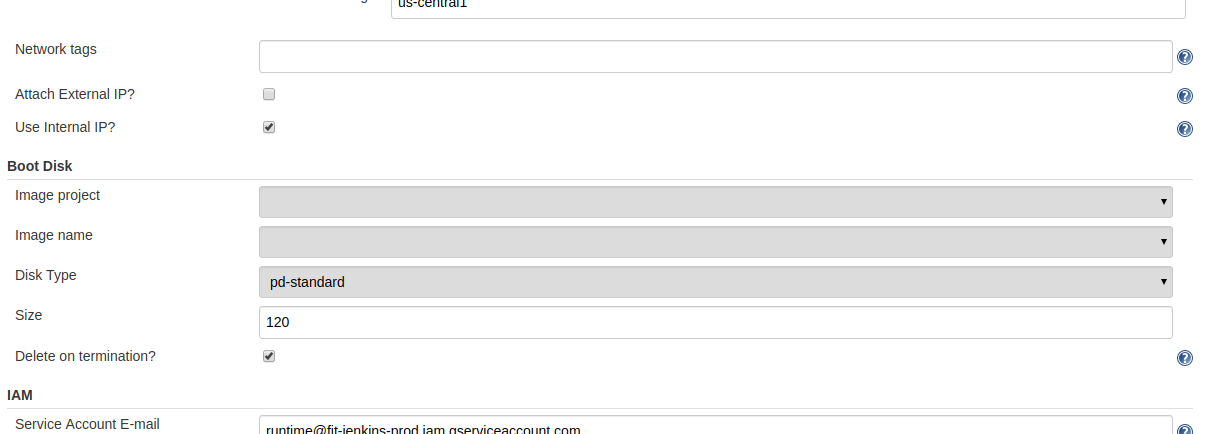
@dkfitbit to clarify, you're referring to the "Image Name" field under the "Boot Disk" section?

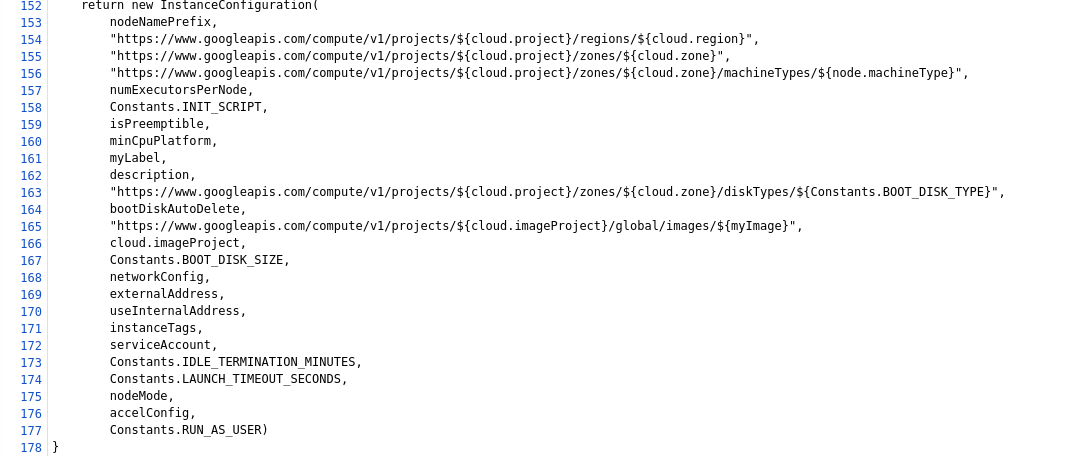
cloud.project is something-jenkins-prod
cloud.imageProject is something-packer-prod
This works, but if I click "save" then it corrupts the plugin configuration.
Thanks for clarifying.
Currently the Boot Disk Image project dropdown is populated by a list of known projects and the user's project. Also, the Boot DIsk Image name dropdown is populated using the credentials provided for the user's project. So while it is possible to enter this configuration with CasC or some other text based configuration, when you open up the UI the dropdowns can't display or select those items if they are from a different project.
I'll look into adding support for this.

@dkfitbit Not sure if this will fit your use case, but we have ways of sharing images across projects: https://cloud.google.com/compute/docs/images/sharing-images-across-projects
@dkfitbit You can use GCP templates to set whatever image you want.. And I see you are using packer to make images.. just add terraform for creating templates automatically and all will be much easier..
@stephenashank Its one of the features that is outside easy path and can be left as feature for template usage..

@ingwarsw but will you be able to use images outside of your google project even in templates?
Using terraform to build the images sounds like a good idea, but my only concern is the user has already invested a lot of work into the GCP project whose sole purpose is to build packer images.
@ingwarsw but will you be able to use images outside of your google project even in templates?
Yes..
Using terraform to build the images sounds like a good idea, but my only concern is the user has already invested a lot of work into the GCP project whose sole purpose is to build packer images.
Im not saying to drop packer.. its still needed for building images.. On top of that use terraform to build templates..
Something like that..
resource "google_compute_instance_template" "jenkins-slave-linux-template" {
  name = "jenkins-slave-linux-template"
  description = "Template for creating linux slaves for jenkins"

  labels = {
    os = "linux"
    purpose = "jenkins"
  }

  instance_description = "Jenkins prime linux slave"
  machine_type = "n1-standard-2"

  // Create a new boot disk from an image
  disk {
    source_image = "family/jenkins-slave-linux"
    disk_type = "pd-ssd"
    auto_delete = true
    boot = true
  }

  network_interface {
    subnetwork         = "${var.project}-${var.region}"
    subnetwork_project = "${var.project}"
  }
}
Ah, I see, my mistake, I meant building templates.
@dkfitbit any thoughts on these possible solutions to your use case?
Considering that we're building a new image every day, then garbage collecting the images that aren't tagged as in-use, I'd really like to not have to copy the images to multiple projects, figure out how to copy the tags when they are updated, and then run the garbage collector script with an uber-credential that can manipulate images for multiple projects.
There are a couple alternative solutions which will involve some work on our part. What do you think of this proposal?
We add a new optional credentials dropdown to select a credential specific to the image selection. By selecting the image project credentials, that project would appear in the dropdown instead of the configuration project. Then those credentials would be used to retrieve a list of images from the selected project.
@dkfitbit but as I wrote you can do that with templates.. In template you can use image from any project..
Why cannot you use that solution?
@stephenashank I think that your solution is unnecessarily complication of plugin, and this use case can be done without it...
@dkfitbit Have you tried templates? They're supported by the plugin and quite pleasant to use: Compute Engine Templates
@stephenashank and I have just tested sharing images outside of projects as well. Reference here
Following the gcloud commands, I ran:
gcloud projects add-iam-policy-binding my-project-that-has-the-image \ --member user:[email protected] --role roles/compute.imageUser
Then run
gcloud compute images list --project my-project-that-has-the-image
to make sure that you now can see images in the project with the image you want. There are more complex configurations in the guide I just linked.
Instance templates are a fine solution assuming the Jenkins user also has access to gcloud or the Cloud Console in order to create templates. But I think it's still important to support this functionality purely in Jenkins.
The projects API could be used to discover projects the credential has access to and append them to the dropdown.

@dkfitbit has the suggested approach with templates resolved this issue?
I second this request. While the workaround of using templates suggested by @ingwarsw does work, it requires the user to have a good workflow for generating and updating templates, e.g. terraform.
Not everyone has that so this would be a useful addition.
At a minimum, this restriction should be documented in the docs (this could include a suggestion to use templates as a workaround).
