

 jenkinsci
PoC: Install Java if not installed in the agent
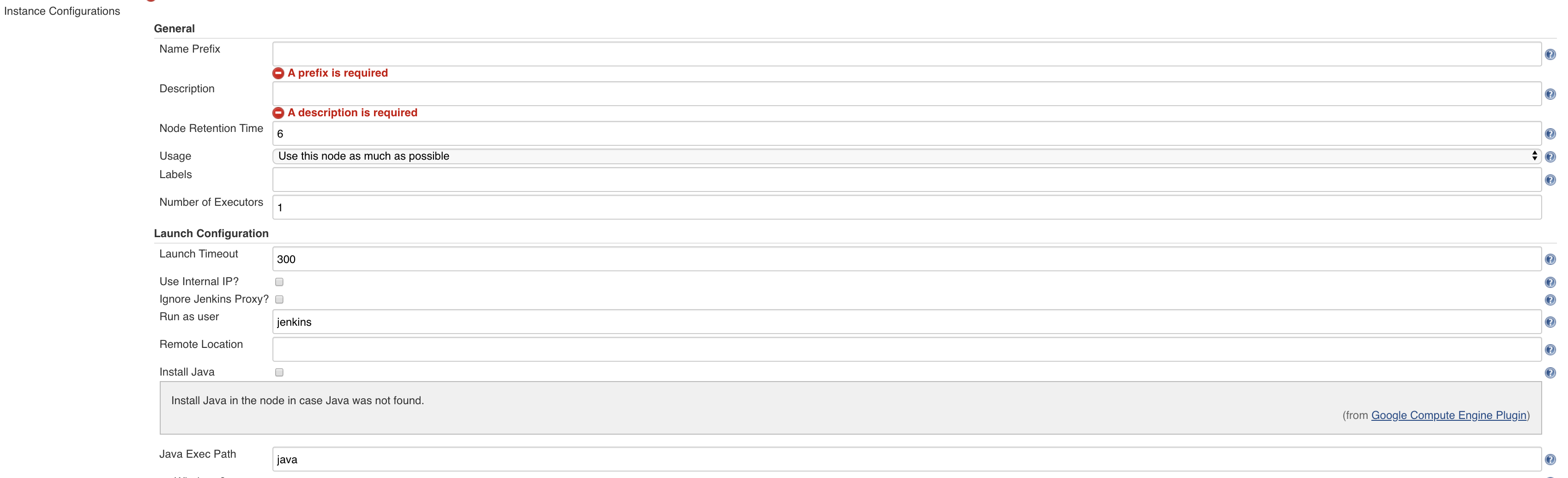
This is a PoC to allow using the agents that are already provided in the default projects without any need to customise the Java installation in the default images for the default projects.
- https://github.com/jenkinsci/google-compute-engine-plugin/blob/2e047393d2e0826c2689c88a8ab431ca441c6cf6/src/main/java/com/google/jenkins/plugins/computeengine/InstanceConfiguration.java#L101-L116
A similar approach was implemented with the EC2-plugin:
- https://github.com/jenkinsci/ec2-plugin/blob/69a4b310549764c2a0a69e8ca1e2b8e6c518a553/src/main/java/hudson/plugins/ec2/ssh/EC2UnixLauncher.java#L221-L222
Screenshots
Actions
- [ ] Validate the installation steps are good enough
- [x] Validate some of the projects to confirm it works as expected
- [ ] Support windows if possible.
Manual tests
I did run some tests in one of my instances:
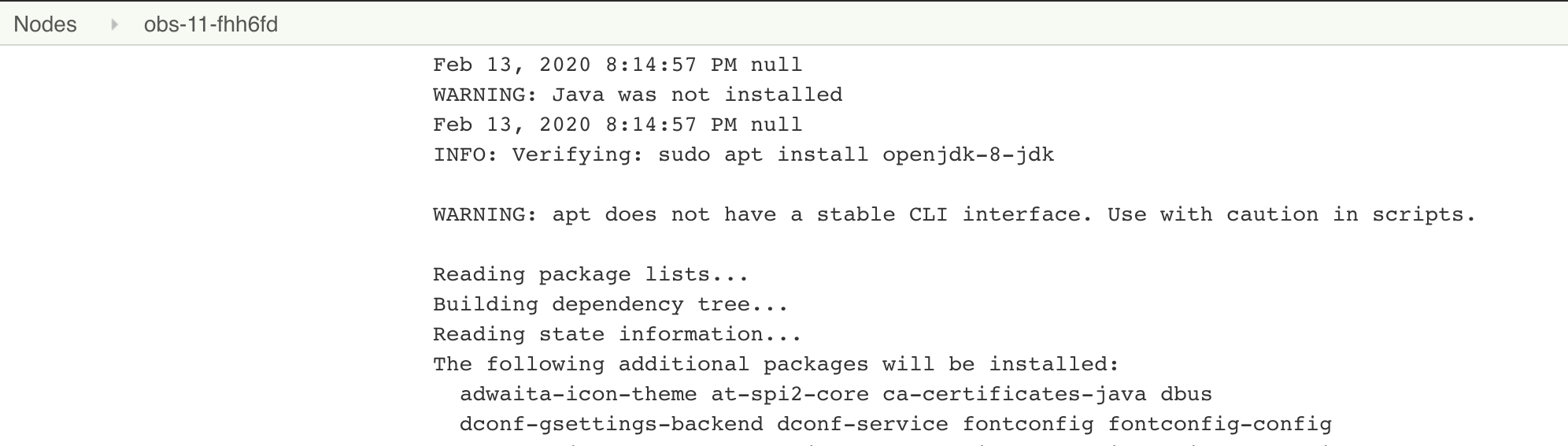
- When the apt install didn't have
-ythen
the global logs said something like the below:

and the logs in the agent said the below
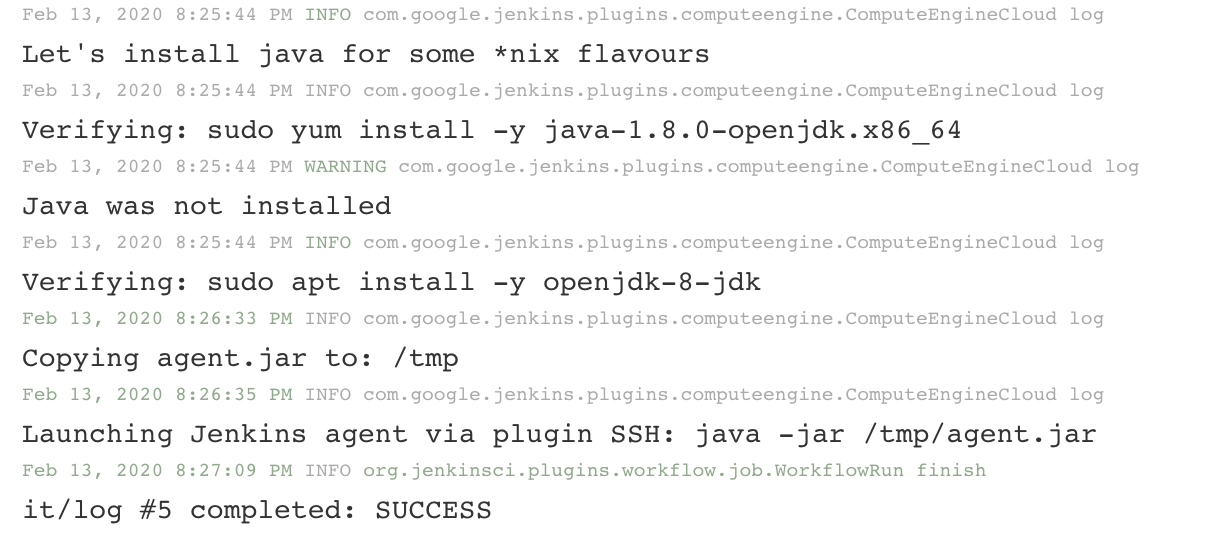
- When the apt install did have
-ythen:
Questions
-
A kind of similar approach can be accomplished with the Startup Script, see -> https://github.com/jenkinsci/google-compute-engine-plugin/blob/2e047393d2e0826c2689c88a8ab431ca441c6cf6/src/test/resources/com/google/jenkins/plugins/computeengine/integration/configuration-as-code-it.yml#L26
- Do we want to support this feature with this new property? I see certain pros, for instance, it's not required to stop the ssh service to do other things.
-
Do we want to enable this feature and also the script in charge of the installation? In other words, similar to the startup script but without the ssh stop/start. What do you think?
Related issues
- Blocked by https://github.com/jenkinsci/google-compute-engine-plugin/issues/189

Thanks @v1v Would like to see an int-test added which verifies this works :)

@craigdbarber , regarding the int-test, I did follow the docs to run them in one of my GCP projects, but I'm afraid I was not able to run them as they failed (the current int-tests), not sure if I do need to configure the GCP project somehow with certain privileges/configuration, can you let me know if that's a requirement? Otherwise, could I have access to the logs from https://jenkins.cloudgraphite-cicd.net/job/google-compute-engine-plugin/job/PR-186/4/display/redirect ?
@v1v Here are the logs from maven from on the test that failed:
[ERROR] Tests run: 1, Failures: 0, Errors: 1, Skipped: 0, Time elapsed: 61.12 s <<< FAILURE! - in com.google.jenkins.plugins.computeengine.integration.ConfigAsCodeInstallJavaTestIT
[ERROR] com.google.jenkins.plugins.computeengine.integration.ConfigAsCodeInstallJavaTestIT.testNonStandardJavaWorkerCreated  Time elapsed: 45.347 s  <<< ERROR!
java.util.concurrent.ExecutionException: java.util.concurrent.ExecutionException: java.io.IOException: Agent failed to connect, even though the launcher didn't report it. See the log output for details.
	at java.util.concurrent.FutureTask.report(FutureTask.java:122)
	at java.util.concurrent.FutureTask.get(FutureTask.java:192)
	at com.google.jenkins.plugins.computeengine.integration.ConfigAsCodeInstallJavaTestIT.testNonStandardJavaWorkerCreated(ConfigAsCodeInstallJavaTestIT.java:93)
	at sun.reflect.NativeMethodAccessorImpl.invoke0(Native Method)
	at sun.reflect.NativeMethodAccessorImpl.invoke(NativeMethodAccessorImpl.java:62)
	at sun.reflect.DelegatingMethodAccessorImpl.invoke(DelegatingMethodAccessorImpl.java:43)
	at java.lang.reflect.Method.invoke(Method.java:498)
	at org.junit.runners.model.FrameworkMethod$1.runReflectiveCall(FrameworkMethod.java:50)
	at org.junit.internal.runners.model.ReflectiveCallable.run(ReflectiveCallable.java:12)
	at org.junit.runners.model.FrameworkMethod.invokeExplosively(FrameworkMethod.java:47)
	at org.junit.internal.runners.statements.InvokeMethod.evaluate(InvokeMethod.java:17)
	at org.junit.runners.ParentRunner.runLeaf(ParentRunner.java:325)
	at org.junit.runners.BlockJUnit4ClassRunner.runChild(BlockJUnit4ClassRunner.java:78)
	at org.junit.runners.BlockJUnit4ClassRunner.runChild(BlockJUnit4ClassRunner.java:57)
	at org.junit.runners.ParentRunner$3.run(ParentRunner.java:290)
	at org.junit.runners.ParentRunner$1.schedule(ParentRunner.java:71)
	at org.junit.runners.ParentRunner.runChildren(ParentRunner.java:288)
	at org.junit.runners.ParentRunner.access$000(ParentRunner.java:58)
	at org.junit.runners.ParentRunner$2.evaluate(ParentRunner.java:268)
	at org.junit.internal.runners.statements.RunBefores.evaluate(RunBefores.java:26)
	at org.junit.internal.runners.statements.RunAfters.evaluate(RunAfters.java:27)
	at org.jvnet.hudson.test.JenkinsRule$1.evaluate(JenkinsRule.java:596)
	at org.junit.internal.runners.statements.FailOnTimeout$CallableStatement.call(FailOnTimeout.java:298)
	at org.junit.internal.runners.statements.FailOnTimeout$CallableStatement.call(FailOnTimeout.java:292)
	at java.util.concurrent.FutureTask.run(FutureTask.java:266)
	at java.lang.Thread.run(Thread.java:748)
Caused by: java.util.concurrent.ExecutionException: java.io.IOException: Agent failed to connect, even though the launcher didn't report it. See the log output for details.
	at java.util.concurrent.FutureTask.report(FutureTask.java:122)
	at java.util.concurrent.FutureTask.get(FutureTask.java:206)
	at com.google.jenkins.plugins.computeengine.ComputeEngineCloud.lambda$getPlannedNodeFuture$0(ComputeEngineCloud.java:305)
	at jenkins.util.ContextResettingExecutorService$2.call(ContextResettingExecutorService.java:46)
	at jenkins.security.ImpersonatingExecutorService$2.call(ImpersonatingExecutorService.java:71)
	at java.util.concurrent.FutureTask.run(FutureTask.java:266)
	at java.util.concurrent.ThreadPoolExecutor.runWorker(ThreadPoolExecutor.java:1149)
	at java.util.concurrent.ThreadPoolExecutor$Worker.run(ThreadPoolExecutor.java:624)
	... 1 more
Caused by: java.io.IOException: Agent failed to connect, even though the launcher didn't report it. See the log output for details.
	at hudson.slaves.SlaveComputer$1.call(SlaveComputer.java:318)
	... 6 more
Here is the failsafe report output from that test:
Test timeout disabled.
=== Starting com.google.jenkins.plugins.computeengine.integration.ConfigAsCodeInstallJavaTestIT
   0.256 [id=12]	INFO	o.jvnet.hudson.test.WarExploder#explode: Picking up existing exploded jenkins.war at /home/jenkins/agent/workspace/gle-compute-engine-plugin_PR-186/target/jenkins-for-test
   1.010 [id=12]	INFO	o.jvnet.hudson.test.JenkinsRule#createWebServer: Running on http://localhost:38161/jenkins/
   3.550 [id=19]	INFO	jenkins.InitReactorRunner$1#onAttained: Started initialization
   4.011 [id=18]	WARNING	hudson.ClassicPluginStrategy#createClassJarFromWebInfClasses: Created /tmp/jenkins2441043637679395574/powershell/WEB-INF/lib/classes.jar; update plugin to a version created with a newer harness
   4.288 [id=19]	WARNING	hudson.ClassicPluginStrategy#createClassJarFromWebInfClasses: Created /tmp/jenkins2441043637679395574/oauth-credentials/WEB-INF/lib/classes.jar; update plugin to a version created with a newer harness
   4.388 [id=19]	INFO	jenkins.InitReactorRunner$1#onAttained: Listed all plugins
   7.870 [id=19]	INFO	jenkins.InitReactorRunner$1#onAttained: Prepared all plugins
   7.880 [id=19]	INFO	jenkins.InitReactorRunner$1#onAttained: Started all plugins
   7.887 [id=19]	INFO	jenkins.InitReactorRunner$1#onAttained: Augmented all extensions
   9.143 [id=18]	INFO	jenkins.InitReactorRunner$1#onAttained: Loaded all jobs
   9.795 [id=18]	INFO	jenkins.InitReactorRunner$1#onAttained: Completed initialization
  10.067 [id=12]	INFO	c.g.j.p.c.i.ConfigAsCodeInstallJavaTestIT#init: init
  11.767 [id=12]	INFO	c.g.j.p.c.ComputeEngineCloud#provision: Provisioning node from configs [com.google.jenkins.plugins.computeengine.InstanceConfiguration@54a4cff] for excess workload of 1 units of label 'integration-install-java'
  12.087 [id=12]	INFO	c.g.j.p.c.ComputeEngineCloud#availableNodeCapacity: Found capacity for 10 nodes in cloud integration
  13.718 [id=12]	INFO	c.g.j.p.c.InstanceConfiguration#provision: Sent insert request for instance configuration [integration-install-java]
  13.747 [id=36]	INFO	c.g.j.p.c.ComputeEngineComputerLauncher#launch: Launch will wait 300000 for operation operation-1581528875670-59e6462d61a5c-82a0db17-e71b6605 to complete...
  13.829 [id=54]	INFO	c.g.j.p.c.ComputeEngineCloud#lambda$getPlannedNodeFuture$0: Waiting 300000ms for node integration-install-java-sm456n to connect
  24.714 [id=36]	INFO	c.g.j.p.c.ComputeEngineCloud#log: Launching instance: integration-install-java-sm456n
  24.715 [id=36]	INFO	c.g.j.p.c.ComputeEngineCloud#log: bootstrap
  24.716 [id=36]	INFO	c.g.j.p.c.ComputeEngineCloud#log: Getting keypair...
  24.716 [id=36]	INFO	c.g.j.p.c.ComputeEngineCloud#log: Using autogenerated keypair
  24.717 [id=36]	INFO	c.g.j.p.c.ComputeEngineCloud#log: Authenticating as jenkins
  24.938 [id=36]	INFO	c.g.j.p.c.ComputeEngineCloud#log: Connecting to 35.192.88.203 on port 22, with timeout 10000.
  34.974 [id=36]	INFO	c.g.j.p.c.ComputeEngineCloud#log: Failed to connect via ssh: The kexTimeout (10000 ms) expired.
  34.976 [id=36]	INFO	c.g.j.p.c.ComputeEngineCloud#log: Waiting for SSH to come up. Sleeping 5.
  40.199 [id=36]	INFO	c.g.j.p.c.ComputeEngineCloud#log: Connecting to 35.192.88.203 on port 22, with timeout 10000.
  50.202 [id=36]	INFO	c.g.j.p.c.ComputeEngineCloud#log: Failed to connect via ssh: The kexTimeout (10000 ms) expired.
  50.203 [id=36]	INFO	c.g.j.p.c.ComputeEngineCloud#log: Waiting for SSH to come up. Sleeping 5.
  55.393 [id=36]	INFO	c.g.j.p.c.ComputeEngineCloud#log: Connecting to 35.192.88.203 on port 22, with timeout 10000.
  55.775 [id=36]	INFO	c.g.j.p.c.ComputeEngineCloud#log: Connected via SSH.
  55.837 [id=36]	INFO	c.g.j.p.c.ComputeEngineCloud#log: Verifying: java -fullversion
  55.901 [id=36]	WARNING	c.g.j.p.c.ComputeEngineCloud#log: Java is not installed at java
  55.902 [id=36]	INFO	c.g.j.p.c.ComputeEngineCloud#log: Let's install java for some *nix flavours
  55.903 [id=36]	INFO	c.g.j.p.c.ComputeEngineCloud#log: Verifying: sudo yum install -y java-1.8.0-openjdk.x86_64
  55.965 [id=36]	WARNING	c.g.j.p.c.ComputeEngineCloud#log: Java was not installed
  55.966 [id=36]	INFO	c.g.j.p.c.ComputeEngineCloud#log: Verifying: sudo apt install openjdk-8-jdk
  56.700 [id=36]	WARNING	c.g.j.p.c.ComputeEngineCloud#log: Java was not installed
  56.716 [id=12]	INFO	c.g.j.p.c.integration.ITUtil#teardownResources: teardown
  57.432 [id=12]	INFO	jenkins.model.Jenkins#cleanUp: Stopping Jenkins
  57.933 [id=12]	INFO	jenkins.model.Jenkins#cleanUp: Jenkins stopped

Actually @v1v, build 5 from our tests succeeded, but for whatever reason failed with the core jenkins build on Java 11. It doesn't make sense why, so I think it may succeed if reran. The easiest way to trigger that is probably to amend the latest commit and force push.
I also noticed that none of the Google-provided free Linux images install a JRE by default. I settled on using Packer to publish an image to my own project:
packer {
  required_plugins {
    googlecompute = {
      version = ">= 1.1.1"
      source = "github.com/hashicorp/googlecompute"
    }
  }
}

variable "project" {
  type = string
}

variable "zone" {
  type = string
}

source "googlecompute" "base" {
  project_id = var.project
  zone = var.zone
  source_image_project_id = ["centos-cloud"]
  source_image_family = "centos-stream-9"
  ssh_username = "jenkins"
}

build {
  sources = ["sources.googlecompute.base"]
  provisioner "shell" {
    inline = ["sudo dnf --assumeyes install java-11-openjdk-headless && java -version"]
  }
}
A feature like in this PR might be useful for experimentation but you should not use it in production—it would be too slow, and put too much load on Linux distribution package servers.
