

 jenkinsci
[JENKINS-71360] Webhook pushes doesn't trigger any job
Jenkins does not start the automatic build of my pipelines when the github webhook is sent.
There is a remark in the log: "Skipped
A week ago everything was working, and now it has abruptly stopped working.
I tried to change ssh keys and github tokens, run the build manually, change branches and links to the repository, but none of this was successful.
I tried to execute the script (https://pastebin.com/jV6695VV )
and got the answer:
ajur_signup_pipeline is empty
Empty SCM for job: ajur_signup_pipeline
Chem-Reagents is empty
Empty SCM for job: Chem-Reagents
mersi_pipeline is empty
Empty SCM for job: mersi_pipeline
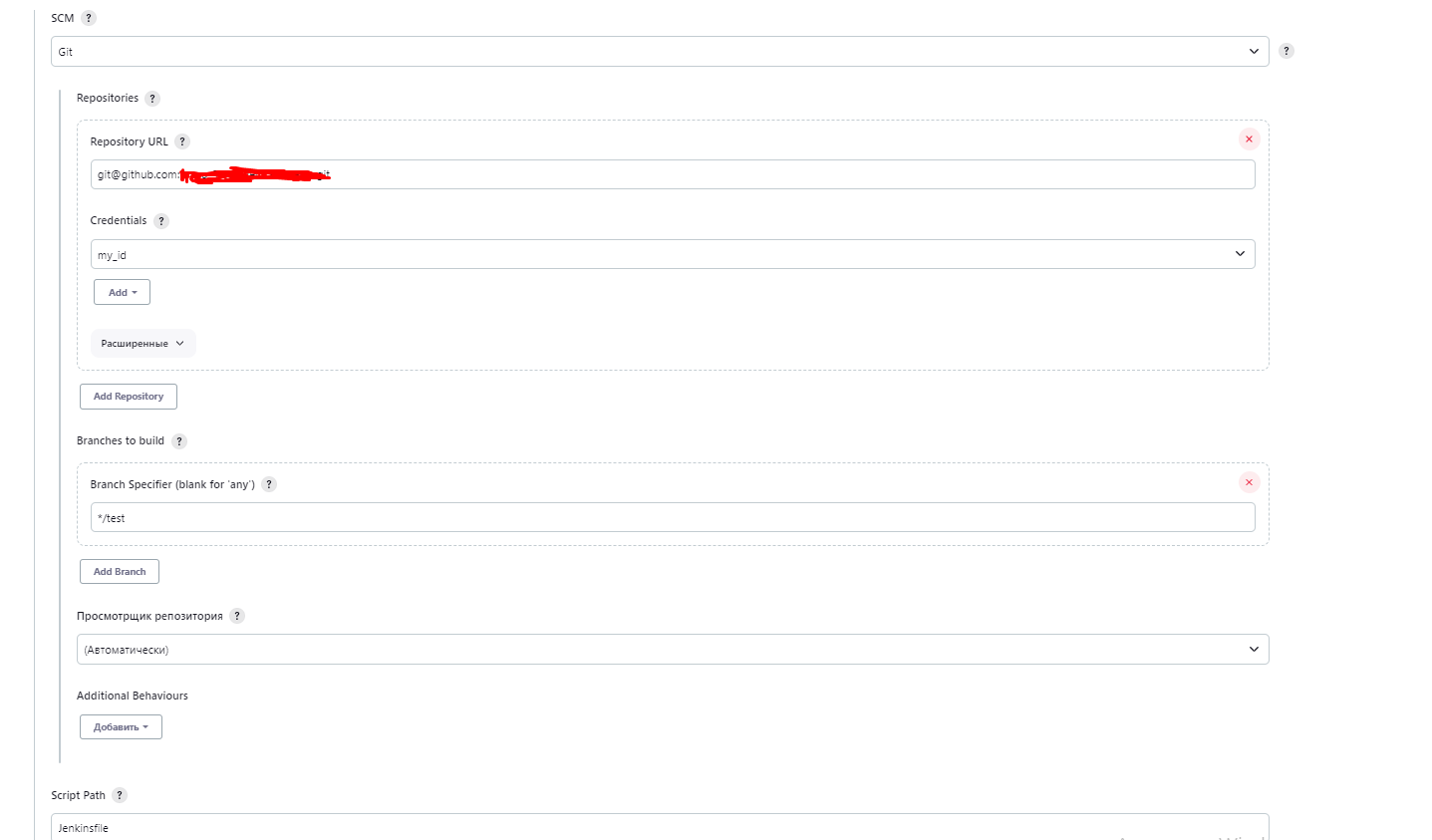
For some reason, Jenkins tells me that I have no information about SCM in my plans, but this is not the case
Originally reported by lemar98, imported from: Webhook pushes doesn't trigger any job
- assignee:
 lanwen
- status: Open
- priority: Blocker
- component(s): github-plugin
- resolution: Unresolved
- votes: 1
- watchers: 5
- imported: 2025-12-08
Raw content of original issue
Jenkins does not start the automatic build of my pipelines when the github webhook is sent.

There is a remark in the log: "Skipped <REPO> because it doesn't have a matching repository.".

A week ago everything was working, and now it has abruptly stopped working.

I tried to change ssh keys and github tokens, run the build manually, change branches and links to the repository, but none of this was successful.

I tried to execute the script (https://pastebin.com/jV6695VV )
and got the answer:
ajur_signup_pipeline is empty
Empty SCM for job: ajur_signup_pipeline
Chem-Reagents is empty
Empty SCM for job: Chem-Reagents
mersi_pipeline is empty
Empty SCM for job: mersi_pipeline

For some reason, Jenkins tells me that I have no information about SCM in my plans, but this is not the case
environment
Jenkins: 2.387.3<br/>
OS: Linux - 5.10.0-21-amd64<br/>
Java: 11.0.18 - Debian (OpenJDK 64-Bit Server VM)<br/>
---<br/>
ant:487.vd79d090d4ea_e<br/>
antisamy-markup-formatter:159.v25b_c67cd35fb_<br/>
apache-httpcomponents-client-4-api:4.5.14-150.v7a_b_9d17134a_5<br/>
authentication-tokens:1.53.v1c90fd9191a_b_<br/>
bootstrap5-api:5.2.2-6<br/>
bouncycastle-api:2.28<br/>
branch-api:2.1105.v472604208c55<br/>
build-timeout:1.31<br/>
caffeine-api:3.1.6-115.vb_8b_b_328e59d8<br/>
checks-api:2.0.0<br/>
cloudbees-folder:6.815.v0dd5a_cb_40e0e<br/>
command-launcher:100.v2f6722292ee8<br/>
commons-lang3-api:3.12.0-36.vd97de6465d5b_<br/>
commons-text-api:1.10.0-36.vc008c8fcda_7b_<br/>
credentials:1254.vb_96f366e7b_a_d<br/>
credentials-binding:604.vb_64480b_c56ca_<br/>
display-url-api:2.3.7<br/>
docker-commons:419.v8e3cd84ef49c<br/>
docker-workflow:563.vd5d2e5c4007f<br/>
durable-task:507.v050055d0cb_dd<br/>
echarts-api:5.4.0-4<br/>
email-ext:2.97<br/>
font-awesome-api:6.3.0-2<br/>
git:5.0.2<br/>
git-client:4.2.0<br/>
github:1.37.1<br/>
github-api:1.314-431.v78d72a_3fe4c3<br/>
github-branch-source:1703.vd5a_2b_29c6cdc<br/>
gradle:2.7<br/>
instance-identity:142.v04572ca_5b_265<br/>
ionicons-api:56.v1b_1c8c49374e<br/>
jackson2-api:2.15.1-344.v6eb_55303dc3e<br/>
jakarta-activation-api:2.0.1-3<br/>
jakarta-mail-api:2.0.1-3<br/>
javax-activation-api:1.2.0-6<br/>
javax-mail-api:1.6.2-9<br/>
jaxb:2.3.8-1<br/>
jdk-tool:66.vd8fa_64ee91b_d<br/>
jjwt-api:0.11.5-77.v646c772fddb_0<br/>
jquery3-api:3.7.0-1<br/>
junit:1202.v79a_986785076<br/>
ldap:682.v7b_544c9d1512<br/>
mailer:457.v3f72cb_e015e5<br/>
matrix-auth:3.1.7<br/>
matrix-project:789.v57a_725b_63c79<br/>
mina-sshd-api-common:2.10.0-69.v28e3e36d18eb_<br/>
mina-sshd-api-core:2.10.0-69.v28e3e36d18eb_<br/>
okhttp-api:4.10.0-132.v7a_7b_91cef39c<br/>
pam-auth:1.10<br/>
pipeline-build-step:491.v1fec530da_858<br/>
pipeline-github-lib:42.v0739460cda_c4<br/>
pipeline-graph-analysis:202.va_d268e64deb_3<br/>
pipeline-groovy-lib:656.va_a_ceeb_6ffb_f7<br/>
pipeline-input-step:468.va_5db_051498a_4<br/>
pipeline-milestone-step:111.v449306f708b_7<br/>
pipeline-model-api:2.2133.ve46a_6113dfc3<br/>
pipeline-model-definition:2.2133.ve46a_6113dfc3<br/>
pipeline-model-extensions:2.2133.ve46a_6113dfc3<br/>
pipeline-rest-api:2.32<br/>
pipeline-stage-step:305.ve96d0205c1c6<br/>
pipeline-stage-tags-metadata:2.2133.ve46a_6113dfc3<br/>
pipeline-stage-view:2.32<br/>
plain-credentials:143.v1b_df8b_d3b_e48<br/>
plugin-util-api:3.2.1<br/>
resource-disposer:0.22<br/>
scm-api:672.v64378a_b_20c60<br/>
script-security:1244.ve463715a_f89c<br/>
snakeyaml-api:1.33-95.va_b_a_e3e47b_fa_4<br/>
ssh-agent:333.v878b_53c89511<br/>
ssh-credentials:305.v8f4381501156<br/>
ssh-slaves:2.877.v365f5eb_a_b_eec<br/>
sshd:3.303.vefc7119b_ec23<br/>
structs:324.va_f5d6774f3a_d<br/>
timestamper:1.25<br/>
token-macro:359.vb_cde11682e0c<br/>
trilead-api:2.84.v72119de229b_7<br/>
variant:59.vf075fe829ccb<br/>
workflow-aggregator:596.v8c21c963d92d<br/>
workflow-api:1213.v646def1087f9<br/>
workflow-basic-steps:1017.vb_45b_302f0cea_<br/>
workflow-cps:3668.v1763b_b_6ccffd<br/>
workflow-durable-task-step:1246.v5524618ea_097<br/>
workflow-job:1301.v054d9cea_9593<br/>
workflow-multibranch:746.v05814d19c001<br/>
workflow-scm-step:408.v7d5b_135a_b_d49<br/>
workflow-step-api:639.v6eca_cd8c04a_a_<br/>
workflow-support:839.v35e2736cfd5c<br/>
ws-cleanup:0.45<br/>
Jenkins running directly<br/>
Jenkins is accessed through <a href="http://<IP>:<PORT">http://&lt;IP&gt;:&lt;PORT</a>><br/>
Jenkins was installed by deb and runs as service<br/>
I tried webrowsers: Chrome (latest), Edge (latest)
3 attachments



lemar98:
- Original comment link
Raw content of original comment:
If I use a public repository then trigger works fine, but if I use a private repo (organization) then trigger are not worked. Used credentials is correct
If I use a public repository then trigger works fine, but if I use a private repo (organization) then trigger are not worked. Used credentials is correct
 mariozelaschi:
- Original comment link
Raw content of original comment:
Is there any update on this issue?
I confirm that I am having the same problem.
Is there any update on this issue?
I confirm that I am having the same problem.
mariozelaschi:
- Original comment link
Raw content of original comment:
Hi everyone, after some testing we found out that the problem is the skipDefaultCheckout() under options in pipeline groovy.

Before this last upgrade the automatic start on push was working fine with this option enabled.

After removing this option and running again once manually, everything works as usual.
Hi everyone, after some testing we found out that the problem is the skipDefaultCheckout() under options in pipeline groovy.
Before this last upgrade the automatic start on push was working fine with this option enabled.
After removing this option and running again once manually, everything works as usual.
lemar98:
- Original comment link
Raw content of original comment:
Hi
I switched to gh actions a long time ago. But your answer made me test your theory and it turned out to be correct! It's strange, but by removing skipDefaultCheckout(), my pipeline is working! In any case, thank you for sharing and not being indifferent.
Hi
I switched to gh actions a long time ago. But your answer made me test your theory and it turned out to be correct! It's strange, but by removing skipDefaultCheckout(), my pipeline is working! In any case, thank you for sharing and not being indifferent.
 kx_aj:
- Original comment link
Raw content of original comment:
After tearing my hear out for an afternoon, I've found the culprit for this...
The issue starts here:
And:
This gets executed as part of registering the webhook (WebhookManager.registerFor), which calls parseAssociatedNames. parseAssociatedNames gets the SCMTriggerItem from the project/job that's passed in. The details for the SCMTriggerItem are from here:
Which from this snippet:
        WorkflowRun b = getLastSuccessfulBuild();
        if (b == null) {
            b = getLastCompletedBuild();
        }
        if (b == null) {
            return Collections.emptySet();
        }
You can see that if there is no previous execution of your job, the SCMTriggerItem will be an empty set, so as far as the GitHub plugin is concerned, there's nothing to register against, and you end up with
After tearing my hear out for an afternoon, I've found the culprit for this...
The issue starts here:
And:
This gets executed as part of registering the webhook (WebhookManager.registerFor), which calls parseAssociatedNames. parseAssociatedNames gets the SCMTriggerItem from the project/job that's passed in. The details for the SCMTriggerItem are from here:
Which from this snippet:
WorkflowRun b = getLastSuccessfulBuild(); if (b == null) { b = getLastCompletedBuild(); } if (b == null) { return Collections.emptySet(); }
You can see that if there is no previous execution of your job, the SCMTriggerItem will be an empty set, so as far as the GitHub plugin is concerned, there's nothing to register against, and you end up with
quatrix:
- Original comment link
Raw content of original comment:
I was able to resolve this issue by removing spaces from the 'Display name' of the multi branch pipeline. e.g I edited 'Web Application Multi-Branch Pipeline' to 'web-application-multi-branch-pipeline' and a push to GitHub resulted in a Jenkins build being triggered.
I was able to resolve this issue by removing spaces from the 'Display name' of the multi branch pipeline. e.g I edited 'Web Application Multi-Branch Pipeline' to 'web-application-multi-branch-pipeline' and a push to GitHub resulted in a Jenkins build being triggered.