

 jenkinsci
[JENKINS-67939] SCM Poll always detects changes - Last build did not detect the right revision
After we changed the authentication method of our Bitbucket Branch Source Plugin to OAuth2, we discovered that all Build Jobs does not detect the right Revision from the last Build.
This results in an endless loop auf build triggers within the SCM Plugin. I'm not sure, if this is here the right place but I got some Log messages, where we can see, that the last build does not receive the revision from the last build (which is currently running or failed).
Only if there is a "successfull" build, the scm poll does not logger triggering new builds.
Here some Logs from: hudson.plugins.git.util.BuildData Level FINEST:
Mar 03, 2022 8:15:12 AM FINEST hudson.plugins.git.util.BuildDatalastBuildRevisionSha1: b5fd154340c91c6a1fddb1660c53fa175736907e does not match sha1:70a7f323f0b867a1075487904ea7482e4e95c566, checking lastBuild.marked
Mar 03, 2022 8:15:12 AM FINEST hudson.plugins.git.util.BuildDatalastBuildMarkedSha1: b5fd154340c91c6a1fddb1660c53fa175736907e does not match sha1:70a7f323f0b867a1075487904ea7482e4e95c566
Mar 03, 2022 8:15:12 AM FINEST hudson.plugins.git.util.BuildDataNo match found in getLastBuild for sha1:70a7f323f0b867a1075487904ea7482e4e95c566, returning null
This is the Output of build #106.
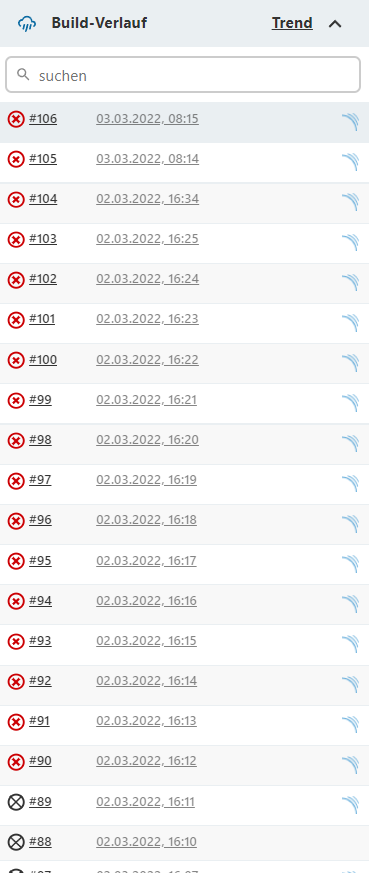
See here the Build History:

In the gaps I disabled the SCM Poll.
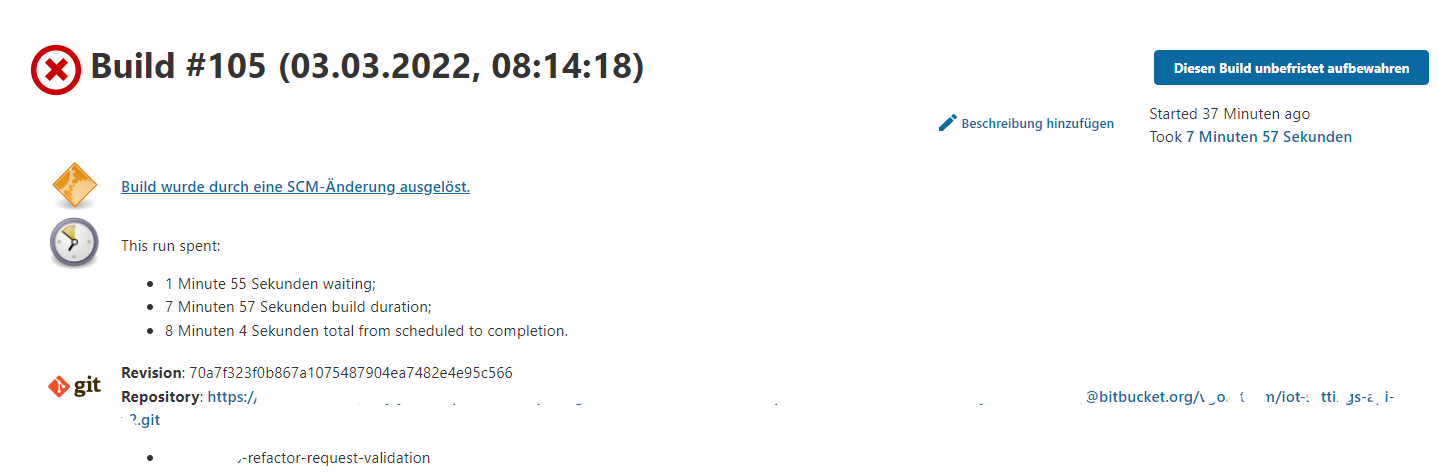
All the builds have the following SCM Information:

All the prevois builds are also building the Revision 70a7f32. So the excpected behavior would be, that the git SCM also detects the running and failed built revision (70a.. instead of b5fd - see log) to avoid this infinite loop of build triggers.
Could you help us? Currently we disabled the whole SCM Poll feature
Originally reported by  norbertkoch_v, imported from: SCM Poll always detects changes - Last build did not detect the right revision
- status: Open
- priority: Major
- component(s): git-plugin
- resolution: Unresolved
- votes: 0
- watchers: 2
- imported: 2025-12-02
Raw content of original issue
After we changed the authentication method of our Bitbucket Branch Source Plugin to OAuth2, we discovered that all Build Jobs does not detect the right Revision from the last Build.
This results in an endless loop auf build triggers within the SCM Plugin. I'm not sure, if this is here the right place but I got some Log messages, where we can see, that the last build does not receive the revision from the last build (which is currently running or failed).
Only if there is a "successfull" build, the scm poll does not logger triggering new builds.
Here some Logs from: hudson.plugins.git.util.BuildData Level FINEST:
Mar 03, 2022 8:15:12 AM FINEST hudson.plugins.git.util.BuildDatalastBuildRevisionSha1: b5fd154340c91c6a1fddb1660c53fa175736907e does not match sha1:70a7f323f0b867a1075487904ea7482e4e95c566, checking lastBuild.marked Mar 03, 2022 8:15:12 AM FINEST hudson.plugins.git.util.BuildDatalastBuildMarkedSha1: b5fd154340c91c6a1fddb1660c53fa175736907e does not match sha1:70a7f323f0b867a1075487904ea7482e4e95c566 Mar 03, 2022 8:15:12 AM FINEST hudson.plugins.git.util.BuildDataNo match found in getLastBuild for sha1:70a7f323f0b867a1075487904ea7482e4e95c566, returning nullThis is the Output of build #106.
See here the Build History:
In the gaps I disabled the SCM Poll.
All the builds have the following SCM Information:
All the prevois builds are also building the Revision 70a7f32. So the excpected behavior would be, that the git SCM also detects the running and failed built revision (70a.. instead of b5fd - see log) to avoid this infinite loop of build triggers.
Could you help us? Currently we disabled the whole SCM Poll feature
environment
Jenkins 2.319.2<br/>
Relevant Plugins:<br/>
Git: 4.10.2<br/>
Bitbucket Branch Source: 751.vda_24678a_f781<br/>
3 attachments

 markewaite:
- Original comment link
Raw content of original comment:
I believe I've seen cases like this when the polling frequency was longer than the build frequency. The best solution in those cases is to switch from polling the repository to use webhooks that notify Jenkins when a commit arrives on the repository. See Kohsuke's blogpost "polling must die" and various videos that describe techniques to configure webhooks.
I believe I've seen cases like this when the polling frequency was longer than the build frequency. The best solution in those cases is to switch from polling the repository to use webhooks that notify Jenkins when a commit arrives on the repository. See Kohsuke's blogpost "polling must die" and various videos that describe techniques to configure webhooks.
norbertkoch_v:
- Original comment link
Raw content of original comment:
Thanks, we will investigate that, for this we have to assign an external address to Jenkins.
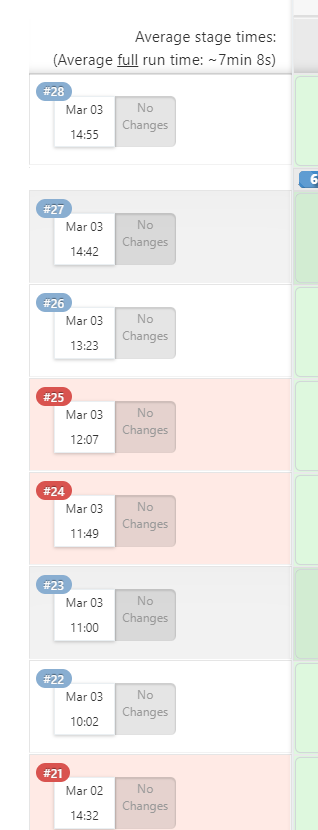
But just for keep in mind, we didn't had this behavior before. And the changes list are now alaways empty, although there were changes:

I cannot assess if this is caused by the Git Plugin or the Bitbucket Branch Source Plugin
Thanks, we will investigate that, for this we have to assign an external address to Jenkins.
But just for keep in mind, we didn't had this behavior before.
And the changes list are now alaways empty, although there were changes:
I cannot assess if this is caused by the Git Plugin or the Bitbucket Branch Source Plugin
markewaite:
- Original comment link
Raw content of original comment:
I'm reasonably confident that I've seen the issue in the git plugin but have never found the specific conditions that are known to cause it.

Sometimes I've been able to resolve it by copying the job to a new name then deleting the job at the old name and renaming the job from the new name to the old name.
I'm reasonably confident that I've seen the issue in the git plugin but have never found the specific conditions that are known to cause it.
Sometimes I've been able to resolve it by copying the job to a new name then deleting the job at the old name and renaming the job from the new name to the old name.
norbertkoch_v:
- Original comment link
Raw content of original comment:
Many thanks for your fast replies.

That's a bit unlucky, because the Projects and Jobs are prepared by Bitbucket Branch Plugin. A recreation is that easy and takes some effort. We figured out, that this is happening on all projects and branches.

Nevertheless I agree, that the best way would be to work with the webhook, but it is still confusing.
Many thanks for your fast replies.
That's a bit unlucky, because the Projects and Jobs are prepared by Bitbucket Branch Plugin. A recreation is that easy and takes some effort. We figured out, that this is happening on all projects and branches.
Nevertheless I agree, that the best way would be to work with the webhook, but it is still confusing.