
configuration-as-code-plugin
 configuration-as-code-plugin copied to clipboard
 jenkinsci
using credentials on JcasC configuration
Your checklist for this issue
🚨 Please review the Support Policy
- [x] The question was asked in the project's Gitter chat
- [x] Jenkins version 2.319.2
- [x] Plugin version 1512.vb_79d418d5fc8
- [x] OS Openshift 4
- [x] Reproduction steps
Description
Can you please let me know how I can use a Jenkins credential as part of a JcasC config? I have a credential sourcing from Hashicorp Vault intended for the use on the password item in mailer plugin. It is a secret type item which is different from the CredentialsId ones that are widely used by other plugins. I've done a lot of searches but still couldn't find a way to make it work.
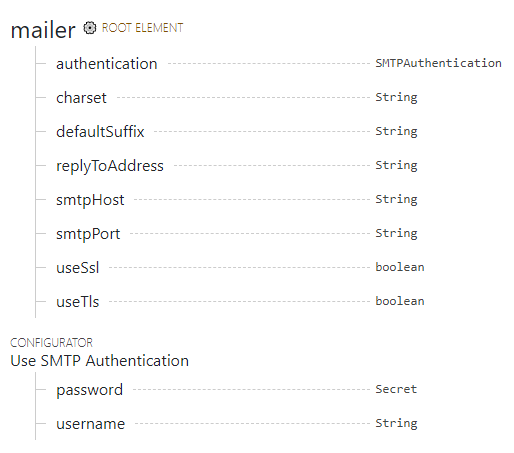
Thanks.

@rliu0009 https://plugins.jenkins.io/hashicorp-vault-plugin/#plugin-content-configuration-as-code

@rliu0009 https://plugins.jenkins.io/hashicorp-vault-plugin/#plugin-content-configuration-as-code
Thanks for your reply Peter, apologies I still don't quite understand.
From what I read, the article is talking about fetching secrets from Vault and store them in credentials. My issue is I've got the credential ready but not sure how to use it as the password under mailer.
I've got the following code for the yaml file.
JCasC:
    vault:
        credentials:
            smtpPasswordCredentials:
                kind: vaultStringCredentialImpl
                description: "Password for Mailer SMTP authentication"
                path:
                    'secret/context/{{ .Release.Namespace }}/{{ include "jenkins.serviceAccountName" . }}/credentials/smtp'
                scope: GLOBAL
                vaultKey: "password"
    mailer:
        smtpHost: applicationrelay.xxx.com
        smtpPort: 587
        authentication:
            username: smtp_user
            password: ???
For the password under mailer, I would like to use the credential above (smtpPasswordCredentials) from vault, would you mind letting me know what should I put in at password?
Thanks.
@rliu0009 Feel free to see the docs for secret source: https://plugins.jenkins.io/hashicorp-vault-plugin/#plugin-content-hashicorp-vault-plugin-as-a-secret-source-for-jcasc
@rliu0009 Feel free to see the docs for secret source: https://plugins.jenkins.io/hashicorp-vault-plugin/#plugin-content-hashicorp-vault-plugin-as-a-secret-source-for-jcasc
I've read this but it doesn't seem to be the problem that I am facing.
Explicitly, the example talks about how to get two secrets from Vault that I've done already. My issue is how to do one step further, for example how can I use the credential secretUsingKey in the example in a later configuration like as the password for the mailer plugin.
Hope I've explained my question clearly enough?
Cheers

are you using k8s for Jenkins deployment ?
close, openshift not k8s, with helm
It will be possible via adding annotation for vault and call it from the vault location like, you can refer official for vault annotation
https://www.vaultproject.io/docs/platform/k8s/injector/annotations#vault-hashicorp-com-agent-inject-secret https://www.vaultproject.io/docs/platform/k8s/injector/annotations#vault-hashicorp-com-agent-inject-template-file
Flow will be like |- Add annotation on deployment file >> call the variable from the location where secret is located >> push the credential on the Jenkins Credentials. the JCasC file will automatically update on back-end
Hope your query is resolve