
code-coverage-api-plugin
 code-coverage-api-plugin copied to clipboard
 jenkinsci
Code Coverage Report is overwritten when calling publishCoverage twice
Version report
Jenkins and plugins versions report: Code Coverage api plugin 2.0.2 Jenkins 2.303.2
- What Operating System are you using (both controller, and any agents involved in the problem)?
Windows 10
Reproduction steps
- Call publishCoverage twice in a pipeline (with or without tag) using two different adapters (e.g. jacocoAdapter, coberturaAdapter)
- Only the latest report is available via the "Coverage Report" menu item
- With earlier version of the plugin both reports were published
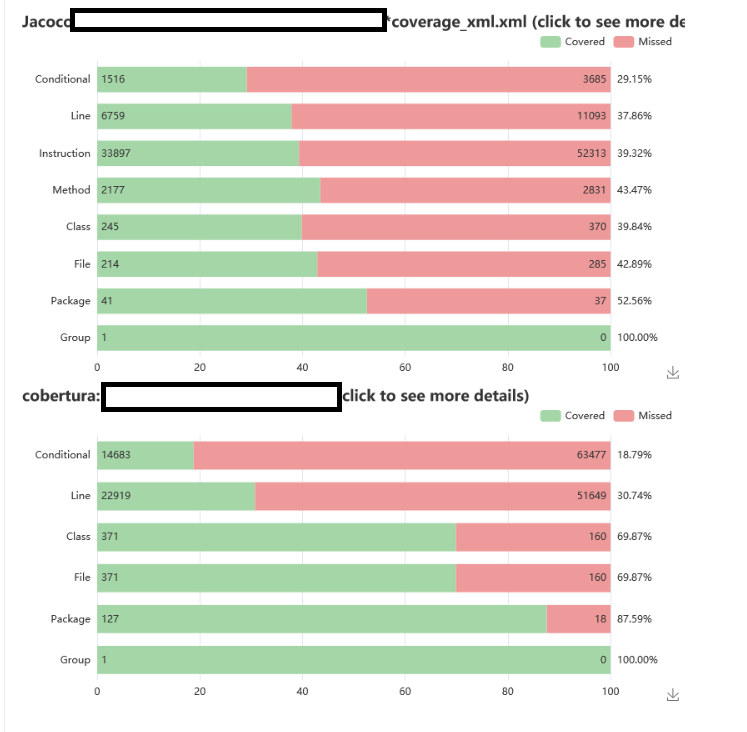
Results
Expected result: Either two different toplevel links are created or both reports are shown via the same link
Actual result: Only the latest report is available


This is a serious bug impacting our consumption of 2.0.2, we have to rollback to 1.1.6 to see all the reports. When can we have a fix?


This is a serious bug impacting our consumption of 2.0.2, we have to rollback to 1.1.6 to see all the reports.
That was actually the idea behind the 2.x release: whenever something does not work, simply switch back to the old version.

an example project or at least a pipeline would be helpful...
I think it is easy to reproduce and to create a test case for that problem.
Just the implementation is a little bit more tricky as we need to rethink on how to present several reports in the new UI (and in the model). Currently the detail view just shows a single result. We can either show an additional page before the details page (for projects that call the step several times) or show the results using two different actions (and URLs).
In the long term it makes sense to discuss the semantics of calling the same step multiple times. I had the same problem in the warnings plugin and there I decided to use different IDs (or URLs) for subsequent step invocations. This helps to simplify the algorithms around the delta computation. Since we also plan to add that part in the coverage plugin (added lines in a PR without coverage, etc.), it might be simpler if every invocation of the step will create a new result in Jenkins.
@uhafner +1 for different URLs. Having 2 different results in the left side menu, possible using tag or any other param to modify it, will make it much more clear. Is there a plan for this? If not, I can contribute, since we're also using this plugin heavily & I don't like the idea of downgrading the plugin.
Currently there is no plan to start implementing this. As you can see from the new issues a lot of work still is open. Additionally, this is just one of my plugins and I can't disregard the others in the next months. So if you want to help with that idea that would be wonderful!
Which direction makes more sense for the others? Separate the results of subsequent calls to the step in several URLs? How and where do we then define those URLs?
I can speak for myself: After seeing the new design, it's obvious that view designed to show a single coverage. So it makes it logical to have different urls. We can have dynamic URLs, tag can be a suffix to coverage, like coverage-tag? Jenkins Git plugin uses the same, when you checkout multiple repos in the same project, you see multiple link with same name Git Build Data, but their url is like git-1, git-2 etc.

The new step recordCoverage is now in beta testing, can you please check if this release helps to solve this issue? Please note that the syntax of the step is totally new and cannot be combined with existing results.
Finally found some time to test the update. With two pipeline branches and the following segments, I got the expected two reports and could remove my stash-and-postprocessing hack. Thanks.
recordCoverage (
	id: 'coverage-java',
	name: 'Coverage Java',
	tools: [[pattern: 'build/report.xml']],
	....
)
recordCoverage(
	id: 'coverage-vue',
	name: 'Coverage Vue',
	tools: [[parser: 'COBERTURA', pattern: 'build/jestcoverage/cobertura-coverage.xml']],
	...
)
