jellyfin
[Issue]: Can't make any changes to the Admin->Networking page, blue save button is not functional
Please describe your bug
The blue "save button" on the Networking page is broken. This is a brand new installation. If I try to make any changes to the network settings and click the blue "save" button at the bottom of the page, nothing happens. There is no notification of the setting being saved. If I navigate away from the page all changes are lost.
I also tried the following:
- Opening the page is a Firefox private window and loading the page.
- Generating a new Firefox profile with default settings and loading the page.
- Accessing the page thought https://domain.com/web/index.html#!/networking.html
- Accessing the page though the http://localhost:8096/web/index.html#!/networking.html
The blue save button does not respond when a change is made and then clicked. There is no way to save changes to the networking page.
Note: The save button on other pages works as expected. I can click on DLNA, make a change, click save and it saves as expected. The network save button however does not work.
Jellyfin Version
10.7.7
if other:
No response
Environment
- OS:Raspberry Pi (Debian bullseye)
- Virtualization: None
- Clients: Browser
- Browser: Firefox 98.0
- FFmpeg Version: n/a
- Playback Method: n/a
- Hardware Acceleration: n/a
- Plugins: n/a
- Reverse Proxy: apache
- Base URL:
- Networking:
- Storage:
Jellyfin logs
There is no event in the log of the attempted configuration change, the save button is broken.
FFmpeg logs
n/a
Please attach any browser or client logs here
No response
Please attach any screenshots here
No response
Code of Conduct
- [X] I agree to follow this project's Code of Conduct

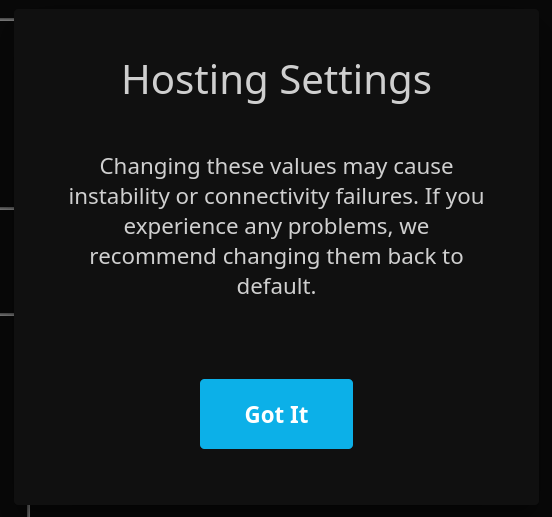

No I do not see this dialog. When I press save, nothing happens, it just seems like the button is broken.
I had the same problem when changing an option that requires a restart. In my case that was proxy setting. Could you look into the browsers dev console? I guess there should been an error

There is (on chrome only), you can look at the two mentioned issues in this thread to see how this issue can happen.

Hello, new Jellyfin user here who is experiencing the same problem on a brand new RPi4 install. Why is the SAVE button non-functional and why does it give zero output?

No I do not see this dialog. When I press save, nothing happens, it just seems like the button is broken.
same here. clicking it does nothing, at all. the cursor changes to hand when you hover over it which implies it should be clickable -- but nothing happens.
Is there a config file I can just edit manually since this web interface is completely busted?
Is there a solution to this issue?
I haven't been able to get past it honestly. Because it happens so early in the setup I wasn't actually able to use Jellyfin and I don't know a way around it and I started looking at alternatives.
I was able to reproduce this with release-10.7.z branch in both, Chrome 99 and Firefox 97.
In Chrome: error An invalid form control with name='' is not focusable., as mentioned.
In Firefox: silent no action.
Can't say why is that, because the template and the controller of network view are the same as in 10.8, ~where it works.~
UPD: It doesn't seem to work. Perhaps it worked in some previous version of the browser.
Fixed by adding the novalidate attribute to the form:
https://github.com/jellyfin/jellyfin-web/blob/be195b0e240b4a4b871eb6a7fe8e4830bd9ab12c/src/controllers/dashboard/networking.html#L4
<form class="dashboardHostingForm" novalidate>
For reference, https://stackoverflow.com/questions/22148080/an-invalid-form-control-with-name-is-not-focusable
Fields UDP Communication Range and SSDP Filter have undefined values that don't match their masks, and the browser validates them, despite they aren't required. They are hidden - that's why "is not focusable" error occurs.
Emptying them or trimming the values according to the masks fixes the form submitting.
Steps to reproduce:
- Navigate to Settings > Advanced > Networking
- Under "Remote Access Settings" ensure "Allow remote connections to this server." is checked ✅
- Under "Public HTTP port number" delete the port number value leaving an empty input box
- Uncheck "Allow remote connections to this server."
- Attempt to submit the form
- Please note a console log error message is logged "An invalid form control with name='' is not focusable."
This is caused by the form hiding elements which are marked to be validated during the form submit.
Recommended fix: Remove this event handler from the code. The section of the form will no longer be hidden when the user checks "Allow remote connections to this server." and form validation will work as expected.

This issue has gone 120 days without comment. To avoid abandoned issues, it will be closed in 21 days if there are no new comments.
If you're the original submitter of this issue, please comment confirming if this issue still affects you in the latest release or master branch, or close the issue if it has been fixed. If you're another user also affected by this bug, please comment confirming so. Either action will remove the stale label.
This bot exists to prevent issues from becoming stale and forgotten. Jellyfin is always moving forward, and bugs are often fixed as side effects of other changes. We therefore ask that bug report authors remain vigilant about their issues to ensure they are closed if fixed, or re-confirmed - perhaps with fresh logs or reproduction examples - regularly. If you have any questions you can reach us on Matrix or Social Media.