

 jeffreybergier
coordinate system conversion doesn't work as expected
I'm trying to make UIKit <-> AV <-> Vision coordinate systems work together and your example of conversion makes sense. Unfortunately, when I'm trying to apply it to face detection approach and draw a rectangular of a detected face the coordinates are completely off
for example, when a user taps on screen coordinates x: 200 y: 100 I'm drawing a box at that position with width: 100, height: 150
let tappedAt = sender.location(in: self.cameraView)
let uiBox = CGRect(x: tappedAt.x, y: tappedAt.y, width: 100, height: 150);
let avBox = self.cameraLayer.metadataOutputRectConverted(fromLayerRect: uiBox)
let vnBox = CGRect(x: avBox.origin.x, y: 1 - avBox.origin.y, width: avBox.width, height: avBox.height)

print("user tapped at: ", tappedAt.x, tappedAt.y)
print(String(format: "-> UI box | x:%.01f y:%.01f w:%.01f h:%.01f", uiBox.origin.x, uiBox.origin.y, uiBox.width, uiBox.height))
printMsg(String(format: "-> AV box | x:%.01f y:%.01f w:%.01f h:%.01f", avBox.origin.x, avBox.origin.y, vnBox.width, avBox.height))
print(String(format: "-> VN box | x:%.01f y:%.01f w:%.01f h:%.01f", vnBox.origin.x, vnBox.origin.y, vnBox.width, vnBox.height))
it gives the following output:
user tapped at:  200.0 100.0
-> UI box | x:200.0 y:100.0 w:100.0 h:150.0
-> AV box | x:0.1 y:0.6 w:0.4 h:0.3
-> VN box | x:0.1 y:0.4 w:0.4 h:0.3
- why the width and height are flipped (width of the UI box corresponds to the height of the AV/VN boxes)?
- why
xfor the UI box corresponds toyof the AV/VN box (I tapped at x: 200 but it affects theypart of AV/NV box, notx)?
It looks like the coordinate system is flipped but I'm unable to come up with the specific system to convert coordinates properly and draw the bounding box for a detected face

I was able to transform it via flip and shift to width/height but I supposed it shouldn't be that tricky:
let vnBox = newObservation.boundingBox
print(String(format: "-> VN box | x:%.01f y:%.01f w:%.01f h:%.01f", vnBox.origin.x, vnBox.origin.y, vnBox.width, vnBox.height))
let avBox = CGRect(x: 1 - (vnBox.origin.y + vnBox.width), y: 1 - (vnBox.origin.x + vnBox.height), width: vnBox.width, height: vnBox.height)
print(String(format: "-> AV box | x:%.01f y:%.01f w:%.01f h:%.01f", avBox.origin.x, avBox.origin.y, avBox.width, avBox.height))
let uiBox = self.cameraLayer.layerRectConverted(fromMetadataOutputRect: avBox)
print(String(format: "-> UI box | x:%.01f y:%.01f w:%.01f h:%.01f", uiBox.origin.x, uiBox.origin.y, uiBox.width, uiBox.height))
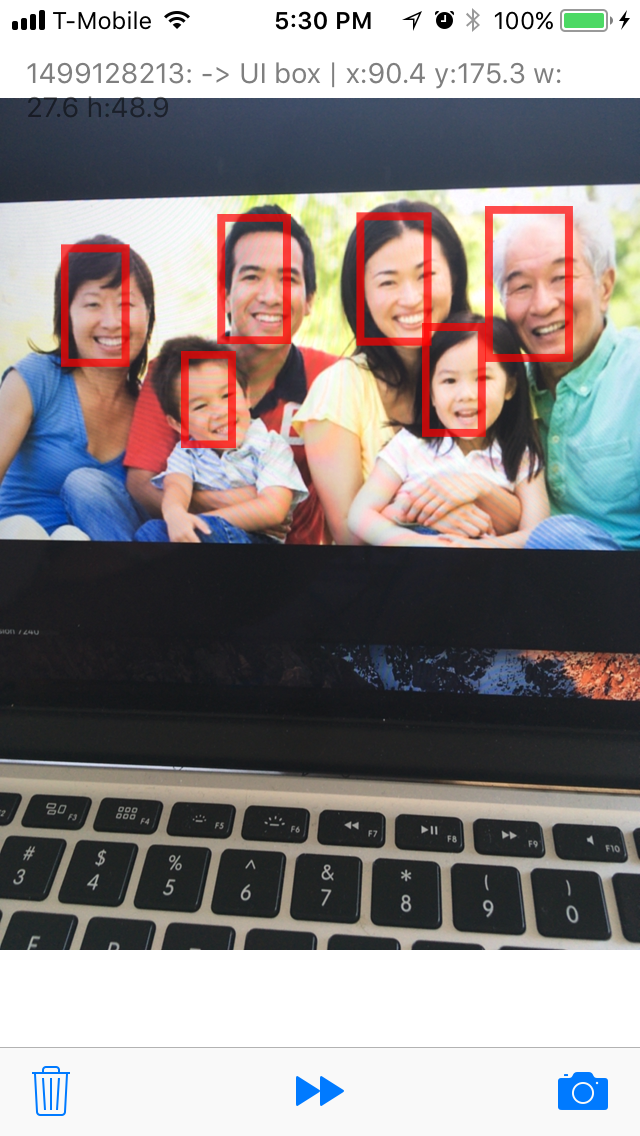
AFAIR, you only need to flip the Y origin to switch back and forth between AVFoundation space and Vision space. I'm not sure why you're having to flip the the X origin as well. However, that picture is so symmetrical in the X direction, it can be hard to tell if you're flipping it right. Try finding a photo that has only 1 face in one corner of the photo. That way you know you're doing the flipping correctly.

@alexeystrakh Hey Alex, The same issue occurred while writing another app when i want to track a rect whose width != height.
The looks like in your app, your device orientation is portrait. But the issue is the VISION framework seems to understand the camera in a "landscape" mode. In this way the width of the rect(in portrait mode) becomes the height of the rect in landscape mode.
covert your uibox by convertRectToHorizontal defines below.
let kWidth = UIScreen.main.bounds.width
let kHeight = UIScreen.main.bounds.height
func convertRectToHorizontal(rect: CGRect) -> CGRect{
    return CGRect.init(x: rect.minY, y: kWidth - rect.origin.x - rect.width, width: rect.height, height: rect.width)
}
and you will get what you expected.

same for me:
var transformedRect = newObservation.boundingBox
transformedRect.origin.y = 1 - transformedRect.origin.y
let convertedRect = self.cameraLayer.layerRectConverted(fromMetadataOutputRect: transformedRect)
doesnt work as expected
resulted rects lower than expected I use next code instead:
let rectWidth = source.size.width * boundingRect.size.width
let rectHeight = source.size.height * boundingRect.size.height
let rect = CGRect(x: 0, y:0, width: source.size.width, height: source.size.height)

The best way to solve this is to use affine transform :
let t = CGAffineTransform(translationX: 0.5, y: 0.5)
            .rotated(by: CGFloat.pi / 2)
            .translatedBy(x: -0.5, y: -0.5)
            .translatedBy(x: 1.0, y: 0)
            .scaledBy(x: -1, y: 1)
var box = obs.boundingBox.applying(t)
box = previewLayer.layerRectConverted(fromMetadataOutputRect: box)
Note that I didn't even tried to optimize and refactor the affine transform.

It looks like apple may have a solution for the rectangle problem. I just saw it today and haven't tried it. Might be worth a look though: https://developer.apple.com/documentation/vision/2908993-vnimagerectfornormalizedrect?language=objc