
code-eol

code-eol copied to clipboard
 jeff-hykin
Compare view: EOL character not shown by default in left pane
Steps to reproduce
- Set
"code-eol.toggleWithWhiteSpace": true(or don't set it, because it istrueby default). - Open a file.
- Make sure whitespaces are shown (call "View: Toggle Render Whitespace" if needed)
- Call the command "File: Compare Active File With..."
- Select another file.
Actual results
- The left pane shows whitepaces, but no EOL character.
- The right pane correctly shows EOL characters with whitespaces.
Expected results
- EOL characters should be displayed in both panes.
Extra steps
- Set focus on the left pane. EOL characters are now displayed!
Video
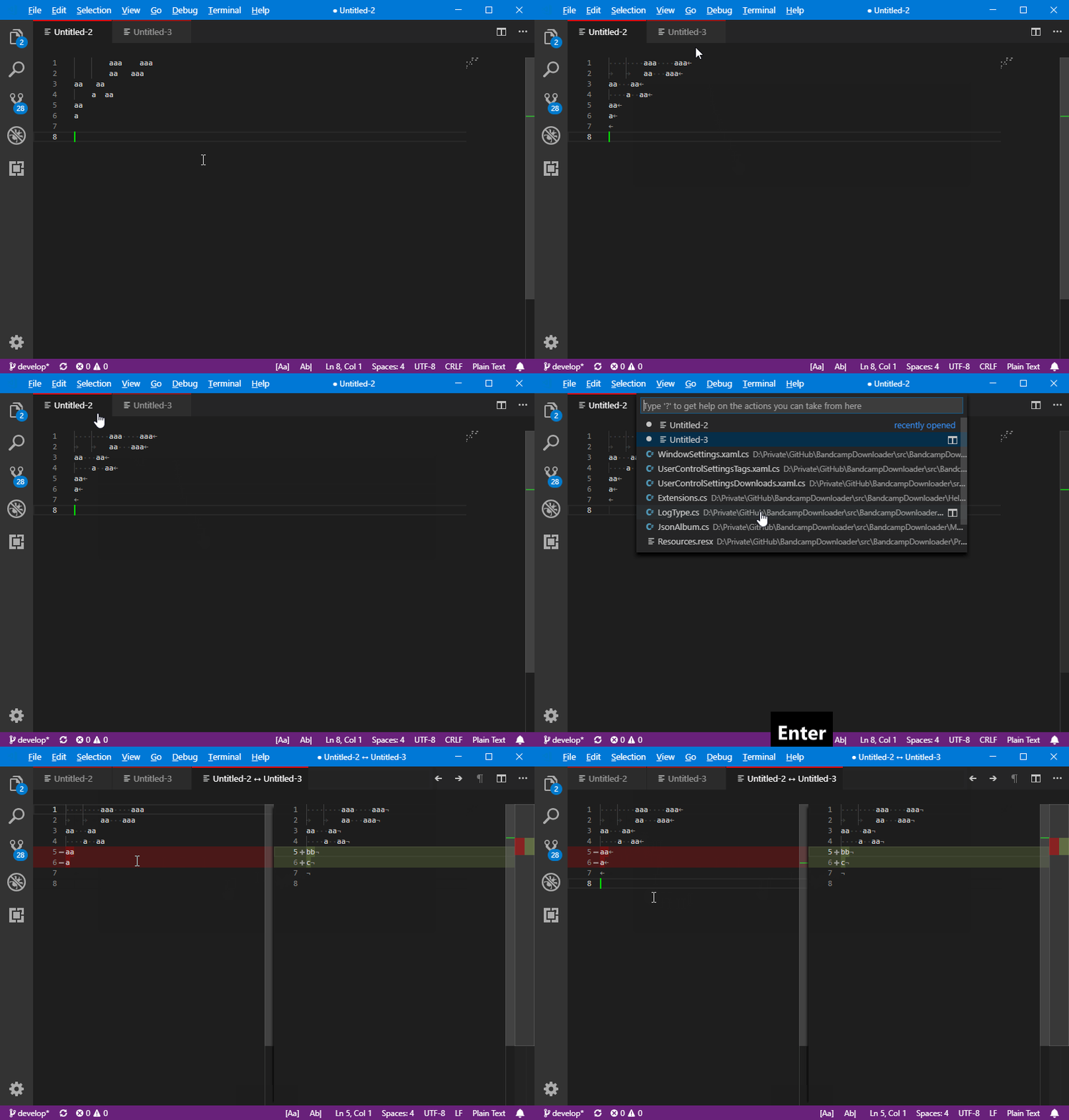

Thanks for posting a video of it that is super helpful!
Right now the line endings get drawn because they're listening to a event like "document is active" or "edit document". I probably need to find another event for when the document is visible but not necessarily active. I'll start looking for that event, and once it's found this should be a 3 line fix.
