

 jbevain
Resolving package references in .NET Core not supported?
In https://github.com/jbevain/cecil/issues/306#issuecomment-339185862, #306 was closed as "done" (via #444), but exactly to what extent was that? Or rather: what capabilities are to be expected by the built in assembly resolver for .NET Core?
Reason I'm asking is I see even latest version (beta 7) fail on resolving package references.
I set up this rather simple scenario, and it fails predictably on a AssemblyResolutionException:
- Target\
- Target.csproj - reference some NuGet package - I tested with Ninject
- Sample\
- Sample.csproj - consume
Target.dll, fetch reference to Ninject and tries to resolve it. But fail.
- Sample.csproj - consume
I wrapped it up in a simple sample repo in case you are interested to try it out:
https://github.com/per-samuelsson/CecilPackageResolve
Just enter \src and run run.bat, or if you are not on windows:
dotnet build .\Target
dotnet run -p .\SampleApp\SampleApp.csproj
Is it so that resolver will only work on published targets?


will you manipulating the target assembly in the context of MSBuild?
That's the idea, yes. But it's not isolated to that scenario, as the sample illustrate. And I will definitely do all I can to stay away from implementing any type of custom task. 😄
I think the assembly resolver for .NET Core assumes the published case, where all package references are copied in the target directory.

... assembly resolver for .NET Core ...
Is that BaseAssemblyResolver compiled with NET_CORE defined?
... assumes the published case, where all package references are copied in the target directory.
And I guess no aim to address this in the pipe, right? Would be good to know in order to adapt.
I solve this problem by passing the list of ReferencePath items for the assembly being post-compiled to my MSBuild task, which implements a custom IAssemblyResolver that resolves assemblies based on the contents of this item list. Since this list is just what csc uses to compile the assembly in the first place, this works regardless of the target framework.

Apparently Atykhyy's comment would be the solution (referring to issue 526). But I'm still struggling with this. I'm creating a call instruction to System.Reflection.MethodBase::GetCurrentMethod(), but when running it or checking it via a disassembler, I get an exception BROKEN CLASS token_ 100000f due to Could not load file or assembly 'System.Private.CoreLib, Version=4.0.0.0, Culture=neutral, PublicKeyToken=7cec85d7bea7798e' or one of its dependencies.. Is there a way to tell AssemblyDefinition.MainModule.ImportReference to use mscorlib or something else than System.Private.CoreLib?

@Phyyl how r u importing System.Reflection.MethodBase::GetCurrentMethod?
I'm using assemblyDefinition.MainModule.ImportReference(typeof(MethodBase).GetMethod("GetCurrentMethod"));
ImportReference(typeof(MethodBase) wont work since that will import the MethodBase that resolves in the current running code.
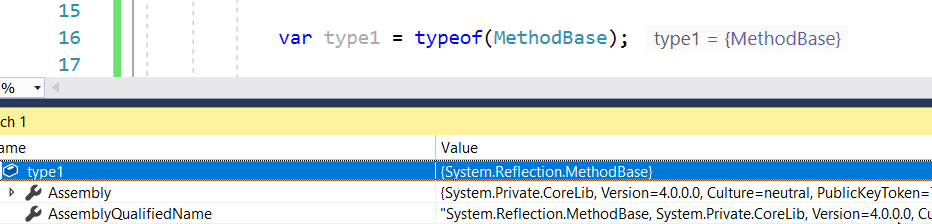
basically u should avoid the ImportReference(typeof...) approach
instead u need to resolve the path to netstandard eg
C:\Program Files\dotnet\sdk\NuGetFallbackFolder\netstandard.library\2.0.3\build\netstandard2.0\ref\netstandard.dll
do a module load on that, find the type+method using strings, and the import that method
Ok cool I'll try that, but I'll also be compiling on other platforms. Is there a way to get the netstandard.dll location programatically?
Is there a way to get the netstandard.dll location programatically?
it depends on the context. With fody i have the full MSbuild context. so msbuild passes me the path to netstandard.dll. so in what context are you importing?
It's a console application that I use to create interface implementation that redirects calls to an other object. I run it as a Target in a csproj after the build
I guess not, I'll try and have a look at fody. My tools is embedded in a nuget package and runs as a <Target AfterTargets="AfterBuild"> and I would prefer not having dependencies in my nuget package
I would prefer not having dependencies in my nuget package
agreed, and wasnt suggesting u use fody.
In AfterBuild you can access the reference paths using @(ReferencePath) https://github.com/Fody/Fody/blob/master/Fody/Fody.targets#L39
I have posted the helper code that improves on my previous approach in atykhyy/cecil-msbuild-helper.