

 jbetancur
Sort does not work how I expected it to (with non unique values)
Issue Check list
- [ X] Agree to the Code of Conduct
- [X ] Read the README
- [ X] You are using React 16.8.0+
- [ X ] You installed
styled-components - [ ] Include relevant code or preferably a code sandbox
Describe the bug
The bug is as follows: If I sort the table using built in sorting methods, which according tot he docs you use array sort, there is something off with the state (since 7.4.7 and in 7.5) that causes additional "ghost" items to be added.
To Reproduce
First I have a table as seen in this screen shot:
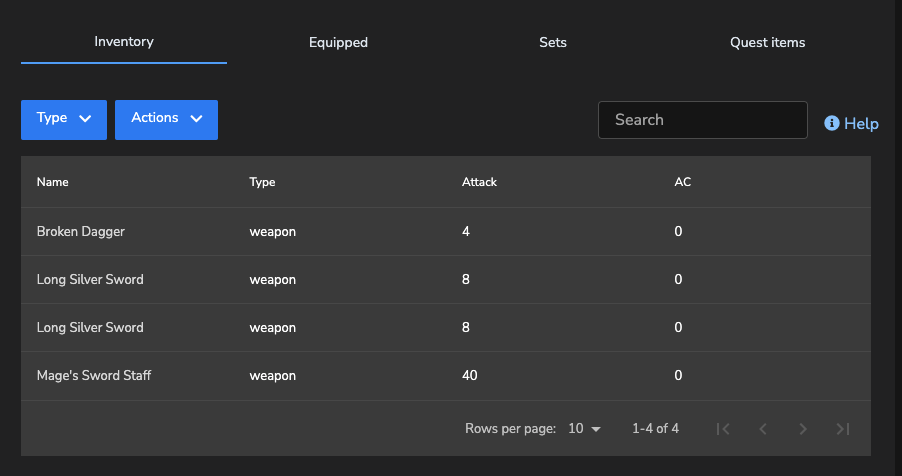
As we can see I have two non unique items in this table: Lets sort by attack:
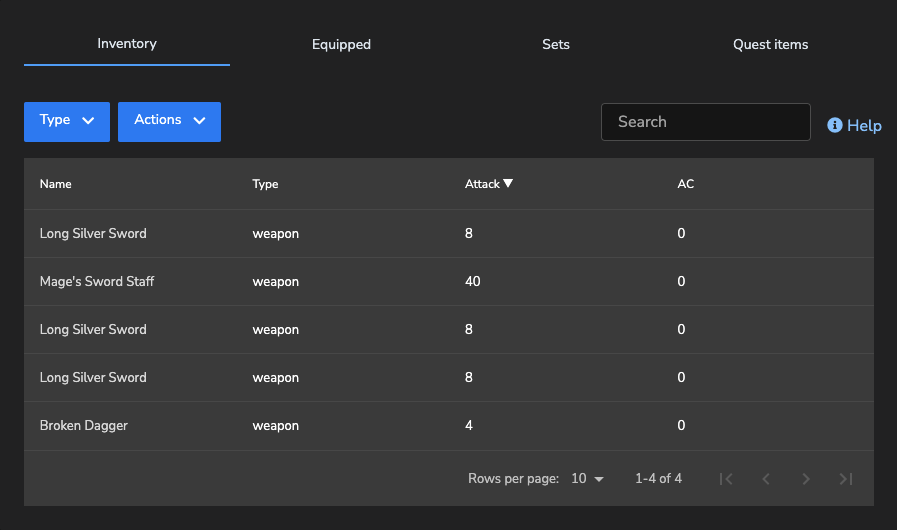
Now we have three of these swords. Remember, we had two. We only have two. I am not using any third party sorting methods
Keep sorting and you end up with more and more and more long swords, pagination does not even kick in the table just keeps growing.
Expected behavior
When I sort the items should not "duplicate" them selves.
Code Sandbox, Screenshots, or Relevant Code
Screen shots are seen above.
Versions (please complete the following information)
- React 17.0.*
- Styled Components 5.3.3
- Mac (any os really)
- Chrome
Additional context
I discovered this issue while implementing my custom search, as this table component does not have a search feature. I filter the data I provide to the table based on x, y and z.
When I was testing the search, the data being sent to your component (for example if I searched Broken ) would be one object in the array and the table would work. But if I searched for Silver Long, the table would update to show three silver long swords, but the props being sent to your data component only showed 2 objects in the array, not three.
I believe this might be a state or a "on component did update" issue, because your built in sort, causes the same issue as my custom search and I do no thing custom to this table other than define columns.
I have one core table that is just responsible for passing the columns and the data to your component to render the table, aside from that there is no custom sort logic or any other state manipulation logic that I could see that could cause this issue, my data going in is correct, but the data being displayed is not.
The only thing I can see that would cause this is the fact that you do not support duplicate values in the table, which is off because you use keys for everything, so this should work?

Can you post some code or a sample of y our data?Can you dupe this with a sandbox? https://codesandbox.io/embed/react-data-table-sandbox-ccyuu
Also make sure you set a keyField prop if you data. By default RDT needs a unique row field named id. If it is something else keyField allows you to specify it. All rows must have a unique key.

I am having the same issue. I tried using a different 'keyField' just in case my id were duplicated and I also ran a query inside my DB using the two 'duplicated keys' from the warnings inside the console, but the data was not duplicated. The sort event is making the keys crash. Additionally, I updated from version 7.4.5 to the latest, but the bug is still happening. Thanks for your help!
