
ChocolateyPackages
 ChocolateyPackages copied to clipboard
 jberezanski
[Docker] Fails to pass --package-parameters to buildtools
I am trying to call:
choco install -y visualstudio2019-workload-universalbuildtools --params "--add Microsoft.VisualStudio.Component.TextTemplating"
I am getting this result:
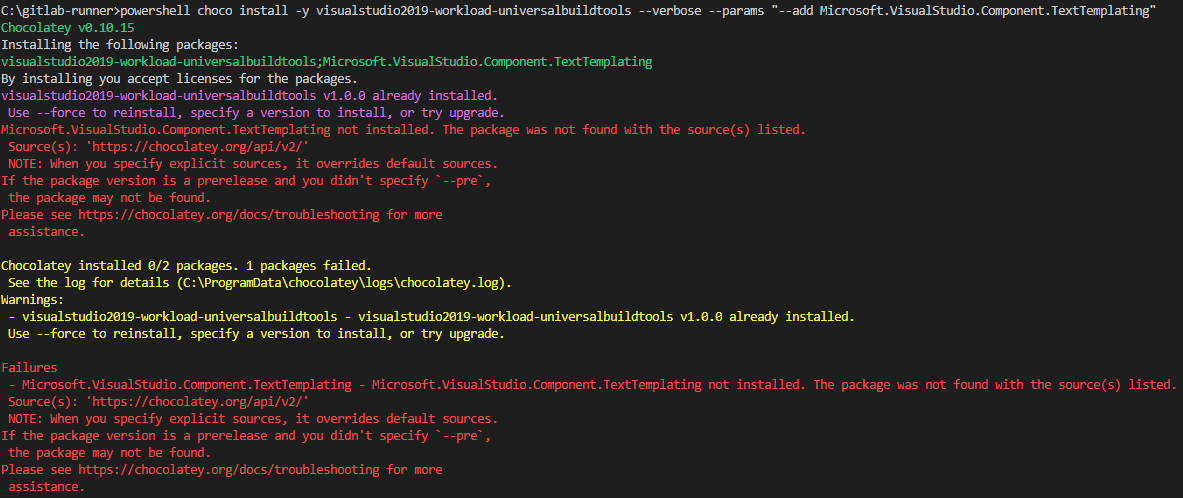 It seems to me it tries to install
 Microsoft.VisualStudio.Component.TextTemplating package from choco instead of passing it to the other package.

Yes, this seems to be a quoting issue. You do not need to call powershell, try using the exact command you posted (without prepending powershell to it), that way there will be one less application in the invocation chain and less chance of command line parameters being mangled.

When I run this on my Win10 1909 system, I get the same symptom you described when I run powershell choco install..., but when I run choco install... it works correctly. Please double check the command you actually run.
I didn't mention that I am running it in a docker file. I thought it does not make any difference but maybe it does. Here is the dockerfile:
# escape=`

FROM mcr.microsoft.com/dotnet/framework/sdk:4.8-windowsservercore-ltsc2019

ADD https://chocolatey.org/install.ps1 /scripts/install.ps1

RUN powershell -File "C:/scripts/install.ps1"

#RUN choco install -y visualstudio2019-workload-universalbuildtools --package-parameters "--add Microsoft.VisualStudio.Component.TextTemplating"
RUN ["choco", "install", "-y", "visualstudio2019-workload-universalbuildtools", "--package-parameters \"--add Microsoft.VisualStudio.Component.TextTemplating\""]
RUN command should run commands in cmd.exe by default. I tried different syntax but still the same issue...
It certainly does. Other users have reported problems with parameter quoting in dockerfiles before. Unfortunately, nobody posted a working example and I don't use Docker so I probably won't be able to help here.
Anyway, the problem is not with these packages (or Chocolatey), rather it is about how to properly pass arguments containing spaces to an executable called from a dockerfile - and that problem statement is generic enough that you could try asking in Docker forums.
One last shot in the dark: what happens if you try
RUN ["choco", "install", "-y", "visualstudio2019-workload-universalbuildtools", "--package-parameters", "--add Microsoft.VisualStudio.Component.TextTemplating"]
?
Exactly the same problem with buildtools or community or any MSVC stuff... : --locale en-US : doesn't work at all --addProductLang fr-FR : doesn't work too
I think no parameters work...
Doesn't work in a dockerfile, BUT also doesn't work inside a Docker container running in manual mode too (with 'run -it'), strange because inside a container in manual mode is like inside 'a real computer', very strange...
For example, the main sample we can find here in the official documentation: https://chocolatey.org/packages/visualstudio2017buildtools
choco install visualstudio2017buildtools --package-parameters "--allWorkloads --includeRecommended --includeOptional --passive --locale en-US"
doesn't work

It certainly does. Other users have reported problems with parameter quoting in dockerfiles before. Unfortunately, nobody posted a working example and I don't use Docker so I probably won't be able to help here.
Anyway, the problem is not with these packages (or Chocolatey), rather it is about how to properly pass arguments containing spaces to an executable called from a dockerfile - and that problem statement is generic enough that you could try asking in Docker forums.
One last shot in the dark: what happens if you try
RUN ["choco", "install", "-y", "visualstudio2019-workload-universalbuildtools", "--package-parameters", "--add Microsoft.VisualStudio.Component.TextTemplating"]?
I was interested in installing visualstudio2019buildtools with additional workloads but run into similar issue.
I've ended up with installing separate choco packages with required workloads but that was still not enough as I had to enable some optional component in a workload.
I was executing:
RUN choco install visualstudio2019-workload-vctools --package-parameters "--add Microsoft.VisualStudio.Component.VC.v141.x86.x64"
which resulted in below error:
Failures
 - Microsoft.VisualStudio.Component.VC.v141.x86.x64 - Microsoft.VisualStudio.Component.VC.v141.x86.x64 not installed. The package was not found with the source(s) listed.
 Source(s): 'https://chocolatey.org/api/v2/'
 NOTE: When you specify explicit sources, it overrides default sources.
If the package version is a prerelease and you didn't specify `--pre`,
 the package may not be found.
Please see https://chocolatey.org/docs/troubleshooting for more
 assistance.
The command 'powershell -Command $ErrorActionPreference = 'Stop'; $ProgressPreference = 'SilentlyContinue'; choco install visualstudio2019-workload-vctools --package-parameters "--add Microsoft.VisualStudio.Component.VC.v141.x86.x64"' returned a non-zero code: 1
While below command executed exactly as expected:
RUN ["choco", "install", "visualstudio2019-workload-vctools", "--package-parameters", "--add Microsoft.VisualStudio.Component.VC.v141.x86.x64"]

Instead of trying to solve the escaping/quoting problem in Docker, why not avoid it altogether:
- put the
choco install ...command in a.cmdscript, - add the script to the image,
- invoke it from the dockerfile with a simple RUN with no parameters or quotes needed.