
vue-grid-layout
 vue-grid-layout copied to clipboard
 jbaysolutions
Items overlap upon window resize
Software version (please complete the following information):
- Browser Chrome
- Vue Version 2.6.10
- vue-grid-layout Version:2.3.7
Describe the bug I'm having a responsive grid layout:
    :responsive="true"
    :cols="{ lg: 3, md: 2, sm: 2, xs: 1, xxs: 1 }"
If I have an item on column 3 and i resize window so that only 2 columns would fit the items overlap.


I was able to fix it on my end. My issue was that I was using vuex and getting the array through a computed property. I simply added a set function to the property to uodated the state and that fixed it! (There is no need to update the DB)
I was able to fix it on my end. My issue was that I was using vuex and getting the array through a computed property. I simply added a set function to the property to uodated the state and that fixed it! (There is no need to update the DB)
I have the same problem as you, also using vuex and computed property. But when I switch the browser mode to mobile phone, refreshing the page, the problem also appears

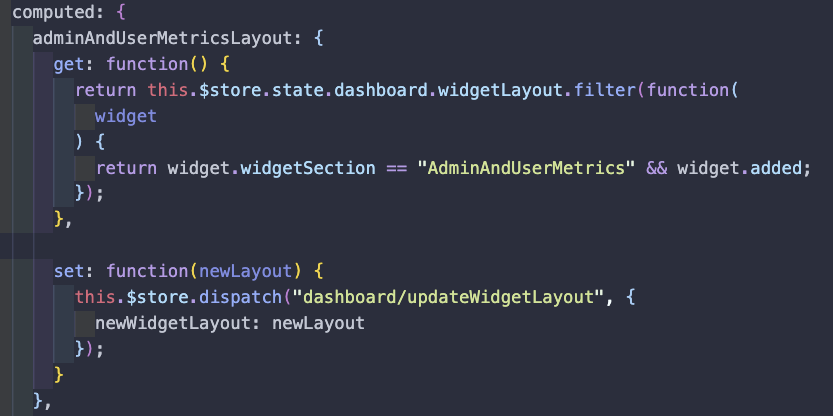

I was able to fix it on my end. My issue was that I was using vuex and getting the array through a computed property. I simply added a set function to the property to uodated the state and that fixed it! (There is no need to update the DB)
I have the same problem as you, also using vuex and computed property. But when I switch the browser mode to mobile phone, refreshing the page, the problem also appears
same with me, overlap still happens when refreshing.
Anybody found a fix? I'm thinking about forcing to rearrange if screen size changed. But how?

I was able to fix it on my end. My issue was that I was using vuex and getting the array through a computed property. I simply added a set function to the property to uodated the state and that fixed it! (There is no need to update the DB)
I have the same problem, how to add a set function?

I was able to fix it on my end. My issue was that I was using vuex and getting the array through a computed property. I simply added a set function to the property to uodated the state and that fixed it! (There is no need to update the DB)
I have the same problem, how to add a set function?
Just do it like this:
computed: {
 yourComputedProperty: {
  get(){ return this.$store.getters.someProperty}
  set(value) { this.$store.commit('setProperty', value)}
}
I also had this issue because I was using a Vuex getter. Once I put the setter in place I also had to ensure I had .sync set on the layout prop for GridLayout or else it wasn't trying to use my setter:
<GridLayout
      :layout.sync="dashLayout"
      :key="0"
      :cols="{ lg: 12, md: 8, sm: 8, xs: 4, xxs: 1 }"
      :row-height="10"
      :is-draggable="true"
      :is-resizable="true"
      :responsive="true"
      :margin="[10, 10]"
>

Even official responsive example have this issue. @gmsa Im using Chrome Version 86.0.4240.183 (Official Build) (64-bit)

That is happening because the docs are generated with vuepress, which uses ssr and causes problems.
EDIT: anyway, the layout prop was missing the .sync modifier, that fixed it in the example.

I had a similar issue and was using vuex getter to get items from the store. In my case part of the issue was the items were not ready when grid layout is rendered. Therefore I used v-if to check items are loaded.
<grid-layout :layout.sync="widgets.layouts" :col-num="colNum" :row-height="60" :is-draggable="draggable" :is-resizable="resizable" :vertical-compact="true" :auto-size="true" :use-css-transforms="false" :cols="columns" :responsive="true" v-if="loaded">
