
Yury Bushmelev

Yury Bushmelev
News from end of October here. I tried it today with same result. So I wiped backup directory completely and started from scratch. Now it's running fine. Catching the lag...
Attaching JVM memory graph here just for reference. Part on the left is on old backup directory. Part on the right is fresh start. Largest area is 'G1 Old Gen'....
It's dead again after nightly backup restart :( JVM memory usage graph for last 24h: 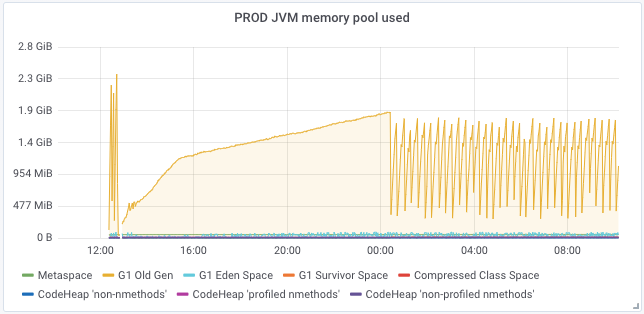 Total lag value graph for last 24h (it was started from 76Mil IIRC): 
Ah, there was no restart actually. I forgot to enable systemd timer for it. Found this in logs: ``` Oct 29 16:24:45 backupmgrp1 docker/kafka-backup-chrono_prod[73214]: org.apache.kafka.clients.consumer.CommitFailedException: Commit cannot be completed since...
JFYI, I wiped it out and started with fresh backup. Feel free to close this issue.
Hi! Yes, I have old directory backup still. Though using it may affect current cluster backup state I guess as I didn't changed sink name..
My guess here is this target dir was broken in some way during eCryptfs enabling attempts. Maybe some file was changed accidentally or something like this.
Happened today on another cluster too... I have Azure backup cronjob which is stopping kafka-backup, then umounting eCryptfs, then doing `azcopy sync`, then mounting eCryptfs back and starting kafka-backup. Tonight...
BTW can failed sink cause kafka-connect to exit? It'd be nice if whole standalone connect process will fail in case of single sink failure (when no other sink/connector exists).
> > Do you want me to do some debugging on this data? I cannot upload it as it's contains company's sensitive data... > > Yes please! That would be...