

 javascriptdata
readExcel not importing all columns
Describe the bug
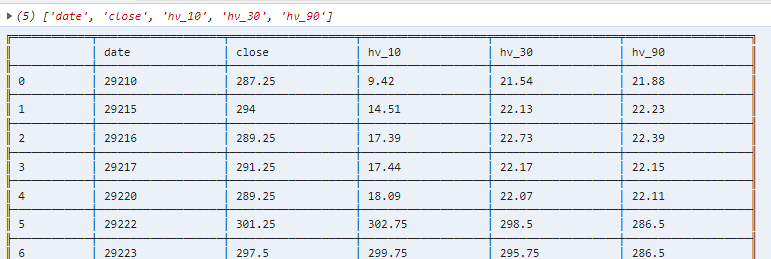
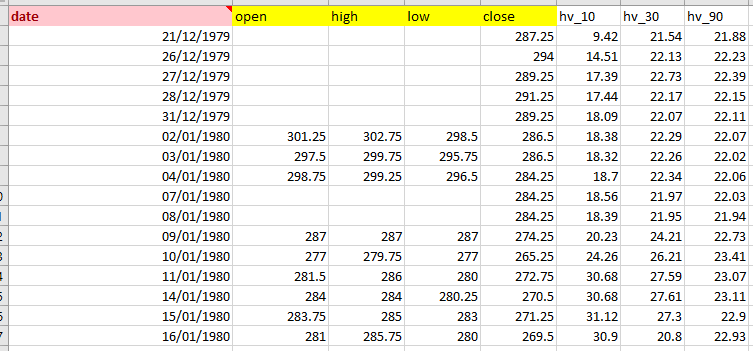
When opening an excel file, columns with no data in first row are ignored.
To Reproduce
dfd.readExcel(remote_url, ).then(df => { df.print() });
Expected behavior In imported file (below), only 5 columns are read by readExcel, open, high, low are missing.

Describe the bug When opening an excel file, columns with no data in first row are ignored.
To Reproduce
dfd.readExcel(remote_url, ).then(df => { df.print() });Expected behavior In imported file (below), only 5 columns are read by readExcel, open, high, low are missing.
Interesting, 🤔 We currently use XLSX package for loading Excel files

Is there any way to specify the headers? or the first row number to parse? I couldn't find any relevant options in the doc.
Describe the bug When opening an excel file, columns with no data in first row are ignored.
dfd.readExcel(remote_url, ).then(df => { df.print() });Expected behavior In imported file (below), only 5 columns are read by readExcel, open, high, low are missing.Interesting, 🤔 We currently use XLSX package for loading Excel files
It should be the best way at present. Forget the readExcel!

My code seems to not import excel files at all. Although it works for csv files (with readCSV())
async function loadData(){
    let df = await dfd.readExcel('data.xlsx')
    df.head().print()
}
The data.xlsx file is in the same directory.
