

 jasonacox
Scanner rewrite
It's not finished yet, I have a bunch of stuff commented out as it hasn't been updated yet, but this is the direction I'm heading. Doing a force-scan adds 4-7 seconds (depending on if it's local or on the other side of a router) to the scan time (which I have defaulting to 18 seconds) using 150 parallel requests and a 3-second connect timeout. Matching scan-detected devices to IDs still needs work as mentioned in #172 . Closes #159 and closes #172.

Well, I had it all nice and neat, but after I added broadcast-discovered device polling back in it kinda spaghetti'd. I may make some classes to better handle how the different socket types process stuff.
Parallel-socket theory of operation:
There are 3 different types of sockets: force-scan connection attempts, broadcast-discovered status polling, and the UDP broadcast receiver. All 3 are stuffed into either the "waiting to write" list or the "waiting to read" list, both of which are fed into select.select(). select() then returns all the sockets which are writable or readable. I currently have a fixed sleep time (200ms during the force-scan phase and 100ms during the broadcast-discovery phase) before the select() call with select() itself getting 0 in order to keep the spinny thing spinning at a constant rate.
When a force-scan connection is first opened, it is dropped into the "write" list. select() then returns it when it either connects, or the connection was actively refused. (Timeouts are handled elsewhere.) If the connection succeeds, it is marked as discovered, a DP_QUERY is sent, and the sock is moved into the "read" list. If the connection failed then it tries to determine if it was refused, or if it connected but then dropped. If it was dropped then it is retried exactly 1 more time. If it was refused, or if the retry fails, it is closed and ignored. When the DP_QUERY response is received, it is decoded and saved if it has payload data. It is then left open in read mode to see if the device broadcasts unsolicited status updates; this is to try and detect which version it is as the DP_REQUEST response does not include it.
When a broadcast is received with polling enabled, a connection is created and it is placed into the "write" list just like force-scan sockets. A connection failure is retried 3 times. Once connected, a status request is sent and the socket is moved into the "read" list. When a status response is received or it exhausts the failure retries, the device info is printed and the socket is closed.
The UDP broadcast receiver is always in the "read" list. When a broadcast is received, a status polling socket is opened if polling is enabled or the device details are immediately displayed if not.
Currently, force-scanned device details are not displayed until the very end after all scanning has finished in hopes that an unsolicited status update is received. I may change this so it displays earlier and then updates should it get one.
Great research here @uzlonewolf I can't wait to try it myself. Also, I'm traveling this week without good acces so I may be a bit more silent than normal.

The scanner branch may be out of sync. Testing this draft, it is fast, but also getting errors on all devices:
python3 -m tinytuya scan
Polling 10.0.1.45 Failed: Send Poll failed
It is. I've basically rewritten it yet again since that last commit but haven't pushed it yet as it's not done. I got passive broadcast listening working again so I'll go ahead and push it, but force scanning isn't going to work yet.
New features:
Scans end after a certain amount of time instead of a count of packets
If you pass wantips=[...] or wantids=[...] the scan will terminate after all of the passed IPs or GW IDs are found even if there is time left
If you pass snapshot={...} then it will only scan the IPs listed in that dict
If a device is found at the last second, the scan time is extended by the lesser of "the time it takes to poll the device" or (connect_timeout * retries)
getmac is used if installed, but it is no longer required
Force scanning features which are not working yet:
When forcescan=True is passed, the netifaces module is used to get a list of every IP address/network attached to the machine and scans all of them. If netifaces is not available it falls back to the original single-IP getmyIP() function.
When forcescan=[...] then all listed networks are scanned.
Because Layer 2 information is not available, force scanned devices are fingerprinted to try and determine the device version and gwId:
When sent an unencrypted status request, v3.1 devices will return the status v3.2 devices will ??? v3.3 devices will return an encrypted rejection message which we can then brute-force to find the key v3.4 devices will slam the door in our face by dropping the connection
@jasonacox What do v3.1 devices do when sent a CONTROL command with the incorrect local key? Do they send a rejection message or do they just ignore the request completely?
With 10 devices in my devices.json file (all online), python3 -m tinytuya devices now takes ~6 seconds and snapshot/json are under 2 seconds. If there are offline devices then devices takes ~18 seconds with snapshot/json remaining sub-2 seconds due to them skipping devices without IPs.
@uzlonewolf - here is 3.1 device command behavior using a bad key. Note real lkey = '78c2e271b3dcfae4' but I couldn't get anything out of the payload using the bogus or real key.
Code
import tinytuya

tinytuya.set_debug(True)

d = tinytuya.OutletDevice('03200160ecfabc8d9700', '10.0.1.31', '1234567890abcdef', version=3.1)

print(" > Fetch Status < ")
print(d.status())

print(" > Turn on < ")
d.turn_on()
Output
DEBUG:TinyTuya [1.7.0]

 > Fetch Status <
DEBUG:status() entry (dev_type is default)
DEBUG:building command 10 payload=b'{"gwId":"03200160ecfabc8d9700","devId":"03200160ecfabc8d9700","uid":"03200160ecfabc8d9700","t":"1663207188"}'
DEBUG:sending payload
DEBUG:payload encrypted=b'000055aa000000010000000a000000747b2267774964223a223033323030313630656366616263386439373030222c226465764964223a223033323030313630656366616263386439373030222c22756964223a223033323030313630656366616263386439373030222c2274223a2231363633323037313838227d4db799a10000aa55'
DEBUG:received data=b'000055aa000000010000000a0000005c000000007b226465764964223a223033323030313630656366616263386439373030222c22647073223a7b2231223a747275652c2232223a302c2234223a3136312c2235223a3136382c2236223a313139347d7dafacce430000aa55'
DEBUG:received message=TuyaMessage(seqno=1, cmd=10, retcode=(0,), payload=b'{"devId":"03200160ecfabc8d9700","dps":{"1":true,"2":0,"4":161,"5":168,"6":1194}}', crc=2947337795, crc_good=True)
DEBUG:raw unpacked message = TuyaMessage(seqno=1, cmd=10, retcode=(0,), payload=b'{"devId":"03200160ecfabc8d9700","dps":{"1":true,"2":0,"4":161,"5":168,"6":1194}}', crc=2947337795, crc_good=True)
DEBUG:decode payload=b'{"devId":"03200160ecfabc8d9700","dps":{"1":true,"2":0,"4":161,"5":168,"6":1194}}'
DEBUG:decoded results='{"devId":"03200160ecfabc8d9700","dps":{"1":true,"2":0,"4":161,"5":168,"6":1194}}'
DEBUG:status() received data={'devId': '03200160ecfabc8d9700', 'dps': {'1': True, '2': 0, '4': 161, '5': 168, '6': 1194}}
{'devId': '03200160ecfabc8d9700', 'dps': {'1': True, '2': 0, '4': 161, '5': 168, '6': 1194}}
 > Turn on <
DEBUG:building command 7 payload=b'{"devId":"03200160ecfabc8d9700","uid":"03200160ecfabc8d9700","t":"1663207188","dps":{"1":true}}'
DEBUG:sending payload
DEBUG:payload encrypted=b'000055aa00000002000000070000009b332e31663535313137396430306432636330336d337664587a4f6b445058324a32686e3843715858616369454b68466834436b45654e56534d5859325755436d4a474e612b486944512b2f792b6c6c68682b726b2b4d6b41327347375648654f4941767834566b487558456f454435434a47337131533377643358594e466d4265322f5568575250357a4a656767596d6c623450b8b89f0000aa55'
DEBUG:received data=b'000055aa00000000000000080000008b00000000332e3138343032376239396630333762623037702f726c75342b76564c422b5450505234462b36557333397a387a52686974705550434d4f6945732f753831755833306843712b362b6475636a57494178336e66462b3064426e524d51384b464355645941436953446b7946586f4977496b456a68534d4c4f37544865383dc3a8ce650000aa55'
DEBUG:received message=TuyaMessage(seqno=0, cmd=8, retcode=(0,), payload=b'3.184027b99f037bb07p/rlu4+vVLB+TPPR4F+6Us39z8zRhitpUPCMOiEs/u81uX30hCq+6+ducjWIAx3nfF+0dBnRMQ8KFCUdYACiSDkyFXoIwIkEjhSMLO7THe8=', crc=3282620005, crc_good=True)
DEBUG:raw unpacked message = TuyaMessage(seqno=0, cmd=8, retcode=(0,), payload=b'3.184027b99f037bb07p/rlu4+vVLB+TPPR4F+6Us39z8zRhitpUPCMOiEs/u81uX30hCq+6+ducjWIAx3nfF+0dBnRMQ8KFCUdYACiSDkyFXoIwIkEjhSMLO7THe8=', crc=3282620005, crc_good=True)
DEBUG:decode payload=b'3.184027b99f037bb07p/rlu4+vVLB+TPPR4F+6Us39z8zRhitpUPCMOiEs/u81uX30hCq+6+ducjWIAx3nfF+0dBnRMQ8KFCUdYACiSDkyFXoIwIkEjhSMLO7THe8='
DEBUG:error unpacking or decoding tuya JSON payload
Traceback (most recent call last):
  File "/Users/jason/Code/tinytuya/sandbox/tinytuya/core.py", line 779, in _send_receive
    result = self._decode_payload(msg.payload)
  File "/Users/jason/Code/tinytuya/sandbox/tinytuya/core.py", line 820, in _decode_payload
    payload = cipher.decrypt(payload[16:])
  File "/Users/jason/Code/tinytuya/sandbox/tinytuya/core.py", line 239, in decrypt
    raw = self._unpad(raw, verify_padding)
  File "/Users/jason/Code/tinytuya/sandbox/tinytuya/core.py", line 259, in _unpad
    raise ValueError("invalid padding length byte")
ValueError: invalid padding length byte
DEBUG:ERROR Unexpected Payload from Device - 904 - payload: null
DEBUG:set_status received data={'Error': 'Unexpected Payload from Device', 'Err': '904', 'Payload': None}
Hmm, that response is command 8 (STATUS) despite the request being command 7 (CONTROL). It also seems to decode properly with the real key to b'{"devId":"03200160ecfabc8d9700","dps":{"4":162},"t":1663207186,"s":84738}' so I suspect it was a coincidental async status update.
Do they respond to status requests with no payload at all? Something like print( d._send_receive( tinytuya.MessagePayload(tinytuya.DP_QUERY, b'') ) ) ?
I really need to find a 3.1 device for myself....
@uzlonewolf - If you will allow me, email me your address and I'll send you a 3.1 plug.
Here is your test with good and bad lkey:
>>> d = tinytuya.OutletDevice('03200160ecfabc8d9700', '10.0.1.31', '78c2e271b3dcfae4', version=3.1)
>>> print( d._send_receive( tinytuya.MessagePayload(tinytuya.DP_QUERY, b'') ) )
DEBUG:sending payload
DEBUG:payload encrypted=b'000055aa000000010000000a00000008354862b10000aa55'
DEBUG:received data=b'000055aa000000010000000a0000001d000000016461746120666f726d6174206572726f7271bf61a40000aa55'
DEBUG:received message=TuyaMessage(seqno=1, cmd=10, retcode=(1,), payload=b'data format error', crc=1908367780, crc_good=True)
DEBUG:raw unpacked message = TuyaMessage(seqno=1, cmd=10, retcode=(1,), payload=b'data format error', crc=1908367780, crc_good=True)
DEBUG:decode payload=b'data format error'
DEBUG:Unexpected payload=b'data format error'
DEBUG:ERROR Unexpected Payload from Device - 904 - payload: ""

>>> d = tinytuya.OutletDevice('03200160ecfabc8d9700', '10.0.1.31', '1234567890abcdef', version=3.1)
>>> print( d._send_receive( tinytuya.MessagePayload(tinytuya.DP_QUERY, b'') ) )
DEBUG:sending payload
DEBUG:payload encrypted=b'000055aa000000010000000a00000008354862b10000aa55'
DEBUG:received data=b'000055aa000000010000000a0000001d000000016461746120666f726d6174206572726f7271bf61a40000aa55'
DEBUG:received message=TuyaMessage(seqno=1, cmd=10, retcode=(1,), payload=b'data format error', crc=1908367780, crc_good=True)
DEBUG:raw unpacked message = TuyaMessage(seqno=1, cmd=10, retcode=(1,), payload=b'data format error', crc=1908367780, crc_good=True)
DEBUG:decode payload=b'data format error'
DEBUG:Unexpected payload=b'data format error'
DEBUG:ERROR Unexpected Payload from Device - 904 - payload: ""
You are right... It seems like sending any cmd 7 results in a null cmd 7 response then a cmd 8 response (this with valid lkey).
DEBUG:building command 7 payload=b'{"devId":"03200160ecfabc8d9700","uid":"03200160ecfabc8d9700","t":"1663212818","dps":{"1":true}}'
DEBUG:sending payload
DEBUG:payload encrypted=b'000055aa00000002000000070000009b332e3137303538653333666338656336393461702f726c75342b76564c422b5450505234462b36557333397a387a52686974705550434d4f6945732f752f5042454c6357776a417463575249684c745661624d317047417936327278466b5a7158617669365247727047374f4d5963764f76317457724e446d3336473947593455586979564a477641446d6e70366636645363f4f1925a0000aa55'
DEBUG:received data=b'000055aa00000002000000070000000c0000000018cfc5da0000aa55'
DEBUG:received null payload (TuyaMessage(seqno=2, cmd=7, retcode=(0,), payload=b'', crc=416269786, crc_good=True)), fetch new one - retry 0 / 5
DEBUG:received data=b'000055aa00000000000000080000008b00000000332e3132366633613532613762636539393838702f726c75342b76564c422b5450505234462b36557333397a387a52686974705550434d4f6945732f752f3770525844687a4236775550712f6b5572643136684b5833634d336e526b6267715372736f526d6e6b6a5a5474515a665a5747614f496979664b6f546d4c6e383da0e8c8fd0000aa55'
DEBUG:received message=TuyaMessage(seqno=0, cmd=8, retcode=(0,), payload=b'3.126f3a52a7bce9988p/rlu4+vVLB+TPPR4F+6Us39z8zRhitpUPCMOiEs/u/7pRXDhzB6wUPq/kUrd16hKX3cM3nRkbgqSrsoRmnkjZTtQZfZWGaOIiyfKoTmLn8=', crc=2699610365, crc_good=True)
DEBUG:raw unpacked message = TuyaMessage(seqno=0, cmd=8, retcode=(0,), payload=b'3.126f3a52a7bce9988p/rlu4+vVLB+TPPR4F+6Us39z8zRhitpUPCMOiEs/u/7pRXDhzB6wUPq/kUrd16hKX3cM3nRkbgqSrsoRmnkjZTtQZfZWGaOIiyfKoTmLn8=', crc=2699610365, crc_good=True)
DEBUG:decode payload=b'3.126f3a52a7bce9988p/rlu4+vVLB+TPPR4F+6Us39z8zRhitpUPCMOiEs/u/7pRXDhzB6wUPq/kUrd16hKX3cM3nRkbgqSrsoRmnkjZTtQZfZWGaOIiyfKoTmLn8='
DEBUG:decoded results='{"devId":"03200160ecfabc8d9700","dps":{"1":true},"t":1663212814,"s":86361}'
DEBUG:set_status received data={'devId': '03200160ecfabc8d9700', 'dps': {'1': True}, 't': 1663212814, 's': 86361}
With bad lkey - it basically ignores the command 7 and just sends back an update as you noticed.
>>> d.turn_on()
DEBUG:building command 7 payload=b'{"devId":"03200160ecfabc8d9700","uid":"03200160ecfabc8d9700","t":"1663213360","dps":{"1":true}}'
DEBUG:sending payload
DEBUG:payload encrypted=b'000055aa00000003000000070000009b332e31366134306637616630333233623036316d337664587a4f6b445058324a32686e3843715858616369454b68466834436b45654e56534d5859325755436d4a474e612b486944512b2f792b6c6c68682b726b2b4d6b41327347375648654f4941767834566b486d5951474c4647526a506b4c366e4b63706b6c475a746d4265322f5568575250357a4a656767596d6c6234fdc289990000aa55'
DEBUG:received data=b'000055aa00000000000000080000008b00000000332e3139633837356534343230396631383632702f726c75342b76564c422b5450505234462b36557333397a387a52686974705550434d4f6945732f752b4e3234466d6e576f36627155785a307976686c7872517032594252714b4d3973654c646e72614d6c38554d6148624e7a7273497a2b31455449616f4d6b44776b3de51bbc480000aa55'
DEBUG:received message=TuyaMessage(seqno=0, cmd=8, retcode=(0,), payload=b'3.19c875e44209f1862p/rlu4+vVLB+TPPR4F+6Us39z8zRhitpUPCMOiEs/u+N24FmnWo6bqUxZ0yvhlxrQp2YBRqKM9seLdnraMl8UMaHbNzrsIz+1ETIaoMkDwk=', crc=3843800136, crc_good=True)
DEBUG:raw unpacked message = TuyaMessage(seqno=0, cmd=8, retcode=(0,), payload=b'3.19c875e44209f1862p/rlu4+vVLB+TPPR4F+6Us39z8zRhitpUPCMOiEs/u+N24FmnWo6bqUxZ0yvhlxrQp2YBRqKM9seLdnraMl8UMaHbNzrsIz+1ETIaoMkDwk=', crc=3843800136, crc_good=True)
DEBUG:decode payload=b'3.19c875e44209f1862p/rlu4+vVLB+TPPR4F+6Us39z8zRhitpUPCMOiEs/u+N24FmnWo6bqUxZ0yvhlxrQp2YBRqKM9seLdnraMl8UMaHbNzrsIz+1ETIaoMkDwk='
DEBUG:error unpacking or decoding tuya JSON payload
Traceback (most recent call last):
  File "/Users/jason/Code/tinytuya/sandbox/tinytuya/core.py", line 779, in _send_receive
    result = self._decode_payload(msg.payload)
  File "/Users/jason/Code/tinytuya/sandbox/tinytuya/core.py", line 820, in _decode_payload
    payload = cipher.decrypt(payload[16:])
  File "/Users/jason/Code/tinytuya/sandbox/tinytuya/core.py", line 239, in decrypt
    raw = self._unpad(raw, verify_padding)
  File "/Users/jason/Code/tinytuya/sandbox/tinytuya/core.py", line 259, in _unpad
    raise ValueError("invalid padding length byte")
ValueError: invalid padding length byte
DEBUG:ERROR Unexpected Payload from Device - 904 - payload: null
DEBUG:set_status received data={'Error': 'Unexpected Payload from Device', 'Err': '904', 'Payload': None}
I'll run a loop to ensure I'm not just missing a cmd 7 error response... (UPDATE)
while(True):
     i = i + 1
     print(d.receive())
     if(i%4==0):
         payload = d.generate_payload(tinytuya.CONTROL, {1: True})
         d.send(payload)
Ok - consistent with bad lkey - no cmd 7 response at all, always cmd 8 updates.
I actually went hunting for some right after I made that post, so hopefully I have some on the way. If they show up without v3.1 on them I'll take you up on that offer. I also have some coming which I hope have v3.2 on them; if they do I wouldn't mind sending you a couple if you want.
Thanks for running those commands for me. Looks like I'll at least be able to determine the version, and possibly get the gwId if they happen to send a status update while the connection is open.
Force scanning now (mostly) works.
Device identification for v3.1 devices is not fully implemented yet. For v3.3 devices it provokes an encrypted error message and then starts trying to decrypt that response using known keys until it finds one which works. For v3.4 devices it starts sending the device commands encrypted with each key until it gets a response (which means it found the correct one).
To run a force scan:
python3 -m tinytuya scan -force scans every network attached to the machine if the netifaces package is installed, or just the default network if it is not.
python3 -m tinytuya scan -force 10.0.0.0/24 scans just 10.0.0.0/24
python3 -m tinytuya scan -force 10.0.0.0/24 10.10.0.0/24 10.20.0.0/24 scans 10.0.0.0/24, 10.10.0.0/24, and 10.20.0.0/24.
All force scans also listen for broadcasts in addition to the force-scanned networks.
This is fantastic @uzlonewolf ! The speed improvement is absolutely incredible and I love the -force options!
python3 -m tinytuya scan- I don't have 3.2 devices (still need to find one) but do have 3.1, 3.3 and 3.4 and all are showing up and polling in the scan.python3 -m tinytuya scan force- I get "Starting Scan for network 127.0.0.0/8" so it is looking only at localnet instead of my WLAN (on macos) and I sure didn't wait for the/8:-) - for machines with multiple interfaces I wonder if we should prompt for selection?python3 -m tinytuya scan -force 10.0.1.0/24- I got a great scan but also seems to consistently mis-identify one 3.3 device as 3.4 (also picked up broadcast):
Unknown v3.4 Device   Product ID = ?  [Failed to Force-Scan]:
    Address = 10.0.1.36,  Device ID = , Local Key = ,  Version = 3.4, MAC =
    Polling 10.0.1.36 Failed: Device stopped responding before key was found
Chandelier   Product ID = qcgkaqmaivuwfwz4  [Valid Broadcast]:
    Address = 10.0.1.36,  Device ID = x, Local Key = x,  Version = 3.3, MAC = x
    Status: {'1': False, '3': 71, '101': False}
Scanned in 18.364540815353394

Scan Complete!  Found 43 devices.
Broadcasted: 25
Force-Scanned: 18  - Matched GWID: 0 Matched Key: 17 Unmatched: 1
Force-Scan Errors: Connection Errors: 1 Version Detect Failed: 1
Can you change scanner.py line 940 and change debug_ips = [] to debug_ips = ["10.0.1.36"] and let me know what it's saying about that mis-identifying device?
I haven't pushed it yet but I added a filter for 127.*.*.* and made it prompt "Y/n" for each network when verbose=True.
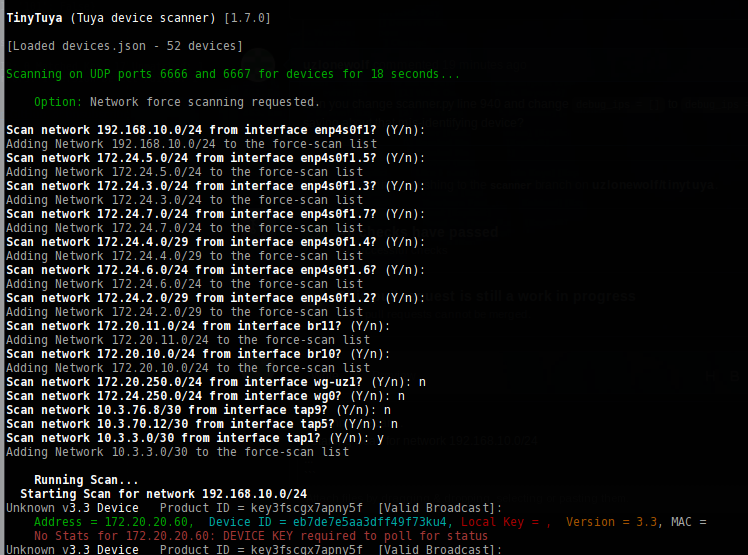
Nice! Love it!
On the debug request - Using debug_ips = ['10.0.1.36'] I ran it multiple times and the output varies a bit, but this seems to capture most of it. Debug doesn't seem to be working?
    Running Scan...
  Starting Scan for network 10.0.1.0/24
Connecting to debug ip 10.0.1.36
 Force-Scan Found Device 10.0.1.36
Chandelier Upstairs   Product ID = keyefm5gggjg4qch  [Valid Broadcast]:
    Address = 10.0.1.18,  Device ID = x, Local Key = x,  Version = 3.3, MAC = bc:dd:c2:59:44:ea
    Status: {'1': False, '101': 0}

....[clip - occasionally a device would fail]....

Stand Lamp by Fireplace   Product ID = AiHXxAyyn7eAkLQY  [Valid Broadcast]:
    Address = 10.0.1.32,  Device ID = x, Local Key = x,  Version = 3.3, MAC = 24:62:ab:3c:56:31
    Polling 10.0.1.32 Failed: No response
Debug sock 10.0.1.36 socket send failed
Connecting to debug ip 10.0.1.36
Resetting device scan end time due to debug ip 10.0.1.36 1663455292.853455 1663455291.853657

....[clip]....

Unknown v3.1 Device   Product ID = ?  [Failed to Force-Scan]:
    Address = 10.0.1.34,  Device ID = , Local Key = ,  Version = 3.1, MAC =
Debug sock 10.0.1.36 socket send failed
Connecting to debug ip 10.0.1.36
Resetting device scan end time due to debug ip 10.0.1.36 1663455294.9384892 1663455293.9387279

....[clip]....

Minecraft1 Server   Product ID = keym9qkuywghyrvs  [Valid Broadcast]:
    Address = 10.0.1.50,  Device ID = x, Local Key = x,  Version = 3.3, MAC = 68:57:2d:fd:94:a0
    Status: {'1': True, '9': 0, '17': 89, '18': 1466, '19': 1790, '20': 1212, '21': 1, '22': 1123, '23': 6986, '24': 7260, '25': 4960, '26': 0}
closed thrice: 10.0.1.36
keygen gave: <tinytuya.scanner.KeyObj object at 0x103391210> 10.0.1.36
Connecting to debug ip 10.0.1.36
Resetting device scan end time due to debug ip 10.0.1.36 1663455297.0284312 1663455296.0287411
v3.4 trying key 10.0.1.36 b'377d01b7c86e970c'
v3.4 session key neg start, debug ip 10.0.1.36

....[clip]....

Unknown v3.4 Device   Product ID = ?  [Failed to Force-Scan]:
    Address = 10.0.1.36,  Device ID = , Local Key = ,  Version = 3.4, MAC =
    Polling 10.0.1.36 Failed: Device stopped responding before key was found
Resetting device scan end time due to debug ip 10.0.1.36 0 1663455297.237886
SmartBulb   Product ID = keycuag84ttsx3fm  [Valid Broadcast]:
    Address = 10.0.1.83,  Device ID = x, Local Key = x,  Version = 3.3, MAC = b8:f0:09:01:3c:c3
    Status: {'20': True, '21': 'white', '22': 1000, '24': '000003e803e8', '25': '07464602000003e803e800000000464602007803e803e80000000046460200f003e803e800000000464602003d03e803e80000000046460200ae03e803e800000000464602011303e803e800000000', '26': 0}
Connecting to debug ip 10.0.1.36
Resetting device scan end time due to debug ip 10.0.1.36 0 1663455303.266581
WD New timeo: 1663455303.3685791
Resetting device scan end time due to debug ip 10.0.1.36 0 1663455303.3685791
Chandelier   Product ID = qcgkaqmaivuwfwz4  [Valid Broadcast]:
    Address = 10.0.1.36,  Device ID = 00712485d8f15bc9d55b, Local Key = x,  Version = 3.3, MAC = d8:f1:5b:c9:d5:5b
    Status: {'1': False, '3': 71, '101': False}
Scanned in 18.056277990341187
Minor add - we should add a check for no netblocks on -force and either disable force mode or exit cleanly.
Scan network 10.0.1.0/24 from interface en0? (Y/n): n
Traceback (most recent call last):
  File "/Users/jason/Code/sandbox/tinytuya/tinytuya/scanner.py", line 1011, in devices
    networks.append( ip )
AttributeError: 'dict_keys' object has no attribute 'append'
Hmm, that debug output is interesting. It is working, it just doesn't print much for individual devices (your screen would be absolutely flooded if it was enabled for every device though).
It seems that particular 3.3 device closes the connection if it receives a payload-less DP_QUERY packet instead of emitting an error, and then stops responding completely when fed a bunch of v3.4 requests. I'll tweak the brute force trying a bit to see if I can detect that.
This also reminds me, I need to add get_mac_address() back in for failed devices. I had removed it because calling it takes 100ms and results in a UDP packet getting sent to port 55555.
In case this help - I tried to separate the debug thread:
python3 -m tinytuya scan -force 10.0.1.0/24 -nocolor | egrep "10.0.1.36|Chandelier" | grep -v Resetting
Connecting to debug ip 10.0.1.36
 Force-Scan Found Device 10.0.1.36
Debug sock 10.0.1.36 socket send failed
Connecting to debug ip 10.0.1.36
Chandelier Upstairs   Product ID = ?  [Failed to Force-Scan]:
Debug sock 10.0.1.36 socket send failed
Connecting to debug ip 10.0.1.36
Chandelier Upstairs   Product ID = keyefm5gggjg4qch  [Valid Broadcast]:
closed thrice: 10.0.1.36
keygen gave: <tinytuya.scanner.KeyObj object at 0xb5b245e0> 10.0.1.36
Connecting to debug ip 10.0.1.36
v3.4 trying key 10.0.1.36 b'9b7eeb55d0c7819e'
v3.4 session key neg start, debug ip 10.0.1.36
Connecting to debug ip 10.0.1.36
trying next key 10.0.1.36 9541e603af7266a4
Connecting to debug ip 10.0.1.36
v3.4 trying key 10.0.1.36 b'9541e603af7266a4'
v3.4 session key neg start, debug ip 10.0.1.36
Connecting to debug ip 10.0.1.36
Debug sock 10.0.1.36 failed!
Debug sock 10.0.1.36 failed!
Timeout for debug ip 10.0.1.36 - reconnecting, retries 2
Connecting to debug ip 10.0.1.36
Debug sock 10.0.1.36 failed!
Debug sock 10.0.1.36 failed!
Timeout for debug ip 10.0.1.36 - reconnecting, retries 1
Connecting to debug ip 10.0.1.36
Debug sock 10.0.1.36 failed!
failed 1 10.0.1.36 104 104
Debug sock 10.0.1.36 failed!
Final timeout for debug ip 10.0.1.36 aborting
Chandelier   Product ID = qcgkaqmaivuwfwz4  [Valid Broadcast]:
    Address = 10.0.1.36,  Device ID = 00712485d8f15bc9d55b, Local Key = x,  Version = 3.3, MAC = d8:f1:5b:c9:d5:5b
    Polling 10.0.1.36 Failed: Connect Failed
Connecting to debug ip 10.0.1.36
trying next key 10.0.1.36 b980a651f7b76a13
Connecting to debug ip 10.0.1.36
v3.4 trying key 10.0.1.36 b'b980a651f7b76a13'
v3.4 session key neg start, debug ip 10.0.1.36
    Address = 10.0.1.36,  Device ID = , Local Key = ,  Version = 3.4, MAC =
    Polling 10.0.1.36 Failed: Device stopped responding before key was found
That does help - it looks like the force-scan and broadcast-poll are fighting for control over the device. For now I'll make it so broadcasts are ignored when a device is being force-scanned, but the final code will do the opposite and abort the force-scan (which is most likely attempting to brute-force the key) if a broadcast is received.
Wait, that device doesn't happen to be a device22 does it? Those use CONTROL_NEW instead of DP_QUERY which would explain it not responding to DP_QUERY.
Also, slight change of plans. Instead of ignoring broadcasts I added a -no-broadcasts flag and went ahead and made the broadcast processing abort a force-scan.
Ok, here is some more info... This is not a device22, here is the debug output from a status():
DEBUG:TinyTuya [1.7.0]

DEBUG:status() entry (dev_type is default)
DEBUG:building command 10 payload=b'{"gwId":"00712485d8f15bc9d55b","devId":"00712485d8f15bc9d55b","uid":"00712485d8f15bc9d55b","t":"1663477738"}'
DEBUG:sending payload
DEBUG:payload encrypted=b'000055aa000000010000000a000000787cc7957550f90d601cab003851e0e6e549b9463a65d3c914741b032258e4fd363312cd3bdce296e87c2d10abea1e9e158ff708776dd328a4ed750c5be5ad406661977e0d5adea2884bd304d1211fc3680597285f950ce9e15997fe05db97c4290943d12e664685f8e879590f84481a38022148f80000aa55'
DEBUG:received data=b'000055aa000000010000000a0000005c0000000067e10dcf3dcd76635cd90aec077455252bbbb850e42164957f260914aa7e5a5dc4c242078f83b4e4731137d9af3c8a7cb308798bef2dc865b1e396352a8db9e7ebd5e344ac68d7f4610fcb176201ca813dc124840000aa55'
DEBUG:received message=TuyaMessage(seqno=1, cmd=10, retcode=0, payload=b'g\xe1\r\xcf=\xcdvc\\\xd9\n\xec\x07tU%+\xbb\xb8P\xe4!d\x95\x7f&\t\x14\xaa~Z]\xc4\xc2B\x07\x8f\x83\xb4\xe4s\x117\xd9\xaf<\x8a|\xb3\x08y\x8b\xef-\xc8e\xb1\xe3\x965*\x8d\xb9\xe7\xeb\xd5\xe3D\xach\xd7\xf4a\x0f\xcb\x17b\x01\xca\x81', crc=1036067972, crc_good=True)
DEBUG:raw unpacked message = TuyaMessage(seqno=1, cmd=10, retcode=0, payload=b'g\xe1\r\xcf=\xcdvc\\\xd9\n\xec\x07tU%+\xbb\xb8P\xe4!d\x95\x7f&\t\x14\xaa~Z]\xc4\xc2B\x07\x8f\x83\xb4\xe4s\x117\xd9\xaf<\x8a|\xb3\x08y\x8b\xef-\xc8e\xb1\xe3\x965*\x8d\xb9\xe7\xeb\xd5\xe3D\xach\xd7\xf4a\x0f\xcb\x17b\x01\xca\x81', crc=1036067972, crc_good=True)
DEBUG:decode payload=b'g\xe1\r\xcf=\xcdvc\\\xd9\n\xec\x07tU%+\xbb\xb8P\xe4!d\x95\x7f&\t\x14\xaa~Z]\xc4\xc2B\x07\x8f\x83\xb4\xe4s\x117\xd9\xaf<\x8a|\xb3\x08y\x8b\xef-\xc8e\xb1\xe3\x965*\x8d\xb9\xe7\xeb\xd5\xe3D\xach\xd7\xf4a\x0f\xcb\x17b\x01\xca\x81'
DEBUG:decrypting=b'g\xe1\r\xcf=\xcdvc\\\xd9\n\xec\x07tU%+\xbb\xb8P\xe4!d\x95\x7f&\t\x14\xaa~Z]\xc4\xc2B\x07\x8f\x83\xb4\xe4s\x117\xd9\xaf<\x8a|\xb3\x08y\x8b\xef-\xc8e\xb1\xe3\x965*\x8d\xb9\xe7\xeb\xd5\xe3D\xach\xd7\xf4a\x0f\xcb\x17b\x01\xca\x81'
DEBUG:decrypted 3.x payload='{"devId":"00712485d8f15bc9d55b","dps":{"1":false,"3":166,"101":false}}'
DEBUG:payload type = <class 'str'>
DEBUG:decoded results='{"devId":"00712485d8f15bc9d55b","dps":{"1":false,"3":166,"101":false}}'
DEBUG:status() received data={'devId': '00712485d8f15bc9d55b', 'dps': {'1': False, '3': 166, '101': False}}
Same but using a bogus/invalid local key:
DEBUG:TinyTuya [1.7.0]

DEBUG:status() entry (dev_type is default)
DEBUG:building command 10 payload=b'{"gwId":"00712485d8f15bc9d55b","devId":"00712485d8f15bc9d55b","uid":"00712485d8f15bc9d55b","t":"1663478057"}'
DEBUG:sending payload
DEBUG:payload encrypted=b'000055aa000000010000000a000000788942e53e7b68baf064364cd88521507c4a686d6563edc5d21b57feb0d7544ae47136bff29382e14351568d31fa9535fc5945955e96b7d87eb54ab5df294f12c39854da1cab9c309b7cc45897dd28b020bc3e1422598843137b5bf0e5edbb0d2d6f9d963b5c024afd0aa90a5d651bd956e6ad865c0000aa55'
DEBUG:received data=b'000055aa000000010000000a0000002c00000001a58708f81a1671cf579242c9e373aaa2fd6865e2369eb6f71d82747f03ca74f0e5cfcb760000aa55'
DEBUG:received message=TuyaMessage(seqno=1, cmd=10, retcode=1, payload=b'\xa5\x87\x08\xf8\x1a\x16q\xcfW\x92B\xc9\xe3s\xaa\xa2\xfdhe\xe26\x9e\xb6\xf7\x1d\x82t\x7f\x03\xcat\xf0', crc=3855600502, crc_good=True)
DEBUG:raw unpacked message = TuyaMessage(seqno=1, cmd=10, retcode=1, payload=b'\xa5\x87\x08\xf8\x1a\x16q\xcfW\x92B\xc9\xe3s\xaa\xa2\xfdhe\xe26\x9e\xb6\xf7\x1d\x82t\x7f\x03\xcat\xf0', crc=3855600502, crc_good=True)
DEBUG:decode payload=b'\xa5\x87\x08\xf8\x1a\x16q\xcfW\x92B\xc9\xe3s\xaa\xa2\xfdhe\xe26\x9e\xb6\xf7\x1d\x82t\x7f\x03\xcat\xf0'
DEBUG:decrypting=b'\xa5\x87\x08\xf8\x1a\x16q\xcfW\x92B\xc9\xe3s\xaa\xa2\xfdhe\xe26\x9e\xb6\xf7\x1d\x82t\x7f\x03\xcat\xf0'
DEBUG:incomplete payload=b'\xa5\x87\x08\xf8\x1a\x16q\xcfW\x92B\xc9\xe3s\xaa\xa2\xfdhe\xe26\x9e\xb6\xf7\x1d\x82t\x7f\x03\xcat\xf0' (len:32)
Traceback (most recent call last):
  File "/home/pi/sandbox/tinytuya/tinytuya/core.py", line 834, in _decode_payload
    payload = cipher.decrypt(payload, False)
  File "/home/pi/sandbox/tinytuya/tinytuya/core.py", line 240, in decrypt
    raw = self._unpad(raw, verify_padding)
  File "/home/pi/sandbox/tinytuya/tinytuya/core.py", line 260, in _unpad
    raise ValueError("invalid padding length byte")
ValueError: invalid padding length byte
DEBUG:ERROR Unexpected Payload from Device - 904 - payload: null
DEBUG:status() received data={'Error': 'Unexpected Payload from Device', 'Err': '904', 'Payload': None}
{'Error': 'Unexpected Payload from Device', 'Err': '904', 'Payload': None}
I ran a test with -no-broadcasts - The force-scan found most of the devices but still can't figure out 10.0.1.36. Also note some SyntaxWarning we should fix (doesn't show up if you omit the netblock). EDIT: Seeing some "Failed to Force-Scan" even with -no-broadcasts.
pi@piserver:~/sandbox/tinytuya $ python3 -m tinytuya scan -force 10.0.1.0/24 -no-broadcasts
/home/pi/sandbox/tinytuya/tinytuya/scanner.py:122: SyntaxWarning: "is not" with a literal. Did you mean "!="?
  if ask is not 2:

TinyTuya (Tuya device scanner) [1.7.0]

[Loaded devices.json - 34 devices]

Scanning on UDP ports 6666 and 6667 for devices for 18 seconds...

    Option: Network force scanning requested.


    Running Scan...
  Starting Scan for network 10.0.1.0/24
Connecting to debug ip 10.0.1.36
Debug sock 10.0.1.36 failed!
<socket.socket fd=18, family=AddressFamily.AF_INET, type=SocketKind.SOCK_STREAM, proto=0, laddr=('10.0.1.67', 57812)>
Traceback (most recent call last):
  File "/home/pi/sandbox/tinytuya/tinytuya/scanner.py", line 219, in get_peer
    addr = self.sock.getpeername()[0]
OSError: [Errno 107] Transport endpoint is not connected

ForceScannedDevice: Retrying connect 10.0.1.36
Connecting to debug ip 10.0.1.36
 ForceScannedDevice: Force-Scan Found Device 10.0.1.36

... [clip] ...

Kitchen Light   Product ID = ?  [Failed to Force-Scan]:
    Address = 10.0.1.x,  Device ID = x, Local Key = x,  Version = 3.3, MAC = 60:01:94:c5:18:86
    Status: {'1': True, '9': 0}
Guest Room Lamp   Product ID = ?  [Failed to Force-Scan]:
    Address = 10.0.1.x,  Device ID = x, Local Key = x,  Version = 3.3, MAC = c4:4f:33:b4:c0:32
    Status: {'1': False, '11': 0}
Chandelier Upstairs   Product ID = ?  [Failed to Force-Scan]:
    Address = 10.0.1.x,  Device ID = x, Local Key = x,  Version = 3.3, MAC = bc:dd:c2:59:44:ea
    Status: {'1': False, '101': 0}

... [clip] ...

Connecting to debug ip 10.0.1.36
Resetting device scan end time due to debug ip 10.0.1.36 0 1663477406.0529058
v3.4 trying key 10.0.1.36 b'9541e603af7266a4'
v3.4 session key neg start, debug ip 10.0.1.36
Resetting device scan end time due to debug ip 10.0.1.36 0 1663477404.1535273
Resetting device scan end time due to debug ip 10.0.1.36 0 1663477404.1535273
Resetting device scan end time due to debug ip 10.0.1.36 0 1663477404.1535273
Resetting device scan end time due to debug ip 10.0.1.36 0 1663477404.1535273
Resetting device scan end time due to debug ip 10.0.1.36 0 1663477404.1535273
Resetting device scan end time due to debug ip 10.0.1.36 0 1663477404.1535273
Resetting device scan end time due to debug ip 10.0.1.36 0 1663477404.1535273
Resetting device scan end time due to debug ip 10.0.1.36 0 1663477404.1535273
Resetting device scan end time due to debug ip 10.0.1.36 0 1663477404.1535273
Resetting device scan end time due to debug ip 10.0.1.36 0 1663477404.1535273
Unknown v? Device   Product ID = ?  [Failed to Force-Scan]:
    Address = 10.0.1.36,  Device ID = , Local Key = ,  Version = ?, MAC =
    Polling 10.0.1.36 Failed: Device stopped responding before key was found
Resetting device scan end time due to debug ip 10.0.1.36 0 1663477404.1535273
Scanned in 18.706149578094482

Scan Complete!  Found 24 devices.
Broadcasted: 0
Force-Scanned: 24  - Matched GWID: 0 Matched Key: 22 Unmatched: 2
Force-Scan Errors: Connection Errors: 1 Version Detect Failed: 1

>> Saving device snapshot data to snapshot.json
We are close! I like the "a" addition. Thanks @uzlonewolf - you're amazing.
:facepalm: I was reopening the connection but not re-sending the payload, so of course none of the retries ever succeeded. It also seems your device requires some payload data or it'll ignore the request instead of rejecting it with an error. Both of those should be fixed with this.
Success! 🚀 That did it!!!
ForceScannedDevice: Brute force 10.0.1.36 decrypted: data format error
ForceScannedDevice: v3.3 brute forced key b'377d0xxxxxxxxxxx' for 10.0.1.36
Resetting device scan end time due to debug ip 10.0.1.36 0 1663515938.8605416
ForceScannedDevice: 10.0.1.36 got step 100 data: b'\x00\x00U\xaa\x00\x00\x00\x02\x00\x00\x00\n\x00\x00\x00\\\x00\x00\x00\x00g\xe1\r\xcf=\xcdvc\\\xd9\n\xec\x07tU%+\xbb\xb8P\xe4!d\x95\x7f&\t\x14\xaa~Z]rMk\xfcN\xad\xdcFS\xb0\xa6\xf3|=\xac\xd3\xee\xdf\xd8\xa7\x84kQ\xc6\x84O\xe2w\xbb\xe8\xa3\xee\x8b\x898\x89\xdf\xba\xef*\x9dE9\x9c\xb4H\xed! /-\xdf\x00\x00\xaaU'
ForceScannedDevice: Final Poll 10.0.1.36 100 b'g\xe1\r\xcf=\xcdvc\\\xd9\n\xec\x07tU%+\xbb\xb8P\xe4!d\x95\x7f&\t\x14\xaa~Z]rMk\xfcN\xad\xdcFS\xb0\xa6\xf3|=\xac\xd3\xee\xdf\xd8\xa7\x84kQ\xc6\x84O\xe2w\xbb\xe8\xa3\xee\x8b\x898\x89\xdf\xba\xef*\x9dE9\x9c\xb4H\xed!'
{'devId': '00712485d8f15bc9d55b', 'dps': {'1': True, '3': 71, '101': False}}
Chandelier   Product ID = ?  [Force-Scanned]:
    Address = 10.0.1.36,  Device ID = 00712485d8f15bc9d55b, Local Key = 377d0xxxxxxxxxxx,  Version = 3.3, MAC = d8:f1:5b:c9:d5:5b
    Status: {'1': True, '3': 71, '101': False}
I notice this OSError always happens at the top - doesn't seem to matter but is curious:
    Running Scan...
  Starting Scan for network 10.0.1.0/24
Connecting to debug ip 10.0.1.36
Debug sock 10.0.1.36 failed!
<socket.socket fd=28, family=AddressFamily.AF_INET, type=SocketKind.SOCK_STREAM, proto=0, laddr=('10.0.1.67', 36660)>
Traceback (most recent call last):
  File "/home/pi/sandbox/tinytuya/tinytuya/scanner.py", line 219, in get_peer
    addr = self.sock.getpeername()[0]
OSError: [Errno 107] Transport endpoint is not connected
And the thread:
$ python3 -m tinytuya scan -force 10.0.1.0/24 -no-broadcasts -nocolor | egrep "10.0.1.36|Chandelier" | egrep -v "Resetting|Upstairs"
Connecting to debug ip 10.0.1.36
 ForceScannedDevice: Force-Scan Found Device 10.0.1.36
ForceScannedDevice: Debug sock 10.0.1.36 socket send failed, receive timed out
Connecting to debug ip 10.0.1.36
ForceScannedDevice: 10.0.1.36 got step 1 data: b'\x00\x00U\xaa\x00\x00\x00\x01\x00\x00\x00\n\x00\x00\x00,\x00\x00\x00\x01\xa5\x87\x08\xf8\x1a\x16q\xcfW\x92B\xc9\xe3s\xaa\xa2\xfdhe\xe26\x9e\xb6\xf7\x1d\x82t\x7f\x03\xcat\xf0\xe5\xcf\xcbv\x00\x00\xaaU'
ForceScannedDevice: Brute force 10.0.1.36 decrypted: data format error
ForceScannedDevice: v3.3 brute forced key b'377d0xxxxxxxxxxx' for 10.0.1.36
ForceScannedDevice: 10.0.1.36 got step 100 data: b'\x00\x00U\xaa\x00\x00\x00\x02\x00\x00\x00\n\x00\x00\x00\\\x00\x00\x00\x00g\xe1\r\xcf=\xcdvc\\\xd9\n\xec\x07tU%+\xbb\xb8P\xe4!d\x95\x7f&\t\x14\xaa~Z]rMk\xfcN\xad\xdcFS\xb0\xa6\xf3|=\xac\xd3\xee\xdf\xd8\xa7\x84kQ\xc6\x84O\xe2w\xbb\xe8\xa3\xee\x8b\x898\x89\xdf\xba\xef*\x9dE9\x9c\xb4H\xed! /-\xdf\x00\x00\xaaU'
ForceScannedDevice: Final Poll 10.0.1.36 100 b'g\xe1\r\xcf=\xcdvc\\\xd9\n\xec\x07tU%+\xbb\xb8P\xe4!d\x95\x7f&\t\x14\xaa~Z]rMk\xfcN\xad\xdcFS\xb0\xa6\xf3|=\xac\xd3\xee\xdf\xd8\xa7\x84kQ\xc6\x84O\xe2w\xbb\xe8\xa3\xee\x8b\x898\x89\xdf\xba\xef*\x9dE9\x9c\xb4H\xed!'
Chandelier   Product ID = ?  [Force-Scanned]:
    Address = 10.0.1.36,  Device ID = 00712485d8f15bc9d55b, Local Key = 377d0xxxxxxxxxxx,  Version = 3.3, MAC = d8:f1:5b:c9:d5:5b
Great! I just need to get v3.1 working now...
That "OSError: [Errno 107] Transport endpoint is not connected" just means the device accepted the connection but then immediately closed it. I have no idea why they do that, it seems pretty random with some devices never doing it but others doing it on occasion. Everything seems to work normally on the 2nd try for whatever reason. I should probably clean up that output a bit to make it a bit more obvious.
I've been delaying finishing this as I really, really, really wanted a v3.2 device to test against. With how it needs to brute-force the version (since that information isn't available anywhere) I have no idea how it'll act when encountering one. I have a switch on order that was reported to have v3.2, however I'm not holding my breath as I have no idea how long ago the reporter bought it. It should arrive tomorrow, so we'll see.
Beyond that I think it just needs some clean-up and documentation. I'll try to get the master-branch changes merged in later today. Once it's ready I think I'm going to close this PR and open a new one so we don't get this giant list of commits in the release notes.
Oh yeah, as for v3.1 devices, I've only tried with 1 so far (and promptly forgot where I put the box with the rest of them) but it worked fine.
decrypt_udp() has been modified; instead of trimming with result[20:-8], just pass the entire result.