

 jankae
Mixed mode - differential mode
Summary
It is possible by measuring all the Sxx to evaluate the performance of a differential pair with a two port VNA
Would it be possible to add a way to analyze the S-parameters as differential or mixed mode parameters in a friendly way ?
Paths to implement it
Maybe a touchstone viewer where you can load and combine various s parameters into a single s parameter then do operations on them like mixed mode conversion or differential conversion and give the possibility to display not only the new s parameters but TDR for example
Extra information
Empty

Would it be possible to add a way to analyze the S-parameters as differential or mixed mode parameters in a friendly way ?
I just had a quick look into the required calculations and this should already be possible within the LibreVNA-GUI. It will be a bit cumbersome to set up, but once it is working you can just save the .setup-file and open that whenever you want to replicate the measurement.
Some hints (no screenshots as I am currently on the wrong computer):
- You can "pause" traces which ignores new incoming data. Add new traces and pause the old/new traces accordingly to acquire all Sxy for your DUT (likely more than two-port if you want to analyze differential S-parameters)
- Optional but probably useful for later: Once you have acquired all the S-parameters, you can export them as a touchstone file (up to 4 ports are supported for the export)
- Create new traces and configure them as "Math" traces: edit the trace, you can select whether the trace is a "live" trace (VNA data overwrites trace data), created from a file or uses a math operation. When in math mode, the trace data can be set as an arbitrary mathematical expression, based on the data from other traces. This is a fairly recent feature, I hope everything works as expected and is reasonable self explanatory
- Use these "math" traces to set up your differential and common mode S-parameters. They will automatically update when the underlying trace data is changed so you can actually set this up first and then take the measurements
give the possibility to display not only the new s parameters but TDR for example
Already implemented as a math operation (different to the math traces explained above!). You can perform a TDR on any trace which contains frequency domain data. Have a look at the right side of the trace edit dialog. This feature has been around for a while, so it is explained with screenshots in the user manual (section 3.4.1)

I still think that additional "math" traces are the way to go here but with 7d7bd3a I just added a feature to the GUI which allows creating these traces automatically:
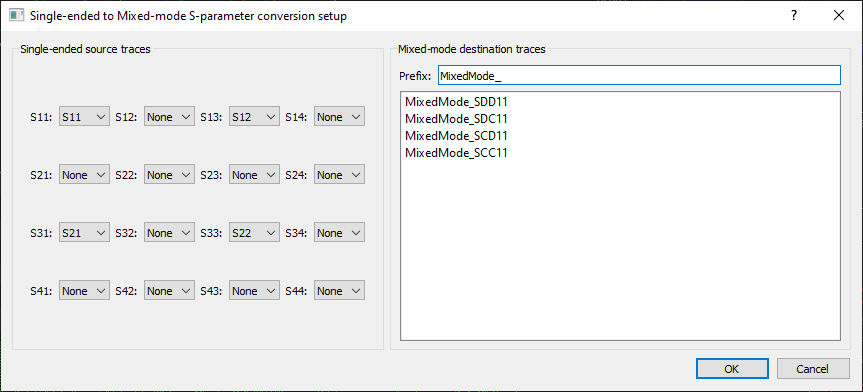
You can find it unter Tools->Mixed Mode Conversion