

 jakob
jakob
Feature request: Change interpretation of empty string depending on NOT NULL flag
Current behaviour:
Many of the text fields in my day-to-day database work are set to NOT NULL. If I erase the contents of a text string in the table row view, or in the detail sidebar, my intention is to insert the empty string into this field, but Postico is assuming I want to enter NULL and this triggers a validation error, meaning I cannot save the row. I then have to go back and explicitly choose "Empty String" from the dropdown menu next to the field.
Proposed behaviour:
If a field is marked NOT NULL, then when the user presses Enter in a text field containing no text, Postico should insert the empty string into the field.

I'm sorry, but I can't do this.
Postico always treats blank cells as NULL. Treating them as empty strings sometimes would be confusing and not what people expect. It's important for me that Postico is predictable and consistent.
I am pretty sure that most people actually expect to see an error when they insert a blank value into a column marked "NOT NULL".

Jakob, perhaps you could reconsider. I came here to report this as a bug and I was surprised to see this marked as a correct behavior. I mean, your explanation makes sense in some contexts, but maybe my situation could server as a different point of view:
I've switched to Go (Golang) for my backend API and since strings in Go are not nullable, it's easier to have those text fields kept as "NOT NULL" as well. So now that my whole database is "NOT NULL" editing anything with Postico became a bit of a nightmare.
Actually, thanks @rohanc for pointing out that there is a way to do that. Until now I thought the only option was to write a SQL update query. But still, it's not the most convenient situation. Good enough for a quick hack once a week, but not for regular usage.
What do you think @jakob about this kind of a scenario?

I'm not familiar with Go, but some quick googling suggests that you should use either sql.NullString or *string to read nullable columns from the database.
From your description, it sounds like you are trying to avoid proper NULL value handling in your application by just using empty strings when you really want NULL.
My recommendation is:
- don't mark optional columns as NOT NULL
- handle NULL values properly in your application
No offense, but I'd really want those empty strings, not NULLs. May I? ;)
Joking aside, I do get your reasoning and respect that, but I'm using several tools on two platforms (Win, Mac) and each of them seems to be having different opinions about NULLs (e.g. HeidiSQL does empty string by default). So, it's a dillema when tools try to force me to design database and code to be a certain way, especially if their opinions don't match ;)
Anyway, looks like you have your mind set here (judging by #407 as well). I appreciate you getting back to me, Jakob!
For what it's worth, I'd like to add my vote to the set of users asking for more delicate empty string/NULL handling. The ORMs in many application frameworks make similar empty string/NULL swaps to avoid ever rendering None or undefined on the front-end when developers very obviously don't want that, so I don't think this use case is particularly rare or arcane. (fwiw, Django definitely does this.)
Additionally, I'm finding that such data cannot be cleanly exported and then re-imported. Using Postico, I've exported the following data:
"id","name","default_value"
1,"name_one",""
2,"name_two",""
3,"name_three",""
And, frustratingly, cannot re-instantiate that data in the exact same table because empty strings that were correctly exported as empty strings get re-interpreted on import as NULL. I don't see how this can be intended behavior :(
And I'd like to close this comment with a glowing statement of how much I love Postico! It's truly wonderful :smile: :heart:

I do love Postico a lot and bought the full version, but I still wish @jakob would let us use it in a way that doesn't require changing schema in legacy databases and/or rewriting frameworks ;) It's wonderful when a tool gives us superpowers, not so cool when it slows down the process, even if the intentions are noble.
Also a paid Postico user, and evangelist!
I wonder if the data round-trip gotcha had flown under the radar until now 🤔
@craiglabenz Yes, the data round trip issue is something I wasn't aware of. I see two separate issues here:
- Dealing with empty text input in the table view
- Dealing with blanks in CSV Import
Currently, Postico treats blanks as NULL by default. This makes it predictable, and I think it's good practice.
But after reconsidering, I agree with you that maybe that isn't the best idea. The data round trip issue is definitely a problem, but also @darekrusin's point about legacy databases is valid: It's unlikely that people rewrite their software just to accommodate whatever I consider best practices.
I'm not sure how to best approach this. I need to think about this for a bit.
What do you think about marking empty text cells with a keyword (eg. "EMPTY") to differentiate between NULL and empty string?
Really appreciate the thoughtful response! Definitely agree with that classification of issues relevant to this discussion. I suspect if I was starting fresh on a database client, when dealing with TextFields, I would make NULL the special case. Of course, Postico is not a fresh database client, so that's not necessarily relevant :laughing:
To restate the current behavior for posterity, the following behavior is seen in the table view:
| Entered | Seen | Stored |
|---|---|---|
| "" | NULL (greyed out) | NULL |
| "NULL" | NULL | "NULL" |
When "" is entered via a query, however, Postico's table view correctly renders nothing, signifying the empty string.
You're proposing that the characters "\EMPTY" (or similar) signify a value of "" and thus possibly something like "EMPTY" signify the characters of the word "empty". This could work just as well, though I fear it might complicate the export/import workflow. Exporting empty strings as "" seems to mandate that importing "" should soon count as "" and not NULL, which would be the opposite behavior of the table view.
In thinking about this more, I think my first choice would still be to swap behavior and make entering the characters "\NULL" specify a true NULL value, and, possibly, entering something like the characters "NULL" signify an escaped value, and thus, the actual string "NULL".
Note: Whether the escaping backslash is needed to indicate the literal or special case could obviously go either way.
Here's a possible table of future behavior that favors empty strings for TextFields:
| Entered | Seen | Stored |
|---|---|---|
| "" | "" | |
| "NULL" | NULL | "NULL" |
| "\NULL" | NULL (greyed out) | NULL |
| "EMPTY" | EMPTY | "EMPTY" |
| "\EMPTY" | \EMPTY | "\EMPTY" |
And here's a possible table of future behavior that favors NULLs for TextFields:
| Entered | Seen | Stored |
|---|---|---|
| "" | NULL (greyed out) | NULL |
| "NULL" | "NULL" | "NULL" |
| "\NULL" | \NULL | "\NULL" |
| "EMPTY" | EMPTY | "EMPTY" |
| "\EMPTY" | "" |
Does that align with your current view of the options, @jakob?
Delighted to see some reconsideration on this front. I feel that encoding of empty string in an application is really an engineering decision for the developer and not something to be imposed by development tools.
For developers who have decided to sometimes use empty strings, the current Postico implementation is frustrating, whereas other aspects of data-entry are quite pleasant, especially compared to competing products. The automatic vertical sizing of text fields, for example, is better than anything that I've seen elsewhere.
Here are some of the programs that allow empty strings to be entered in table edit view, just by leaving the field blank:
- Navicat for PostgreSQL (NULLs via right-click, Set to NULL).
- DBeaver (NULLs via right-click, Edit, Set to NULL)
- DataGrip (NULL are entered via CTRL+ALT+N)
PgAdmin3, on the other hand, requires users to enter two single quotes to enter an empty string.
In considering the various options for data-entry, I think it would be nice if Postico took into account the "NOT NULL" status of each table column, so that users cannot accidentally enter NULLs into NOT NULL columns. At the moment they only see an error message when the row is committed.
I've also experienced this - the ORM of the platform I'm working on has many model fields defined as strings. While the schema allows null, the ORM cries foul when I manually add a record since I can't easily set fields to empty strings. That said, thanks to @rohanc I found the popup right-side menu that allows me to set to empty strings - I had never noticed the button for this menu before. I've previously used Navicat for MySQL which defaults to empty string and requires a right-click for set to NULL.
Granted if I had written what I'm working on from scratch, I would have made the schema columns NOT NULL or found a way to coerce the ORM into being OK with null vs empty string.
@craiglabenz 's suggestion seems good, but as with anything there are caveats; you'd need a workaround to be able to set a field to "\NULL" or "\EMPTY" or whatever the token is to indicate null or empty string.

@illz - At the risk of being dense, which popup right side menu is this? Would you might sharing a screenshot?
@craiglabenz no prob, took me a few to find it. With a row selected, click the button in the red circle and the right side-bar will show up where you can use the down arrow next to a field to select "Empty String"
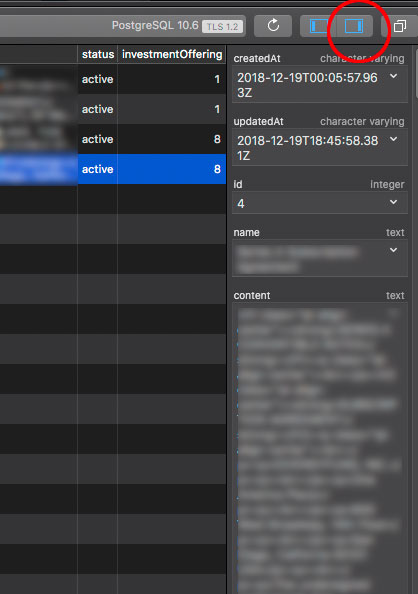
There are two more ways to insert empty strings:
- Right-click on a cell (when the editor is not active) and select "Insert" > "Empty String"
- If you have a Macbook Pro with Touch Bar, press the "Empty Str" button while editing a text field
My workaround workflow so far had been to copy the SQL preview and manually replace NULL with ``. Right click on cell to "Insert Empty String" solves this for me.

It doesn't make sense for Postico to produce an export with "" then complain importing the file later: 'this can't be null ....'
There should probably be a test where Postico can consume the file it just exported I think.

It doesn't make sense for Postico to produce an export with "" then complain importing the file later: 'this can't be null ....'
There should probably be a test where Postico can consume the file it just exported I think.
encountered same issue here

Using Postico 2 Preview and it's a deal-breaker. I was trying to import a CSV table exported from DBeaver with this sort of structure:
"id","blankable_field","nullable_field"
23,"",,
24,"",,
Postico is trying to insert NULLs into "blankable_field" even though it's quoted, which obviously (at least to me) makes it a blank string. I don't understand how this can be seen as the correct thing to do. If there were at least an option to interpret quoted values as blank or a dropdown per-column to set a default value (NULL, constant, etc) to fall back to when it's empty. Right now it's unusable.

