

 jacobslusser
ScintillaNet.IndicatorValue rare and wrong behavior
This is strange. When I set IndicatorValue with a value equal to 0, it is setted to 1.... It works ok with any other values, but does not work setting it to 0... Please, see the code below and the screenshot...
        for (int ndx = -10000000; ndx <= 10000000; ++ndx)
        {
            sci.IndicatorCurrent = 20;
            sci.IndicatorValue = ndx;
            if (sci.IndicatorValue != ndx) MessageBox.Show(ndx.ToString() + ": " + sci.IndicatorValue.ToString());
        }
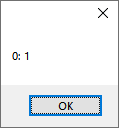

You are not actually filling a range with the indicator, so I don't know how the value would be stored and what the code would return. As you are going from negative numbers, it maybe that all negative numbers are ignored. I suggest going +ve to -ve and also using SCI_INDICATORFILLRANGE.

Dear Steve:
I tried what you said, and got the same wrong result:
Here the code:
int ind;
for (int ndx = -10000000; ndx <= 10000000; ++ndx)
{
	sci.IndicatorCurrent = 20;
	sci.IndicatorValue = ndx;
	sci.IndicatorFillRange(0, 10); //text contained in Scintilla is the default "Scintilla1"
	ind = sci.Indicators[20].ValueAt(2);
	if (ind != ndx) MessageBox.Show(ndx.ToString() + ": " + sci.IndicatorValue.ToString());
}
Positive and negative numbers works well. The only problem is with number 0.
Thank you.
You will probably need to log this with the scintilla guys. The ScintillaNET code interface looks okay to me and I see no reason for it to work that way.