
smserver
 smserver copied to clipboard
 itsjunetime
Crossover? BlueBubbles Android Attachments don't display properly in SMServer
 I'm not quite sure what to make of this one.
 Here it is from the host device
Could you paste here the link of the video? To do so, you'll need to:
- go into inspect element
- select the message where the video isn't loading and expand it if necessary. You should see an html element that looks something like
<video controls="controls" src="..."></video> - Copy the value in the
srcattribute, where the...is above, and paste it here.

photo that did load: data?path=Attachments/7b/11/50104232-57F7-4313-B8C1-A07B5DFB200C/2021-01-29 17:50:09.493059.jpeg photo that didn't load: data?path=Attachments/62/02/E8DA5871-D15E-422E-8E5D-A9CD58F31AB6/s^efnrZ]o_cfkv_s.jpeg video: data?path=Attachments/0c/12/1F87CEBF-84AD-41EB-96FC-6E3291C26A2A/lslpphZ^Zbfj`_ft.mov
So I took some time to check out this issue and, funnily enough, it's due to the HTTP Server Framework I was using — it didn't properly encode the carets and backticks in the URLs, so any request that included those characters (and possibly some others) didn't get handled correctly.
I've fixed the issue and filed a PR with the maintainers of the framework. However, I use my own custom fork of the framework (Criollo) for SMServer, so we don't have to wait for the PR to be merged. This issue will be fixed with the next update.
Great find!
 ^ Me seeing that your custom fork can be updated before the official framework is
Here's something really quick (but not all too important). On iOS, if you type out a message in the subject line and have no text in the main message line, the message will send as a regular message, but on SMServer it doesn't send unless the text is moved into the main line. Can this be changed? (If it's too much work, it's not a big deal, it's maybe affected me three times total).
Yeah, I can definitely do that; it'll be very easy to implement.
Edit: It's been implemented; you'll see the difference in the next update.
This fix and new feature have been implemented in version 0.7.2. Closing issue now.
Woohoo! SMServer update days are the best days. However, as much as I hate to open this back on you, I had a web preview not load, its img src is "data?path=pple.messages/31C799B4-4F62-4D6F-BC28-084437247986/A293D343-D862-4762-9D2A-397F9465BFFA.pluginPayloadAttachment", is this related or no?
Man, I really jumped the gun on closing this issue lol
So this issue is somewhat related, but it's not caused by the same thing. It appears that you have some attachments on your phone that are stored somewhere other than /var/mobile/Library/SMS/Attachments -- I don't have any attachments stored in anywhere other than /var/mobile/Library/SMS/Attachments, so that's why I haven't run into this yet. Do you think you'd be able to ssh into your device (as root), run find / -name "A293D343-D862-4762-9D2A-397F9465BFFA.pluginPayloadAttachment", and paste the output here? (It may take a few minutes to complete the command so don't get worried if it looks like it's hung)
Also, does this attachment load in your iMessages app on your phone or does it load in neither place?

I have a 21 second 38.2 MB video taken within the iPhone messages app that isn't loading. I suspect it's because of the file size, but here is its directory just in case. data?path=Attachments/aa/10/4352142B-4D6E-47CE-9BAA-51CDC83A5160/63425872041__86B471DE-0BED-4264-B250-8B71BC3B7FDB.MOV
Hmmm yeah that path looks fine so I'd expect it would work -- very unusual that it's not working. I'll look into it.
Also, you may have missed it, but I asked up above: are all of these attachments viewable in the iMessages app on your iPhone or do they not show up there as well?
Yes, all of the attachments were viewable on the iPhone. Also, did I mess up the SSH command, or do I need to run it in another program?
That ssh interface appears unusual so I'm not quite certain if it's showing everything I need to see. Do you think you'd be able to ssh in through something like windows terminal or command prompt and then run the command there and show the output here?
That ssh interface appears unusual so I'm not quite certain if it's showing everything I need to see. Do you think you'd be able to ssh in through something like windows terminal or command prompt and then run the command there and show the output here?
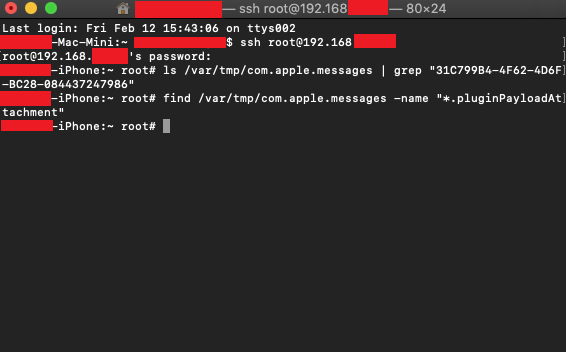
I was unable to SSH using command prompt or powershell, here are my results with terminal on macOS

That's really fascinating... Could you also try to ssh into your phone and run ls /var/tmp/com.apple.messages | grep "31C799B4-4F62-4D6F-BC28-084437247986" and find /var/tmp/com.apple.messages -name "*.pluginPayloadAttachment" and show the output here?
I left both of those commands running in WinSCP for more than 20 minutes each and had no results. On macOS they were instantly rejected
 I ran WinSCP's find command from my iPhone's root and found nothing
Hmm, well I'm not quite sure what to make of that. All your SSH/find commands seem to imply that this file doesn't exist on your phone, but clearly it does, since you can view it in your iMessages app. Are you certain that you pasted the path of the attachment here correctly?
Yes, I pasted it directly from the inspect element page and I've checked it again with Ctl+F, I'm running the find command again but this time removing the file extension
Update - Running the find command at root without the file extension didn't find anything either. That's really strange


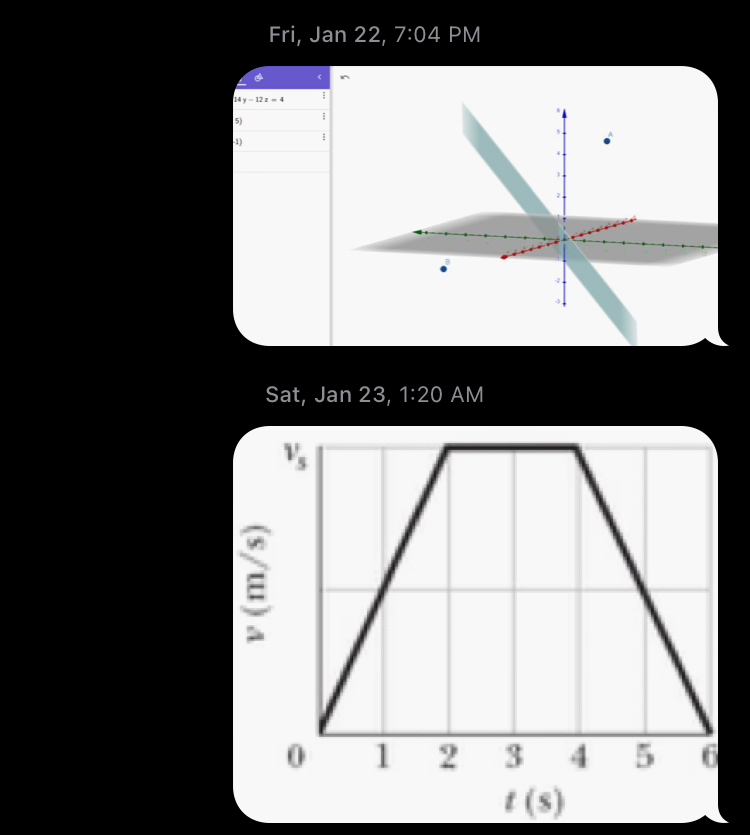 Here's another one I just got, I suspect the # is the problem
Attachment 1 - data?path=Attachments/12/02/3E113A1E-4CA7-4369-898C-E2211769E92D/X#6.JPG Attachment 2 - data?path=Attachments/bd/13/52E42A03-3CD0-4C24-B591-355B6DC47C58/#7WP.JPG
Here is another web preview that didn't load data?path=pple.messages/6BB5278F-A98C-4542-BC17-C75BC79D5C15/30484B1C-EED8-4E9F-A58C-6CCA247B9A61.pluginPayloadAttachment
and data?path=pple.messages/7A8C7CD1-8130-4904-9ACB-8F3BF3904C15/3761BB16-58B9-4886-B98D-0A1ADE13AB6A.pluginPayloadAttachment
I have a 21 second 38.2 MB video taken within the iPhone messages app that isn't loading. I suspect it's because of the file size, but here is its directory just in case. data?path=Attachments/aa/10/4352142B-4D6E-47CE-9BAA-51CDC83A5160/63425872041__86B471DE-0BED-4264-B250-8B71BC3B7FDB.MOV
I just had a similar thing happen with a 2 minute and 9 second video that is 4.98 MB
 It's also an MOV file, so issue #105 may be related