

 itinance
Android 11 save File in /storage/emulated/0/Download not possible
we are using react-native-fs for android 11. i have the problem that i can't save Pfd and Excel files on the Downloads folder (/storage/emulated/0/Download) anymore, because we edit the files via other apps and then upload the file again in our app. I know that from Android 11 the storage accesses have changed and it is only possible on the so called scope storage. Is there with react-native-fs or somehow also different (via React Native) to store the files so that also other apps can see the files or you can open them in the file explorer of Android or see them like a shared folder for all apps. There is also the possibility with MANAGE_EXTERNAL_STORAGE but this setting is reserved for certain apps only according to Android.
React native version: 64.2 react-native-fs: 2.18.0 Andriod 11
Thanks in advance

You need to ask for permission to write. See below.
import { PermissionsAndroid } from 'react-native';

funcion () {
const permission = await PermissionsAndroid.request(
        PermissionsAndroid.PERMISSIONS.WRITE_EXTERNAL_STORAGE,
        {
          title: '',
          message: '',
          buttonNeutral: 'Ask Me Later',
          buttonNegative: 'Cancel',
          buttonPositive: 'OK'
        }
      );

      if (permission === 'denied') return;
      if (permission === 'granted') {
           // YOUR WRITE FUNCTION HERE
      }
}

When I ask for a permission, nothing happens. I don't see pop up or any notification, guess promise never resolves after making the request. Any idea? @gilsonviana-modus
My Android.manifest is like below:
<uses-permission android:name="android.permission.INTERNET" />
<uses-permission android:name="android.permission.READ_EXTERNAL_STORAGE" />
<uses-permission android:name="android.permission.WRITE_EXTERNAL_STORAGE" />
<uses-permission android:name="android.permission.DOWNLOAD_WITHOUT_NOTIFICATION" />

<application
  android:name=".MainApplication"
  android:label="@string/app_name"
  android:icon="@mipmap/ic_launcher"
  android:roundIcon="@mipmap/ic_launcher_round"
  android:allowBackup="false"
  android:theme="@style/AppTheme">
  <activity
    android:name=".MainActivity"
    android:label="@string/app_name"
    android:configChanges="keyboard|keyboardHidden|orientation|screenSize|uiMode"
    android:launchMode="singleTask"
    android:windowSoftInputMode="adjustResize">
    <intent-filter>
        <action android:name="android.intent.action.MAIN" />
        <category android:name="android.intent.category.LAUNCHER" />
        <action android:name="android.intent.action.DOWNLOAD_COMPLETE"/>
    </intent-filter>
  </activity>
</application>

You need to add additional permission called MANAGE_EXTERNAL_STORAGE, you can see in this post
https://stackoverflow.com/a/69820147/10851423

@iqbalprasas MANAGE_EXTERNAL_STORAGE is reserved only for specific types of apps and Google Play will reject any other apps if they have this permission. https://support.google.com/googleplay/android-developer/answer/10467955

MANAGE_EXTERNAL_STORAGEis reserved only for specific types of apps and Google Play will reject any other apps if they have this permission.
@ilyagru You're right. The permission is very strong and Google Play seems to be extra-cautious with the application that requests that permission. Is there any workaround? I'm getting this when trying to save an image to the phone's storage:
Error: ENOENT: open failed: EPERM (Operation not permitted),
open '/storage/emulated/0/myApp/utils/images/231638009197305.jpg'
const granted = await PermissionsAndroid.request(
  PermissionsAndroid.PERMISSIONS.WRITE_EXTERNAL_STORAGE,
  {
    title: 'Permission',
    message: 'MyApp needs to access storage.',
  },
);

if (granted === PermissionsAndroid.RESULTS.GRANTED) {
  return new Promise((resolve, reject) => {
    RNFS.mkdir(dirPictures)
      .then(() => {
        RNFS.moveFile(filePath, dirPictures + '/' + newFilepath)
          .then(() => resolve(true))
          .catch(error => reject(error));
      })
      .catch(err => reject(err));
  });
}

Hi @abhishek-pokhriyal , I tried ur solution but there is error on RNFS.mkdir()
The error is
Error: Directory could not be created
I am running on Android 10, Any idea?

My issue was to download and save a .pdf file and open it with a default viewer on Android 11, as per the first message in this thread. I fixed it by a few things and it is working on both Android 10 and 11 so far on my end. cc @abhishek-pokhriyal
- Add both to
AndroidManifest.xml
<uses-permission android:name="android.permission.READ_EXTERNAL_STORAGE" />
<uses-permission android:name="android.permission.WRITE_EXTERNAL_STORAGE" />
- Add
<queries>toAndroidManifest.xmlon the same level as permissions (it is needed to be able to open e.g. .pdf files with a default viewer)
<queries>
        <intent>
            <action android:name="android.intent.action.VIEW" />
            <data android:mimeType="*/*" />
        </intent>
    </queries>
- Add
root-pathto<paths>inandroid/app/src/main/res/xml/filepaths.xml
<?xml version="1.0" encoding="utf-8"?>
<paths xmlns:android="http://schemas.android.com/apk/res/android">
  <external-path name="appdownloads" path="Download/" />
  <external-path name="files" path="/" />
  <root-path name="root" path="." />
</paths>
- In
android/build.gradle
buildscript {
    ext {
        buildToolsVersion = "30.0.2"
        minSdkVersion = 21
        compileSdkVersion = 30
        targetSdkVersion = 30
    }
- Use
RNFS.DocumentDirectoryPathon Android as the path for downloading documents.
@WenLonG12345 The code I posted was NOT the solution. It was just the code that used to work fine when targetSdkVersion = 29. As soon as I updated to targetSdkVersion to 30, it stopped working. This specific part which stopped working was this:
RNFS.moveFile(filePath, dirPictures + '/' + newFilepath)
  .then(() => resolve(true))
  .catch(error => reject(error));
})
console.logged the error and got this:
Error: ENOENT: open failed: EPERM (Operation not permitted),
open '/storage/emulated/0/myApp/utils/images/231638009197305.jpg'
@abhishek-pokhriyal I found a solution that works on Android 10 & 11 by giving them permission but I am not really sure is this a good example to follow.
(PS: I am using redux-saga, just treat yield as await will do)
const localDir = `${RNFS.ExternalDirectoryPath}`;
const localDownloadDir = `${RNFS.DownloadDirectoryPath}/TestDownload`;

const permissionGranted = yield call(requestReadWritePermission);
if (permissionGranted) {
    const options = {
        fromUrl: uri,
        toFile: localFile
    };

    const download = RNFS.downloadFile(options);
    const result = yield download.promise;

    if (result.statusCode === 200) {
        // create own directory
        yield RNFS.mkdir(localDownloadDir);
        // copy file from internal storage to external storage
        yield RNFS.copyFile(localFile, localDownloadFile);

        yield put({
            type: 'fileModel/updateState',
            payload: {
                isMediaExist: true,
            }
        });
        ToastAndroid.show(translate('media_downloaded'), ToastAndroid.SHORT);
    }
}
The core concept here is
- Download files to shared directory -
RNFS.ExternalDirectoryPath, because here doesn't required any permission based on scoped storage. - Grant permissions (
PERMISSIONS.WRITE_EXTERNAL_STORAGE&PERMISSIONS.READ_EXTERNAL_STORAGE)
You must have permission now, or else will throw exception.
- Create a new directory in /Download
- Move files in shared directory into this new directory in /Download.
Somehow after testing on Android 9, 10, 11, all of the devices are working fine. Please let me know if I made any mistake.
I'm trying to do the same thing, in the app there are documents that the user are supposed to press on and then the app should download that file for them.

My issue was to download and save a .pdf file and open it with a default viewer on Android 11, as per the first message in this thread. I fixed it by a few things and it is working on both Android 10 and 11 so far on my end. cc @abhishek-pokhriyal
- Add both to
AndroidManifest.xml<uses-permission android:name="android.permission.READ_EXTERNAL_STORAGE" /> <uses-permission android:name="android.permission.WRITE_EXTERNAL_STORAGE" />
- Add
<queries>toAndroidManifest.xmlon the same level as permissions (it is needed to be able to open e.g. .pdf files with a default viewer)<queries> <intent> <action android:name="android.intent.action.VIEW" /> <data android:mimeType="*/*" /> </intent> </queries>
- Add
root-pathto<paths>inandroid/app/src/main/res/xml/filepaths.xml<?xml version="1.0" encoding="utf-8"?> <paths xmlns:android="http://schemas.android.com/apk/res/android"> <external-path name="appdownloads" path="Download/" /> <external-path name="files" path="/" /> <root-path name="root" path="." /> </paths>
- In
android/build.gradlebuildscript { ext { buildToolsVersion = "30.0.2" minSdkVersion = 21 compileSdkVersion = 30 targetSdkVersion = 30 }
- Use
RNFS.DocumentDirectoryPathon Android as the path for downloading documents.
This helped me a lot. Thank you very much

My issue was to download and save a .pdf file and open it with a default viewer on Android 11, as per the first message in this thread. I fixed it by a few things and it is working on both Android 10 and 11 so far on my end. cc @abhishek-pokhriyal
- Add both to
AndroidManifest.xml<uses-permission android:name="android.permission.READ_EXTERNAL_STORAGE" /> <uses-permission android:name="android.permission.WRITE_EXTERNAL_STORAGE" />
- Add
<queries>toAndroidManifest.xmlon the same level as permissions (it is needed to be able to open e.g. .pdf files with a default viewer)<queries> <intent> <action android:name="android.intent.action.VIEW" /> <data android:mimeType="*/*" /> </intent> </queries>
- Add
root-pathto<paths>inandroid/app/src/main/res/xml/filepaths.xml<?xml version="1.0" encoding="utf-8"?> <paths xmlns:android="http://schemas.android.com/apk/res/android"> <external-path name="appdownloads" path="Download/" /> <external-path name="files" path="/" /> <root-path name="root" path="." /> </paths>
- In
android/build.gradlebuildscript { ext { buildToolsVersion = "30.0.2" minSdkVersion = 21 compileSdkVersion = 30 targetSdkVersion = 30 }
- Use
RNFS.DocumentDirectoryPathon Android as the path for downloading documents.
I was struggling a lot, in some devices action view intent is not showing up. This solution worked for me to pop up the action view intent. Thanks buddy.

external-path
will it work on Samsung Galaxy M51 having trouble with that device only

My issue was to download and save a .pdf file and open it with a default viewer on Android 11, as per the first message in this thread. I fixed it by a few things and it is working on both Android 10 and 11 so far on my end. cc @abhishek-pokhriyal
- Add both to
AndroidManifest.xml<uses-permission android:name="android.permission.READ_EXTERNAL_STORAGE" /> <uses-permission android:name="android.permission.WRITE_EXTERNAL_STORAGE" />
- Add
<queries>toAndroidManifest.xmlon the same level as permissions (it is needed to be able to open e.g. .pdf files with a default viewer)<queries> <intent> <action android:name="android.intent.action.VIEW" /> <data android:mimeType="*/*" /> </intent> </queries>
- Add
root-pathto<paths>inandroid/app/src/main/res/xml/filepaths.xml<?xml version="1.0" encoding="utf-8"?> <paths xmlns:android="http://schemas.android.com/apk/res/android"> <external-path name="appdownloads" path="Download/" /> <external-path name="files" path="/" /> <root-path name="root" path="." /> </paths>
- In
android/build.gradlebuildscript { ext { buildToolsVersion = "30.0.2" minSdkVersion = 21 compileSdkVersion = 30 targetSdkVersion = 30 }
- Use
RNFS.DocumentDirectoryPathon Android as the path for downloading documents.
I have tried this solution, I am able to save my file but when i am going to open the same file using react-native-file-viewer it shows below error
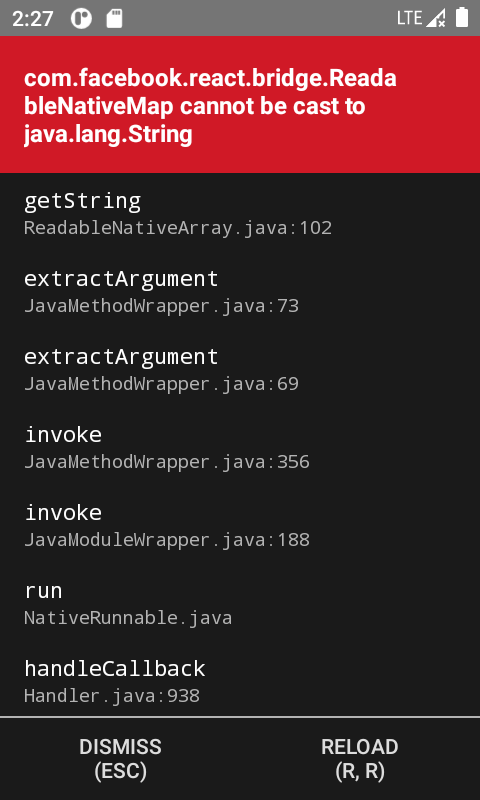
Please let me know if you have any idea
Note :- I have verified the path is string type

My issue was to download and save a .pdf file and open it with a default viewer on Android 11, as per the first message in this thread. I fixed it by a few things and it is working on both Android 10 and 11 so far on my end. cc @abhishek-pokhriyal
- Add both to
AndroidManifest.xml<uses-permission android:name="android.permission.READ_EXTERNAL_STORAGE" /> <uses-permission android:name="android.permission.WRITE_EXTERNAL_STORAGE" />
- Add
<queries>toAndroidManifest.xmlon the same level as permissions (it is needed to be able to open e.g. .pdf files with a default viewer)<queries> <intent> <action android:name="android.intent.action.VIEW" /> <data android:mimeType="*/*" /> </intent> </queries>
- Add
root-pathto<paths>inandroid/app/src/main/res/xml/filepaths.xml<?xml version="1.0" encoding="utf-8"?> <paths xmlns:android="http://schemas.android.com/apk/res/android"> <external-path name="appdownloads" path="Download/" /> <external-path name="files" path="/" /> <root-path name="root" path="." /> </paths>
- In
android/build.gradlebuildscript { ext { buildToolsVersion = "30.0.2" minSdkVersion = 21 compileSdkVersion = 30 targetSdkVersion = 30 }
- Use
RNFS.DocumentDirectoryPathon Android as the path for downloading documents.
Hi, Is there any chance to reject the app by Google play store when I am using this code? android.permission.MANAGE_EXTERNAL_STORAGE Already my previous release is rejected by the play store when I used the above permission in the androidmanifest.xml file.
Thank you.

You can use this:
import * as FileSystem from 'expo-file-system';
import {StorageAccessFramework} from 'expo-file-system';

 try {
      const content = 'DATA';
      const permissions_ =
        await StorageAccessFramework.requestDirectoryPermissionsAsync();
      if (!permissions_.granted) {
        return;
      }
      const uri = await StorageAccessFramework.createFileAsync(
        permissions_.directoryUri,
        'YOUR_FILE_NAME.txt',
        'text/plain',
      );
      await FileSystem.writeAsStringAsync(uri, content, {encoding: 'utf8'});
      console.log(uri);
    } catch (ignore) {}
Or similar functionality with the react-native-fs library. I am using expo modules so I can use expo-file-system.
