

 itgalaxy
bug: icon doesn't export properly
Hi, I have an icon that is not exporting properly. I am not sure if it is a problem with my svg or this script.
<?xml version="1.0" encoding="UTF-8" standalone="no"?><!DOCTYPE svg PUBLIC "-//W3C//DTD SVG 1.1//EN" "http://www.w3.org/Graphics/SVG/1.1/DTD/svg11.dtd"><svg width="100%" height="100%" viewBox="0 0 20 20" version="1.1" xmlns="http://www.w3.org/2000/svg" xmlns:xlink="http://www.w3.org/1999/xlink" xml:space="preserve" style="fill-rule:evenodd;clip-rule:evenodd;stroke-linejoin:round;stroke-miterlimit:1.41421;"><path id="linkedin" d="M18.405,0c0.881,0 1.595,0.715 1.595,1.595l0,16.81c0,0.881 -0.714,1.595 -1.595,1.595l-16.81,0c-0.881,0 -1.595,-0.714 -1.595,-1.595l0,-16.81c0,-0.88 0.714,-1.595 1.595,-1.595l16.81,0Zm-12.478,17.36l0,-9.832l-3.057,0l0,9.832l3.057,0Zm11.445,-0.001l0,-5.392c0,-2.649 -0.572,-4.684 -3.663,-4.684c-1.487,0 -2.484,0.815 -2.892,1.588l-0.042,0l0,-1.343l-2.931,0l0,9.831l3.054,0l0,-4.863c0,-1.283 0.243,-2.525 1.833,-2.525c1.566,0 1.588,1.467 1.588,2.607l0,4.781l3.053,0Zm-12.973,-11.175c-0.979,0 -1.771,-0.794 -1.771,-1.772c0,-0.977 0.792,-1.772 1.771,-1.772c0.977,0 1.771,0.795 1.771,1.772c0,0.978 -0.794,1.772 -1.771,1.772Z"/></svg>
It is supposed to be a cutout of the linked in icon. It displays fine in inkscape but the dot is missing on the i when exported to a font.
Any help would be greatly appreciated


I have given you the svg code above.
Here it is displaying fine in inkscape:

Here it is not displaying properly as part of the font:

Is there anything else you need?
I'm not sure I understand. The dark blue here is just a css style I have applied. I don't think I have any stokes in the svg. Thanks for helping though
The icon I have as an svg is here:
<?xml version="1.0" encoding="UTF-8" standalone="no"?><!DOCTYPE svg PUBLIC "-//W3C//DTD SVG 1.1//EN" "http://www.w3.org/Graphics/SVG/1.1/DTD/svg11.dtd"><svg width="100%" height="100%" viewBox="0 0 20 20" version="1.1" xmlns="http://www.w3.org/2000/svg" xmlns:xlink="http://www.w3.org/1999/xlink" xml:space="preserve" style="fill-rule:evenodd;clip-rule:evenodd;stroke-linejoin:round;stroke-miterlimit:1.41421;"><path id="linkedin" d="M18.405,0c0.881,0 1.595,0.715 1.595,1.595l0,16.81c0,0.881 -0.714,1.595 -1.595,1.595l-16.81,0c-0.881,0 -1.595,-0.714 -1.595,-1.595l0,-16.81c0,-0.88 0.714,-1.595 1.595,-1.595l16.81,0Zm-12.478,17.36l0,-9.832l-3.057,0l0,9.832l3.057,0Zm11.445,-0.001l0,-5.392c0,-2.649 -0.572,-4.684 -3.663,-4.684c-1.487,0 -2.484,0.815 -2.892,1.588l-0.042,0l0,-1.343l-2.931,0l0,9.831l3.054,0l0,-4.863c0,-1.283 0.243,-2.525 1.833,-2.525c1.566,0 1.588,1.467 1.588,2.607l0,4.781l3.053,0Zm-12.973,-11.175c-0.979,0 -1.771,-0.794 -1.771,-1.772c0,-0.977 0.792,-1.772 1.771,-1.772c0.977,0 1.771,0.795 1.771,1.772c0,0.978 -0.794,1.772 -1.771,1.772Z"/></svg>
If you open it in inkscape, illistrator, afinity designer or any other type of vector editor, you see the vector like this:
After running it through the webfont program, I get this version of the icon:
Ignore the fact that the colour is different, the problem is that the dot above the i is missing. Are you able to tell me why this is?
I build the font with this command if it helps:
webfont "icon-font/*.svg" --normalize -d "icon-font/dest/" -t "icon-font/icon_font.less.njk"
Feel free to use difference option, it is hard to say what is wrong without reproducible test repo

Changing the fill-rule to nonzero, you can see that the dot is the real problem.
https://developer.mozilla.org/en-US/docs/Web/SVG/Attribute/fill-rule
Thanks, I will look into this. I am very much NOT a designer. I am given a folder of svgs to work with. Do you know of any way to automate the process of fixing these icons? Failing that, is there something I should ask the designer who creates these icons to do when they are exported?
I'm also not a designer so this is just my experience: You should inspect your svg with the nonzero rule, when you convert it with this tool.
And to fix it you have to change the path direction.
This image helped me to get the logic behind the rule:
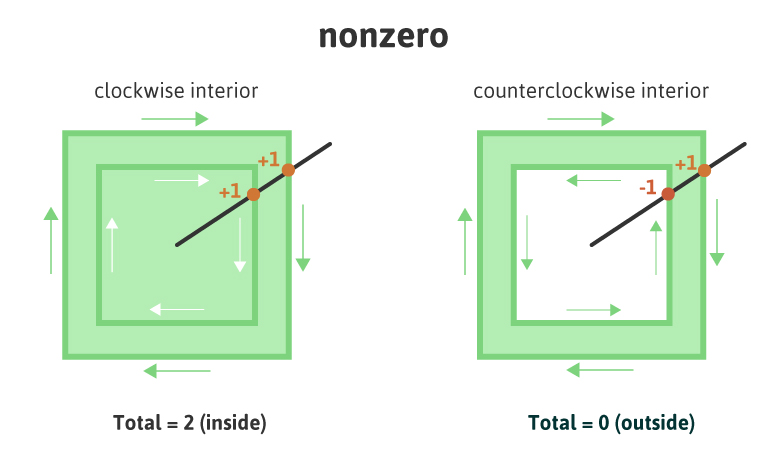 EDIT: I'm sorry I don't know any way to automate this process, just tell him to inspect it as I said and let him change those wrong path directions
Check this answer: https://github.com/itgalaxy/webfont/issues/80#issuecomment-435621410

Hi, I have an icon that is not exporting properly. I am not sure if it is a problem with my svg or this script.
Hi @Jab2870, were you able to export the icon properly after the response (https://github.com/itgalaxy/webfont/issues/80#issuecomment-435621410) shared by @rjurado01?
I would like to know if I could close this issue, if everything is right.

@jimmyandrade when the package was inactive I also faced this kind of issue and I tried to fix it using the solution in #144 but it did not work for me, using --normalize mentioned in #80 also did not work so I just ended up making a package that retraces the whole SVG converting it into a fill instead of strokes which seemed to be the issue.
You can find the package here https://github.com/oslllo/svg-fixer
If you are going to test it using the ICON provided by the author just make sure that you remove the width and height with percentage dimensions as that will throw an error it's a bug I will fix later. It should work as long as you don't use percentage dimensions then add them later after its fixed.
I was thinking of maybe adding it as a pre-processor or just recommending people to run their icons though it before generating a font with webpack if icons are not exporting properly.
Your thoughts?

Step 5 is the most important for me
Designing Icons
- Open the icon in Adobe Illustrator
- Use the Pathfinder tool to cut out the shape from the circle (
Minus Front) - Select all the paths you want to merge and exclude any internal paths you do not
- Open your Pathfinder and click
Uniteto merge the objects - Go to top menu and click
Objecttab, in drop down choosecompound pathand clickmakeor you pressctrl+8
