

 iterative
Multiple projects in workspace support
I use to work with many folders under the same workspace, however the extension seems to be designed to have just one project. The most I can do is select a project and does not appear all my dvc projects

Hi @DavidGOrtega,
Thanks for raising this. I tried to set things up so that this should work. However, this was not a focus during the release though so things have gone untested and are broken.
How many DVC projects are missing in this workspace. The logic that we use to identify DVC projects in the workspace is as follows:
Search for any directory with a .dvc in the root one level below the current workspace OR if there aren't any then check the folder above the current workspace.
What would be the expected behaviour when trying to run a DVC command from a multi-project workspace? Where are you seeing this?
Thanks

I would expect to see a parent view where you can see the projects and then you dig into every one of them. Indeed one thing that might not work very well is that the extension is still offering me to choose the columns where they vary along with every project.
Im missing about 2 more real dvc projects
Parent view sounds a bit too heavy (we'll need to do some custom navigation, etc) + it means both plots and the table will need it. Or may be I'm missing the idea.
Can it be done as selector in the quick pick? Like pick the currently active one? @mattseddon is it done already?

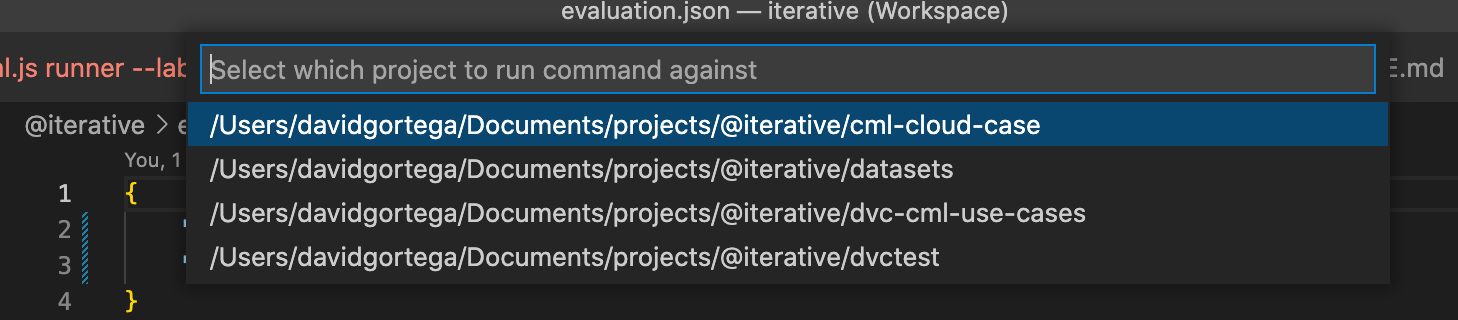
This is what it looks like when there are multiple projects in the workspace:
https://user-images.githubusercontent.com/37993418/180125300-42733acd-d6da-438b-85d1-68fd73ca64f5.mov
As shown in the demo it is possible to run commands from the palette. You will first be asked which project you want to run the command against. We can add more icons/actions into the repository root level elements of the side bar tree views to short circuit some of this behaviour but I wouldn't see it as a priority right now.
It should also be noted that you can only have a single install of DVC (currently) per workspace so under this setup you wouldn't be able to have a virtual environment per project. In order to do that we'd need to do some extra work.
Im missing about 2 more real dvc projects
I really don't know what is going on here. I would need to jump on a call to try and diagnose.
@DavidGOrtega could you clarify if it's still an issue for you?
wouldn't be able to have a virtual environment per project. In order to do that we'd need to do some extra work.
@mattseddon how does mspython deal with this? do they switch from one to another automatically?
@DavidGOrtega could you also please clarify how do you create virtual env for multiple projects?
idea by @mattseddon - we can check analytics in Azure (the load extension event).