

 itchio
An option to install/run games from normal browser
Integrated browser has a number of big disadvantages comparing to normal desktop browser:
- it has its own cookie store, so you're not logged in on websites (even on itch.io itself (#672), but it also affects other websites, for example you cannot "like" a youtube video embedded on a game page without logging into youtube)
- familiar ways to interact with browser doesn't work: Alt+Left doesn't work for going back in history, no context menu, tabs are on the left, etc
- no bookmarks (well, tabs are like bookmarks, but you cannot really have a lot of them)
- no password manager to help you log into those websites
- no way to install browser plugins which may alleviate some of these disadvantages
- sometimes it simply doesn't work (see #809, still happening for me)
- it may have non-fixed security vulnerabilities, because it's updated not that frequently as "real" browsers
These disadvantages are inherent to almost any browser-based app, e.g. Steam, nothing special about itch. And probably a lot of users do like itch app being a separate application. On the other hand, it feels like a lot of "power users" may be hesitant to install itch app simply because it's "another copy of a browser on my machine", not just because of 100Mb it takes, but also because of the issues above.
Therefore, an idea: allow to install and run games using normal desktop browser right from itch.io website. Of course many of the things itch app does cannot be done by a website or even browser extension, so it needs to interact with desktop software (the very same itch app). Hence the idea is that after installing itch app it would say to user "hey, you can now also install and run games from your normal browser" and make him/her happier.
Speaking about implementation, interaction with app can be done via passing requests to localhost:some_port listened by itch app (this method has some security concerns though). Using Chrome's Native Messaging would be more secure, but that's available only to Chrome's browser extensions. Unfortunately there seem to be no simple solution.

Unfortunately there seem to be no simple solution.
For one-sided: "hey I found this game from my browser please install it", there's the itchio:/// protocol, which the app implements on all three platforms. It's just not on the website yet :)
For the rest, I've been giving it some thought, although I haven't found a good solution yet.

Here's a few things to consider for this issue:
- Any AJAX request is subject to cross-origin restrictions (CORS), that must be taken into account
- Listening on localhost:port for instructions is potentially a big security hole: you're basically giving anyone who can scan relatively few ports (65536) permission to install anything on your computer. That sounds really dangerous (incidentally, Steam is wide open to this, with its various
steam:///commands).
One option would be to have a bidirectional channel between itch app and itch.io opened at all times, so user may issue commands via itch.io website, having itch.io server send them back to app (similar to how you can install app on Android phone from your desktop browser).
One way to do this that wouldn't be as dangerous as AJAX open to any port is to use a websocket or webrtc. A websocket connection can have its referer checked (forging it isn't really possible in a standard web browser) and have its IP checked to ensure it's coming from localhost. Then the main remaining risk is privilege escalation (a low-privilege app opening a forged websocket connection) which you could just solve by making sure the itch app won't do anything usable for privesc in response to commands. I've used this before for communication between a native app and a browser extension (since Chrome's native messaging API is a complete broken wreck)

One way to do this that wouldn't be as dangerous as AJAX open to any port is to use a websocket or webrtc. A websocket connection can have its referer checked (forging it isn't really possible in a standard web browser) and have its IP checked to ensure it's coming from localhost. Then the main remaining risk is privilege escalation (a low-privilege app opening a forged websocket connection) which you could just solve by making sure the itch app won't do anything usable for privesc in response to commands. I've used this before for communication between a native app and a browser extension (since Chrome's native messaging API is a complete broken wreck)
That's not a bad idea at all.
itch v25 uses butler as a service, so it already has an HTTP server running (on localhost only), but it also uses a secret, so random programs shouldn't be able to just send commands to that. I don't think it should be used for that though.
What I would be most comfortable with would be for the itch app to connect to the website, and receive commands directly from there, so.
- Commands could be issued via the itch.io API (for example if you were queueing a game install from an itch mobile app), or the website directly
- The connection would be http2 (or at least https), I'm partial to Server-Sent Events lately, WebSockets would work just as well
- You can't just "connect to the itch app" and control it, it contacts the trusted source
- We don't have to do any polling because it's gross and inefficient.
I'm curious to see how @leafo feels about all this.
You could have the app launch the website in the browser by shell-opening a url, and pass a secret authentication key in the URL. Then the website can store that authentication key in a httpsonly cookie. i.e.
open 'https://itch.io/?from-app&secret-key=foo'
Then require that secret to authenticate to the app API. That way people can still use their browser of choice instead of the app, but it integrates cleanly with the app without exposing the protocol to attackers.
If you want the app to connect 'to' the website, I think that has to be WebRTC. I'm not aware of any other way for a web browser to receive incoming connections.
You could have the app launch the website in the browser by shell-opening a url, and pass a secret authentication key in the URL.
That could work, but the secret is regenerated every time the app is started (and every time butler is seamlessly updated in the background), so I'm not sure about this.
If you want the app to connect 'to' the website, I think that has to be WebRTC. I'm not aware of any other way for a web browser to receive incoming connections.
Ah, I wasn't thinking of having the app connect directly to the browser. I was just thinking that all apps would connect to the website, and the browser would receive (from the website) information on what apps are currently online, what they have installed, if something is currently running, etc.
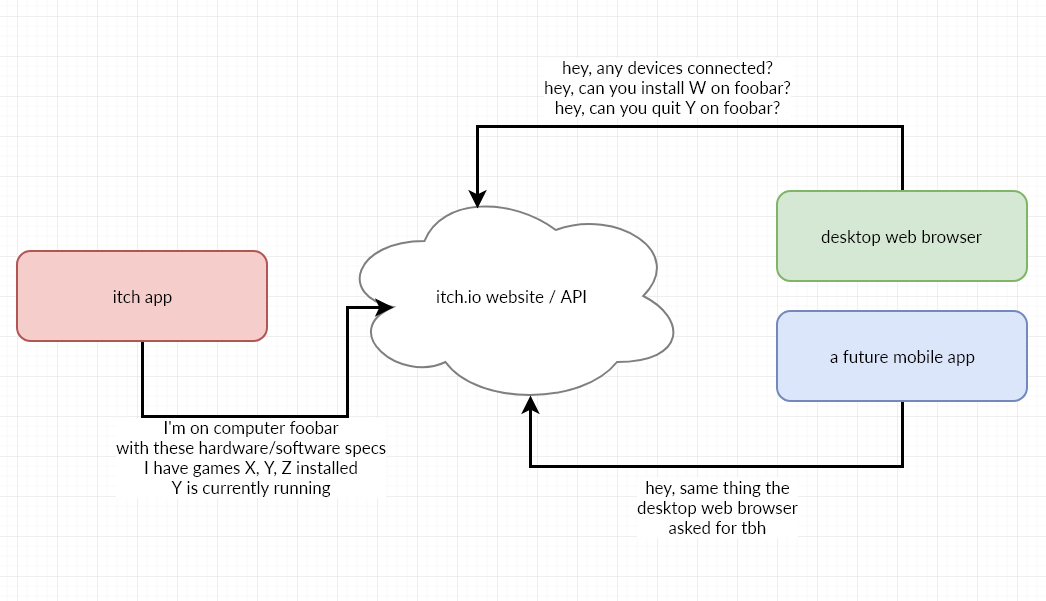
That means you need an internet connection, but we're talking about browsing anyway so that doesn't seem like a problem.
That also means that you could use your phone (connected via 4G or something, so, not, on your local subnet), to control your desktop app, which would be pretty neat.
Hey, are there any plans to add the itch:/// links to the website? It would be great to be able to install games via the app that I find via Twitter, for example. I understand the cross-machine case is more complicated but for the same machine adding the links is enough, right?

The itch app (which opens the itch.io site) does already use an itch:// protocol in its webview, no idea what exactly makes the site render with those links in place though. (I would appreciate if someone who does know would let me know)
