

 israel-dryer
Add translations for any hard-coded text within widgets
Some custom windows (such as themed dialog boxes) are used in your program, but it seems that some of their contents are in English and cannot be changed. Would you mind providing an way to translate it to other languages? I am willing to help translate it into Chinese.

@NewbieXvwu, thank you for submitting. This is a good catch.
Can you try running this code and post the results? I've read that this tcl/tk package can do the translations automatically... that would be nice.
import tkinter as tk

def translate(text):
    return root.tk.eval("namespace eval ::tk {::msgcat::mc %s}" % text)


root = tk.Tk()
tk.Button(root, text=translate("retry")).pack()
root.mainloop()


My operating system is in Chinese, but it doesn't seem to translate... Maybe the translation function only supports some languages.
Another possibility is that the translation function calls Google translation. Chinese mainland can not visit Google translation.
Maybe only Linux system supports this function? I don't have a Linux environment.
@NewbieXvwu I forced my system to german swiss and it worked on Windows 11. For some reason, I can't get it to work with the Chinese locale codes though.
What result do you get if you run this?
from gettext import gettext

result = gettext('Retry')
print(result)
Python 3.10.1 (tags/v3.10.1:2cd268a, Dec 6 2021, 19:10:37) [MSC v.1929 64 bit (AMD64)] on win32 Type "help", "copyright", "credits" or "license" for more information. from gettext import gettext result = gettext('Retry') print(result) Retry
My idea is this: add a file similar to "en_US.json". When the program needs to read hard coded data, read it from the file, and automatically read the file similar to "zh_CN.json" by judging the system language setting to realize translation. This may be a supplement to TK's own translation function.
@NewbieXvwu, I think this is something that is important to fix, but I'll need some time to consider the best way to implement something like this. At a minimum I could probably add a module that includes translations of standard labels used in custom widgets and dialogs.
@NewbieXvwu, It looks like this mapping can be done within tcl/tk. I used google translate so hopefully it is right.

I used the first command listed below, the 2nd one could be used to map multiple translations at once for a single locale.
::msgcat::mcset locale src-string ?translate-string? Sets the translation for src-string to translate-string in the specified locale and the current namespace. If translate-string is not specified, src-string is used for both. The function returns translate-string.
::msgcat::mcmset locale src-trans-list Sets the translation for multiple source strings in src-trans-list in the specified locale and the current namespace. src-trans-list must have an even number of elements and is in the form {src-string translate-string ?src-string translate-string ...?} ::msgcat::mcmset can be significantly faster than multiple invocations of ::msgcat::mcset. The function returns the number of translations set.
If you will compile a list of all the translations you think I will need, I'll add it in a test module and we can see how it works in the application. Then we can test how it might scale to the other languages that are not supported (apparently) by tkinter.
I hope to separate the translation file from the code (similar to "zh_CN.json"), so that even people without Python basics can participate in the translation.
I don't see one. But we can definitely use one of these as a template.
https://github.com/tcltk/tk/tree/main/library%2Fmsgs
Would you mind taking one of these msg files and converting it to Chinese?
Otherwise, if it's too big a task, I might be able to run a script to look them up.
zh_cn.zip I am not a professional translator. This translation may contain errors. It is based on "en.msg".
I tested it on Kubuntu virtual machine. It doesn't seem to be a problem with Windows itself.

If possible also add translation for widgets.
weblate offers a free hosting plan, I don't know if it's compatible with tk inter
https://docs.weblate.org/en/latest/index.html https://docs.weblate.org/en/latest/user/files.html

@NewbieXvwu, two things... I created a check that loads the custom msg file if it's in a list of locales... which there is only one currently.

The other thing is that the msg file has to map between English and Chinese as you can see from this Russian msg file. I added it in manually for retry in the msg file, but we'll have to add the Chinese translation after the English word for all of them.

@antrrax I tried weblate, but it doesn't seem compatible with msg format.
@israel-dryer What should be "langdir" in your code?
That's the directory that contains the msg file
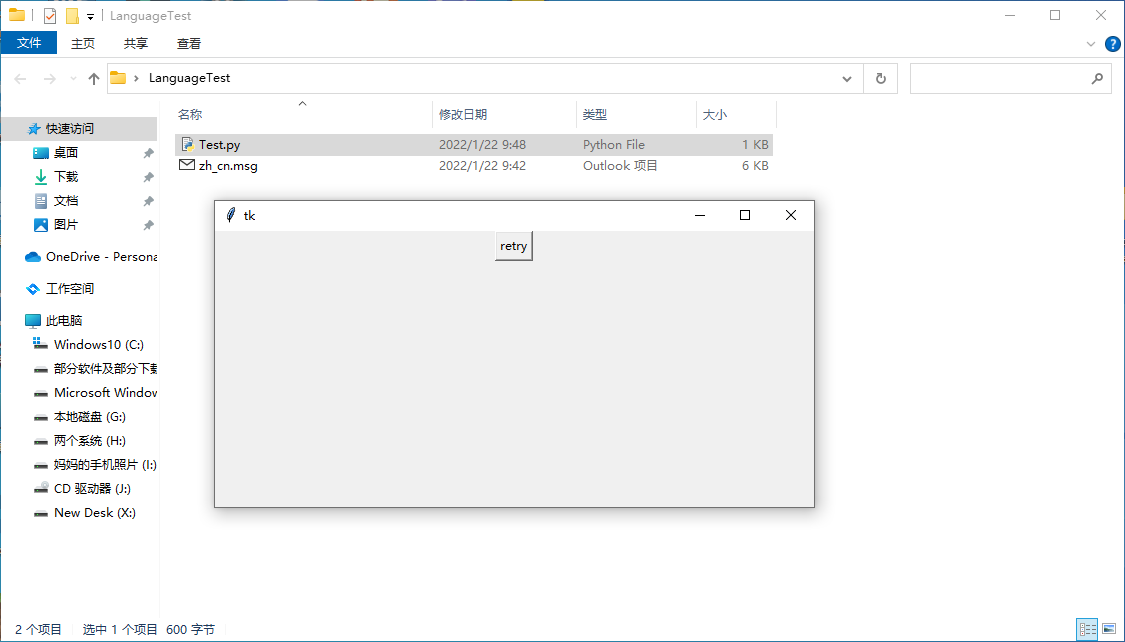
My py file:
import tkinter as tk langdir = r'C:\Users\Administrator\Desktop\LanguageTest' def translate(text): return root.tk.eval(f"namespace eval ::tk ::msgcat::mc {text}") root = tk.Tk() root.tk.eval("namespace eval ::tk ::msgcat::mclocale zh_cn") locale = root.tk.eval("namespace eval ::tk ::msgcat::mclocale") if locale in ['zh_cn']: root.tk.eval(f"namespace eval ::tk ::msgcat::mcload {langdir}") tk.Button(root, text=translate('retry')).pack() root.mainloop()