

 irzyxa
Add "% to icon title
Can you add % to the volume icon title please ? like 50**%** , which is much more readable.

What do you mean? Where should % be added? To hint/tooltip? Any screenshots?

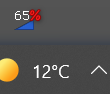 Might be added to the hint too, for clarity...
It is very small icon just 16x16 pixels so I don't think percent fits there. You can try to do this by yourself. Go to Volume2 folder, Skins/Volume2 Default and try to edit any png file in any graphic designer.
It might not be the correct approach (being so small)... You should try and implement it as a static text char readout (in XML?) over the graphics. No idea how to do that...
So here is realistic size of tray icon and I cannot add any extra characters there:
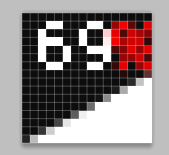 FYI: All skins have been drawn in graphic programs not drawn in real time, because icon should look differently for different taskbar size (High DPI). Icons can be: 16px, 20px, 24px,32px and for different sizes you have different amount of space so you can draw more detailed icon.
It looks pretty good when the size is small. I'd shift everything one pixel to the left, to complete the "%" symbol bottom right, and try to program it not to overlap the "%" color of the digit...
BTW, same-color (white here) is good enough for the "%" too.. I was just using red to point to it...