

 ipython
Memory Error: IOStream.Flush timed out
Hi,
I was running a long session on Jupyter notebook. I mistakenly ran a function with no variables and the kernel got stuck. After a while, I saw the error: Memory Error., IOStream.Flush timed out When I checked the OS task manager, there was sufficient memory present. What's weird is the kernel got stuck at a simple function call with no variables (something like do_something() ) Anyone has any idea how this might have occurred and what's the best way to avoid the same in the future (I lost 10-12 hours of work due to this error) TIA

It happened to me also, while trying to see the output of a function that used multiprocessing.

I had the same issue when running a program in jupyter kernel that also was using multiprocessing module.


Same here. Jupyter was up for 4 days and I had to kill it by control-C.
Happened again. Jupyter notebook was running on AWS and I was using papermill to run notebooks.

Getting this issue when trying to import a module installed for local development ( pip install -e . )

after upgrading my Mac from Mojave to Catalina, I experience the same issue with a phrase of code that worked before.

I am having this problem as well. Anyone find a reason for this and how to address it? I was running a tsfresh job
from tsfresh import select_features

rel = select_features(extracted_features, y)


Hi,
I had the same problem and it was solved by restarting jupyter. Exit and then jupyter notebook command again.


Same problem here, instead of exit and relaunch the jupyter notebook, is there any way to fix it inside the program? thanks.


I'm also having this problem applying a function to a dask dataframe.

This problem is still happening, l
lyrics_list_clean = list(allpossible['letras'].apply(clean_lyrics, convert_dtype=str))
freezes at only about 200, again at about 900, then no progress at all
No amount of restarting jupyter helps

In Jupyter Notebook I put a 1 second sleep in the iterations that solved it for me.
import time

for i in list:
    do_multithreading_thing()
    time.sleep(1)


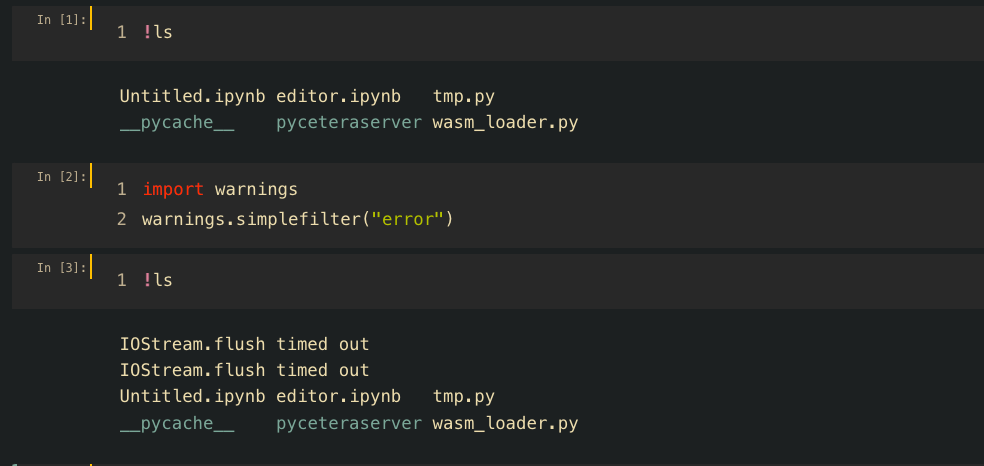
I coded 'warnings.simplefilter("error")' in jupyter notebook and got that error.
OS macOS Mojave
Python 3.9.12
jupyter 1.0.0
tornado 6.2


Same here, but currently trying multiprocess (forked version of standard module multiprocessing). I have a continuously running script that uses multiprocess that always crashes after many hours of running. Six hours running with multiprocess atm, but that's nothing special, beyond 48 hrs would be improvement. Update: I took a good look at my code and removed all the dels and gc.collects that were a holdover from before using multiprocess where I was attempting to resolve a memory leak from repeatedly plotting with matplotlib. This was likely causing an error trying to reference variables that had been deleted. So far so good continuously running a script with multiprocessing for ~24hrs.
Update: Multiprocessing crashed after 3 days. Multiprocess has now been running for over 4 days. However, memory usage is increasing ~2% per day.
Another update: Died after 4 days. All I see for errors is a bunch of "WARNING:traitlets:kernel died: 25.000293016433716" Time to implement logging...

Set the size of the output cache. The default is 1000, you can change it permanently in your config file. Setting it to 0 completely disables the caching system, and the minimum value accepted is 20 (if you provide a value less than 20, it is reset to 0 and a warning is issued). This limit is defined because otherwise you’ll spend more time re-flushing a too small cache than working link
nice job

got the same problem.
when running !ls in ipython it takes <1sec.
But in jupyterlab or in vscode notebooks, it takes ~20 sec with "IOStream.flush timed out" warnings
I have added c.InteractiveShell.cache_size = 0 in ipython_config.py but it has no effect.
more help would be welcomed.

After quite a lot of head scratching I came up with this solution and explanation: https://stackoverflow.com/a/77172656/2305175
TL;DR:
Try limiting your output to console as much as possible while working with threads/tasks and especially waiting on them. This also means limiting tqdm usage/updates.

In your env(mine is noob) , modify flush_timeout in OutStream class in iostream.py as u like , I am using py 3.11
kate anaconda3/envs/noob/lib/python3.11/site-packages/ipykernel/iostream.py
and return it again after doing your stuff
