pipxe
 pipxe copied to clipboard
 ipxe
ipxe
Headless boot issue with absent monitor
I'm using pipxe with MAAS images and cloud-init to have a bunch of centrally managed Pies, just like I do with x86. After patching EDK2 to not limit RAM to 3GB, and to auto-boot from the network device (instead of waiting for manual input), there is another issue left for headless boot: absent monitor. Either the UEFI bootloader from EDK2 or pipxe doesn't like an absent monitor and appears to freeze (I can ping the machine for about 5 seconds and then it goes offline, so it appears to be happening between the UEFI and pipxe phases). At first, I worked around it by using a dummy HDMI plug, but later found out that it can be worked around in software by adding the following into config.txt (which in my case resides on the TFTP server):
hdmi_force_hotplug=1
hdmi_safe=1
I successfully tested the workaround it on a RPi4B with 2G and 8G of RAM.
Unfortunately I don't know whether the issue is triggered in the UEFI bootloader or in pipxe, so I'm not sure where to report it.

I've used piPXE for headless boot before (on a Pi 3B+), so it definitely is capable of working. The console output in piPXE is entirely via the UEFI firmware's EFI_SIMPLE_TEXT_OUTPUT_PROTOCOL so I don't see any way that the piPXE code itself could be hanging due to an unplugged HDMI cable.
Have you tried attaching a USB TTL serial adapter (e.g. https://www.amazon.co.uk/Serial-Converter-Adapter-Prolific-Windows-Black/dp/B08DKM6Q63)? That should let you observe the boot messages for debugging even when no HDMI display is present.

I tried with the exact same setup (RPi4B 8GB) and was able to reproduce the issue. I see boot-initrd & boot-kernel images are fetched from the server, but squashfs is not, so it halts somewhere between – I wonder if it is possible that it's an issue with those MAAS images?
Adding those hdmi vars to config.txt makes the problem disappear.
Unfortunately I have no USB TTL serial adapter nor micro hdmi cable to check the output.

Have you tried attaching a USB TTL serial adapter
At https://www.raspberrypi.com/documentation/computers/raspberry-pi.html#configuration-properties is this text:
BOOT_UART
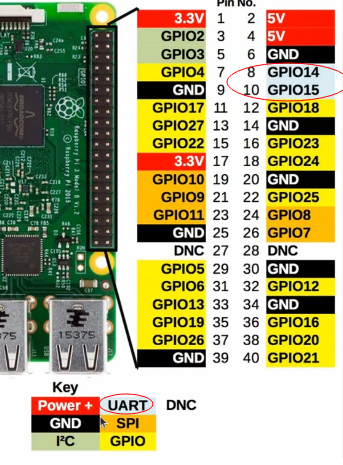
If 1 then enable UART debug output on GPIO 14 and 15. Configure the receiving debug terminal at 115200bps, 8 bits, no parity bits, 1 stop bit.
Default: 0
Are it those pins, GPIO 14 and GPIO 15, that should be used?
https://pinout.xyz/pinout/uart# says there is more as one UART, that is why I'm asking. Good thing that pin out page is that it documents that GPIO 14 is Transmit of the raspi and is at pin 8.
Other question: iPXE also uses 115k2 8N1 ?

Are it those pins,
GPIO 14andGPIO 15, that should be used?
Yes, seems so.