

 iperov
Training on RTX 3090 capable of 600 ms/iteration, but on average is 3+ seconds/iteration
On Windows 10 Pro RTX 3090 DeepFaceLab_NVIDIA_RTX3000_series_build_07_17_2021.exe installed with no modifications No other python instances installed Hardware scheduling enabled Latest NVIDIA GPU drivers installed WIndows completely up to date
Expected behavior
Training proceeds with iteration times generally around the same value, with a few iterations at 2x this value - for example, initial iteration time is 620 ms; most iteration times are 600-700 ms; a few are 1200-1400 ms; average is 700-800 ms.
Actual behavior
Many iteration times are 10 - 20x the lowest value, making average training time 5-7x the lowest iteration time - for example, initial iteration time is 620 ms; 60% of iterations are 600-700ms; a few are 1200-1400 ms; 25-35% are 10-20 seconds; average is 3.5 seconds. Model parameters below, but pattern persists with all training that GPU can handle w/o errors. Extracting and merging frames works fine, even faster than it used to, but training is taking 5x longer than expected.
Steps to reproduce
This issue persists for all models trained. Steps taken to isolate the issue which have not had any effect:
- reverted to previous 2021 RTX3000 builds
- turned off hardware scheduling
- turned hardware scheduling back on
- updated tensorflow installation via python console successfully
- Started with brand new model
- Tried different number and size of dst and src images
- Rolled back NVIDIA drivers
- Installed current NVIDIA studio driver using DDU
- Installed current NVIDIA gaming driver using DDU
- Cleared NVIDIA GPU cache/temp files
- General system health checks - DISM, scannow, file check
- Full malware scan of entire system
- Cleaned registry
- Used packed & unpacked data_dst and data_src files
- Increased paging file to 100GB
- Allowed system to manage paging file size
- Disconnected all peripherals except for mouse & keyboard
- Turned off/disconnected wired and wireless access
- Turned off all non-microsoft services and programs at startup
- Started in safe mode
- Turned off models on GPU option
- Increased & decreased expected iteration time by varying batch size
- Installed DFL instance on other internal and external SSD and non-SSD drives
Steps taken which solved the problem:
- reverted to August 2020 RTX DFL build
Screeenshots showing model executed:
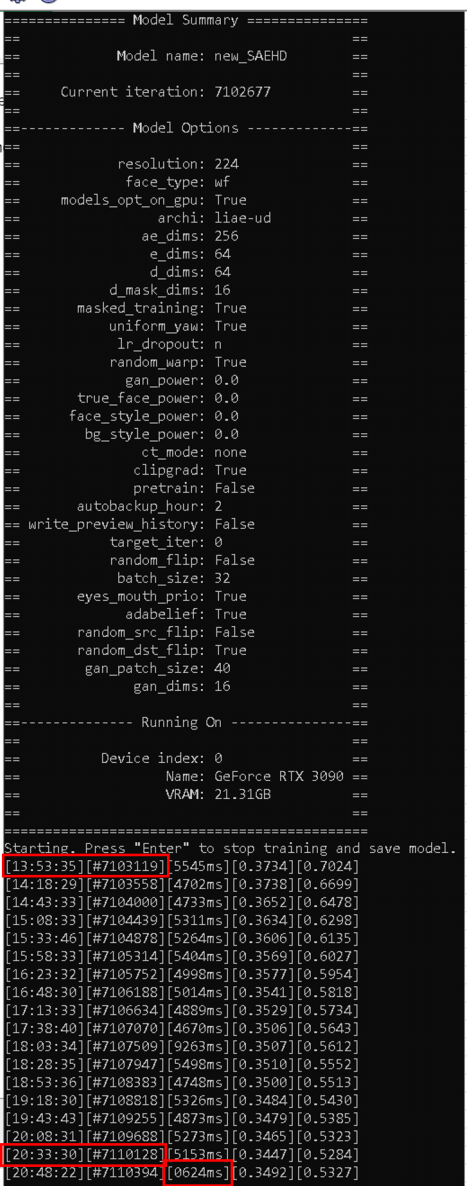
Highlighted on the screenshot: Most recent iteration time: 624 ms Training time between the highlighted times: 7 hours 40 minutes, or 23,995 seconds Training iterations during that time: 7,009 Average seconds per iteration during entire training time: 3.42 seconds
System info: Item | Value OS Name | Microsoft Windows 10 Pro Version | 10.0.19043 Build 19043 OS Manufacturer | Microsoft Corporation System Manufacturer | Gigabyte Technology Co., Ltd. System Model | X299X AORUS MASTER System Type | x64-based PC Processor | Intel(R) Core(TM) i9-10980XE CPU @ 3.00GHz, 3000 Mhz, 18 Core(s), 36 Logical Processor(s) BIOS Version/Date | American Megatrends Inc. F3c, 12/10/2019 SMBIOS Version | 3.2 Embedded Controller Version | 255.255 BIOS Mode | UEFI BaseBoard Manufacturer | Gigabyte Technology Co., Ltd. BaseBoard Product | X299X AORUS MASTER Platform Role | Workstation Secure Boot State | Off PCR7 Configuration | Binding Not Possible Windows Directory | C:\Windows System Directory | C:\Windows\system32 Boot Device | \Device\HarddiskVolume1 Hardware Abstraction Layer | Version = "10.0.19041.1110" Installed Physical Memory (RAM) | 32.0 GB Total Physical Memory | 31.7 GB Available Physical Memory | 17.4 GB Total Virtual Memory | 129 GB Available Virtual Memory | 58.5 GB Page File Space | 97.7 GB Page File | C:\pagefile.sys Kernel DMA Protection | Off Virtualization-based security | Not enabled Hyper-V - VM Monitor Mode Extensions | Yes Hyper-V - Second Level Address Translation Extensions | Yes Hyper-V - Virtualization Enabled in Firmware | Yes Hyper-V - Data Execution Protection | Yes
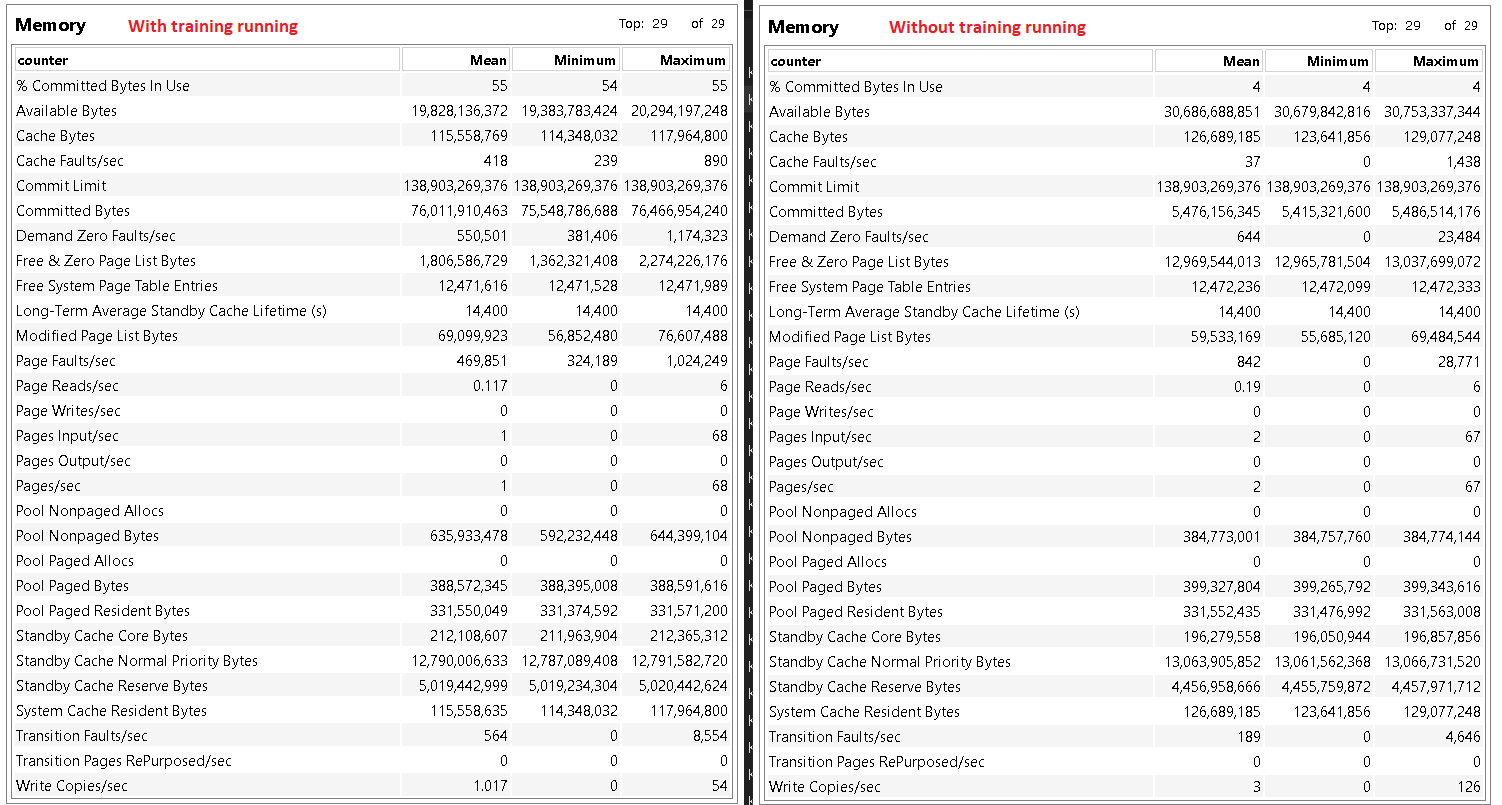
Memory diagnostic with and without training active:


Did you ever find the answer? If so, would you mind sharing it and closing this issue?

No. One cause identified is having dst and/or src images with different resolutions, but the problem occurs without that cause being present.